web
You’re offline. This is a read only version of the page.
close
Skip to main content

Announcements

No record found.

News and Announcements icon
Community site session details

Community site session details

Session Id :
Microsoft Dynamics AX (Archived)

Unregister - Return sales order

(0) ShareShare
ReportReport
Posted on by 997

Hi all,

I create Item arrival 2 times for return sales order (1 line = 1 item number) but I create packing slip and invoice for the first item arrival.

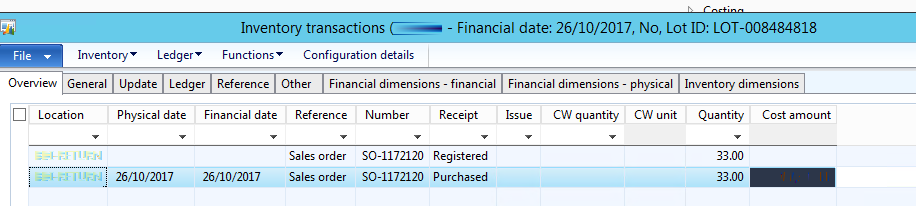
So, the inventory transaction occur 2 lines with 2 status: Purchased and Registered
25318.1.png

The status of this sales order is still Open

1184.2.png

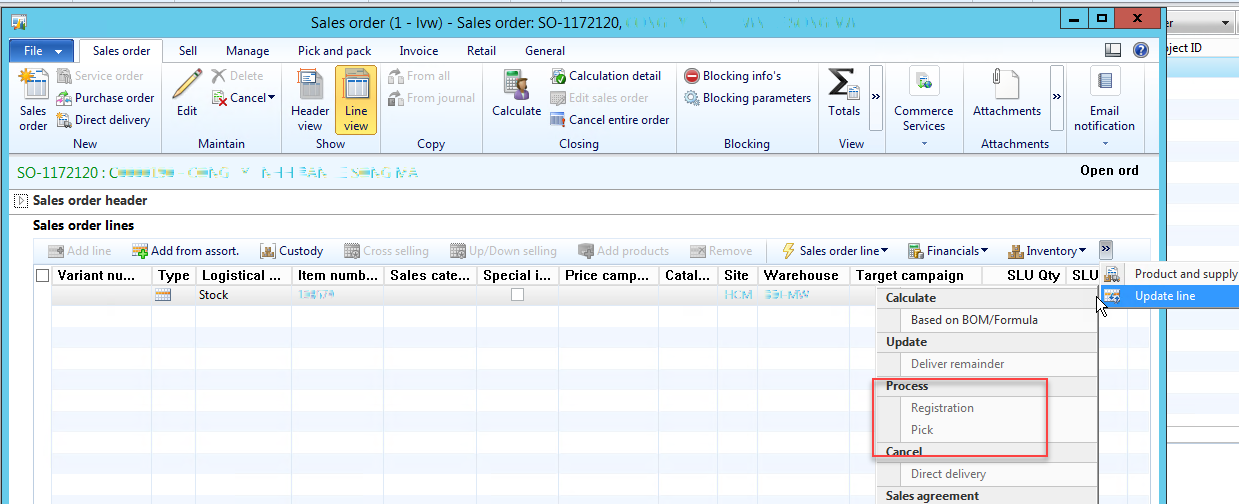
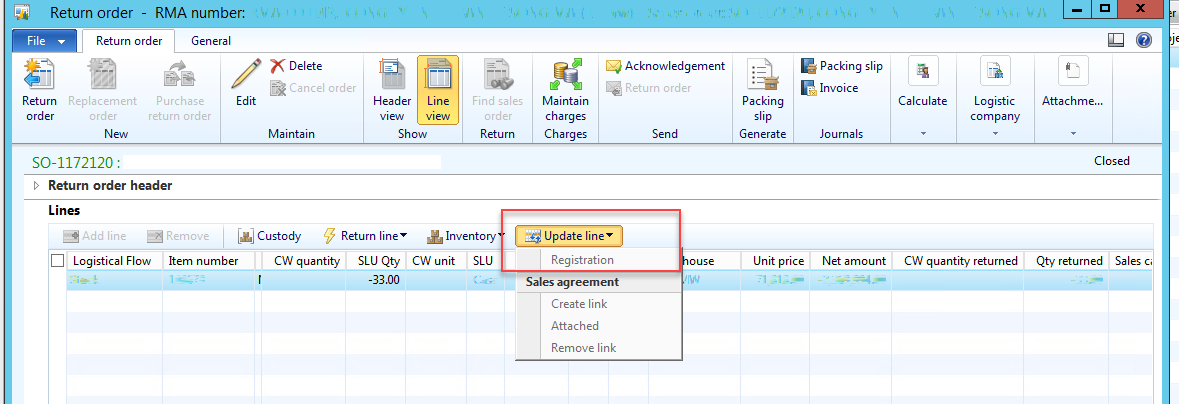
I want to unregister the line in return order but all registered/pick button is invisible in all screen (sales order/ RMA)
1184.3.png

5707.4.png

Please help me unregister and change return order status to invoiced.

*This post is locked for comments

I have the same question (0)
  • Guy Terry Profile Picture
    28,977 Moderator on at

    In the ribbon bar -> 'General' tab, hit the 'Line quantity' button. There is an 'Update line' -> 'Registration' button there. Is that one available?

  • Cam Phung Profile Picture
    997 on at

    Hi Guy Terry,

    It is invisible.

    5775.5.png

  • Guy Terry Profile Picture
    28,977 Moderator on at

    Hi Phung Luong,

    I tried to replicate what you describe... but I can't. How did you process two Item arrivals for one Return Order line?

    If I do it via the Arrival Overview, it won't let me start the second arrival. If I do it via the Item arrival journal directly, I get errors; I think because I am not able to select the LotId of the Return order line.

  • Cam Phung Profile Picture
    997 on at

    Hi Guy Terry,

    So do you have any hint to fix this case not by function. Maybe I think we should need to technical to support this case.

    I also can not replicate this case.

  • Guy Terry Profile Picture
    28,977 Moderator on at

    Hi,

    Sorry no; I have nothing!

    I have seen that the 'Registration' button on the 'Line quantity' form was available when perhaps it shouldn't have been (but that was a different scenario).

  • Suggested answer
    fatihgork Profile Picture
    3,817 on at

    Hi Phung,

    While your sales orders status (SalesTable.SalesStatus/SalesLine.SalesStatus) is Open order, your return orders status (SalesTable.ReturnStatus/SalesLine.ReturnStatus) Should not be closed.

    These should be fixed first. Then it will open.

    Do you have a custom solution that updates these status fields? It seems to be not working right.

  • Cam Phung Profile Picture
    997 on at

    Hi all,

    I fixed this case.

    Our Technical have to change something to clear the registered line and change status of Sales order return.

  • Community Member Profile Picture
    on at

    Hi Phung, we are facing a similar issue. Can you guide us with the steps that were taken to resolve the issue.

    Thanks in advance.

  • Cam Phung Profile Picture
    997 on at

    Hi Sharat338,

    Our IT fix this case. I remember that I have to increase stock (by counting) > go to table to edit status.

    Thanks.

  • Anvi Profile Picture
    5 on at

    Same issue

Under review

Thank you for your reply! To ensure a great experience for everyone, your content is awaiting approval by our Community Managers. Please check back later.

Helpful resources

Quick Links

Introducing the 2026 Season 1 community Super Users

Congratulations to our 2026 Super Stars!

Meet the Microsoft Dynamics 365 Contact Center Champions

We are thrilled to have these Champions in our Community!

Congratulations to the April Top 10 Community Leaders

These are the community rock stars!

Leaderboard > 🔒一 Microsoft Dynamics AX (Archived)

#1
CP04-islander Profile Picture

CP04-islander 39

#2
Michel ROY Profile Picture

Michel ROY 14

#3
imran ul haq Profile Picture

imran ul haq 8

Last 30 days Overall leaderboard

Featured topics

Product updates

Dynamics 365 release plans
