web
You’re offline. This is a read only version of the page.
close
Skip to main content

Notifications

Announcements

No record found.

Community site session details

Community site session details

Session Id :
Supply chain | Supply Chain Management, Commerce
Suggested Answer

Replenishment Pick for Batch enabled Items based on FEFO Principle

(0) ShareShare
ReportReport
Posted on by 25

Hi Experts, 

I need guidance from you to achieve the scenario described below. 

When ever a replenishment work is created for batch enabled products i need the system to Pick the batch based on the FEFO principle. 

Scenario :-  

Item Number - Product A -  

Stored in Fixed location – PICK-1

Replenishment Trigger is set to fixed locations with Min- 15 and Max – 25

Bulk Locations are configured to allow mixed batches.

Location stocking Limit -    

Location

Item Number

Unit

Quantity

PICK-1

PRODUCT-A

EA

25


Receipt of Product from 1st PO into the BULK locations

Location

Item Number

Batch Number

Expiry Date

Unit

Quantity

BULK-1

PRODUCT-A

BATCH-1

09/09/2022

EA

100

Now when I run the replenishment the system will create a Replenishment work to replen my pick location with 25 EA from the bulk locations

Stock status.

Location

Item Number

Batch Number

Expiry Date

Unit

Quantity

BULK-1

PRODUCT-A

BATCH-1

09/09/2022

EA

75

PICK-1

PRODUCT-A

BATCH-1

09/09/2022

EA

25

After doing sales for 15 qty. from my Pick location the stock status


Location

Item Number

Batch Number

Expiry Date

Unit

Quantity

BULK-1

PRODUCT-A

BATCH-1

09/09/2022

EA

75

PICK-1

PRODUCT-A

BATCH-1

09/09/2022

EA

10

Now I have another Receipt of Product from 2nd PO.

Location

Item Number

Batch Number

Expiry Date

Unit

Quantity

BULK-1

PRODUCT-A

BATCH-2

03/09/2020

EA

100

Stock Status

Location

Item Number

Batch Number

Expiry Date

Unit

Quantity

BULK-1

PRODUCT-A

BATCH-1

09/09/2022

EA

75

BULK-1

PRODUCT-A

BATCH-2

03/09/2020

EA

100

PICK-1

PRODUCT-A

BATCH-1

09/09/2022

EA

10

Now when I run the replen again the system creates a replenishment work to pick BATCH-1 and not BATCH-2 , which has a shorted expiry date.

I have setup the location directive’s action query to sort by expiration date in ascending order.
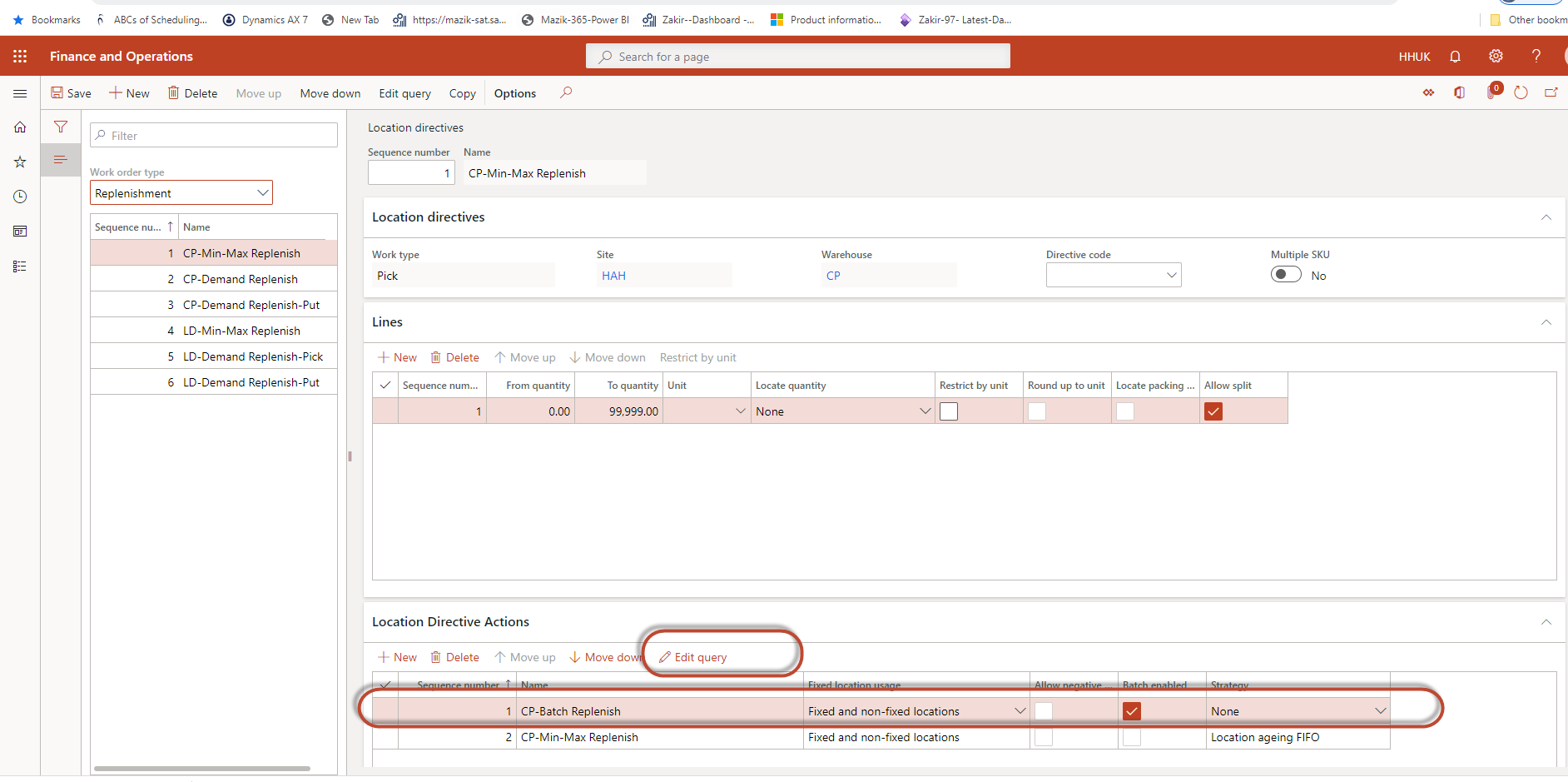
pastedimage1591542610509v1.png

pastedimage1591542619696v2.png

Am i missing something here ?

we are on F&O -2020 release wave 1 - Platform - Update 34.

I have the same question (0)
  • Suggested answer
    saurabh bharti Profile Picture
    15,039 Moderator on at

    Hi Zakir,

    I see this is pending for long time and no solution posted yet, i would suggest to send this directly to known SME's.

  • Suggested answer
    AliceBarendregt Profile Picture
    1,470 on at

    Hi Zakir, 

    For a batch below item, I wasn't able to reproduce the scenario as you described earlier. In the latter case the batch is being allocated based on the sorting logic specified via the location directive. Did you use an item with a reservation hierarchy of batch above? In this case, I was able to reproduce the behavior as you described. This because in this case, the system validates the batch that you have specified upon reservation. As a result, it might occur in this case that a batch that does not have the earliest expiration date is been selected. 

    Thanks, 

    Alice

  • zakir Profile Picture
    25 on at

    Hi Alcie,

    Thank you for your reply.  I am using Batch above reservation hierarchy. Since this scenario is for Replenishment pick , i am not going and reserving any stock, the system picks and suggests the batch.

  • zakir Profile Picture
    25 on at

    Thank you Saurabh !

  • Suggested answer
    Sagar Suman Profile Picture
    6,550 Super User 2025 Season 2 on at

    Hi zakir,

    Its advisable to have batch below location in the reservation hierarchy in case you want to use some options available in warehouse management to do FEFO shipping.

    Consider this example 

    Item has two batch lying on the same location 

    pastedimage1592255672359v1.png

    Batch 11 will expire earlier and should be shipped first 

    pastedimage1592255715551v2.png

    Item has a fixed location 

    pastedimage1592255741776v3.png

    Now once replenishment template is run work is created 

    pastedimage1592255781209v4.png

    Now we use "Pick oldest batch" option in the menu item and keep it to force.

    Now as I intentionally try to pick the batch 14 which system will not allow me to do that.

    pastedimage1592255864034v5.png

    This is one way you can make sure that batches are shipped using FEFO.

  • Suggested answer
    Sagar Suman Profile Picture
    6,550 Super User 2025 Season 2 on at

    Hi zakir,

    If batch is below location in reservation hierarchy consider this as well. 

    Item which has two batches on two different locations 

    pastedimage1592256877025v2.png

    Batch 05 will expire first and should be shipped first 

    pastedimage1592256908909v3.png

    Item has a fixed location as shown below 

    pastedimage1592256934561v4.png

    Do a sort on expiration date on ascending order

    pastedimage1592256978627v5.png

    Run replenishment template and work is created for location which has a batch with earliest expiry date 

    pastedimage1592257022429v6.png

    You can use the above option as shared by me in tandem with this to make solution full proof in case batches are on same location. 

  • Suggested answer
    Sagar Suman Profile Picture
    6,550 Super User 2025 Season 2 on at

    Hi zakir,

    In case you want that batch should be above location then only option is to use FEFO batch reservation option in item model group to do reservation based on FEFO.

    This is the only option and generally not advisable on advance warehouses. 

    pastedimage1592257364603v1.png

  • zakir Profile Picture
    25 on at

    Hi  Sagar,

    Thank you for your response, much appreciated !!

    The reason we are using Batch above location in the reservation hierarchy is that the client is in the health industry and they want to see batches before reserving during sales picking. There are cases wherein a specific batch needs to be reserved for a customer. They want the system to tell the user which batch to pick, instead of the warehouse worker deciding the batch to be picked.

  • Suggested answer
    Sagar Suman Profile Picture
    6,550 Super User 2025 Season 2 on at

    Hi Zakir Shaikh,

    If batch has to be above location then only option for you is to use item model group setting as shown above by me.

    This will reserve batch based on FEFO.

Under review

Thank you for your reply! To ensure a great experience for everyone, your content is awaiting approval by our Community Managers. Please check back later.

Helpful resources

Quick Links

Responsible AI policies

As AI tools become more common, we’re introducing a Responsible AI Use…

Neeraj Kumar – Community Spotlight

We are honored to recognize Neeraj Kumar as our Community Spotlight honoree for…

Leaderboard > Supply chain | Supply Chain Management, Commerce

#1
Laurens vd Tang Profile Picture

Laurens vd Tang 284 Super User 2025 Season 2

#2
Siv Sagar Profile Picture

Siv Sagar 178 Super User 2025 Season 2

#3
André Arnaud de Calavon Profile Picture

André Arnaud de Cal... 116 Super User 2025 Season 2

Last 30 days Overall leaderboard

Featured topics

Product updates

Dynamics 365 release plans
