web
You’re offline. This is a read only version of the page.
close
Skip to main content

Notifications

Announcements

No record found.

Community site session details

Community site session details

Session Id :
Small and medium business | Business Central, N...
Suggested Answer

Calling a JavaScript function into a codeunit

(0) ShareShare
ReportReport
Posted on by 241

Hi, how are you all doing. Hope you all are doing great. I'm looking for a way to invoke a JS function intto a codeunit.

I created a JS function that takes a Text/String parameter and also returns a Text/String value. I invoked that procedure on a page using currpage.controladdinName.JSFunctionName(txt); It's working fine on the page. 

But when I call this function in one of my codeunit then it gives an error. Can't implicitly convert from type 'None' to Text.
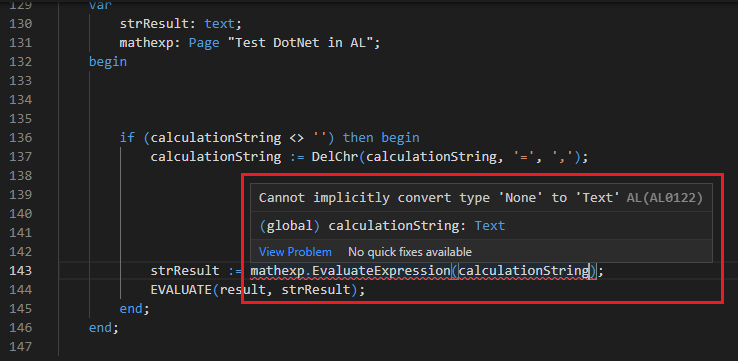
jsincodeunit.png

Can anyone please tell me how to get rid of this error. Answers will be highly appreciated.

Thanks for reading.


I have the same question (0)
  • Suggested answer
    Tabrez Ajaz Profile Picture
    785 on at

    Hi @Javed,

    I have another idea, you can create an HTTP azure function and host it on azure, or you can use already available API's, by making HTTP Call you can send your expression and handle the response return from the azure function which will contain the result.

    Refer to the below API, send a request with the expression and read the return response.

    https://api.mathjs.org/

    Good Luck :)

  • Damjan Zakojc Profile Picture
    443 on at

    Hi,

    I am looking for a solution to run JS directly from the codeunit object.

    I have already been using JS calls from a page, but now, I would need to call a JS from a codeunit. Is this possible?

  • JJMc Profile Picture
    291 on at

    Maybe if you pass the ControlAddin from the page, to the CodeUnit procedure, you will be able to manage this.

  • Francisco Bedolla Profile Picture
    1,123 on at

    in www.youtube.com/watch Erik shows how to use an barcode scanner using some js code

    check it out

  • M Hussnain Javed Profile Picture
    241 on at

    Hi Damjan Zakojc 

    JavaScript is a front-end language.

    It's not possible to use it in the codeunit. A javaScript control addin can only be called on the page like this currpage.controladdinName.JSFunctionName(); 

    Don't forget to help the community by verifying the answer or at least like the suggestion if it did help in any way. It will let others know that the topic has verified the answer and was beneficial to you.

Under review

Thank you for your reply! To ensure a great experience for everyone, your content is awaiting approval by our Community Managers. Please check back later.

Helpful resources

Quick Links

Responsible AI policies

As AI tools become more common, we’re introducing a Responsible AI Use…

Neeraj Kumar – Community Spotlight

We are honored to recognize Neeraj Kumar as our Community Spotlight honoree for…

Leaderboard > Small and medium business | Business Central, NAV, RMS

#1
OussamaSabbouh Profile Picture

OussamaSabbouh 2,664

#2
YUN ZHU Profile Picture

YUN ZHU 960 Super User 2025 Season 2

#3
Jainam M. Kothari Profile Picture

Jainam M. Kothari 773 Super User 2025 Season 2

Last 30 days Overall leaderboard

Featured topics

Product updates

Dynamics 365 release plans



