web
You’re offline. This is a read only version of the page.
close
Skip to main content

Notifications

Announcements

No record found.

Community site session details

Community site session details

Session Id :
Customer experience | Sales, Customer Insights,...
Answered

Untouched, Default Subscription Center 404 Error

(0) ShareShare
ReportReport
Posted on by 120

I was trying to access our subscription center and received a 404 error on Contoso Ltd. What is Contoso Ltd? How do I fix this issue? I was just using the default subscription center, this is nothing special I've created, or even made edits to, so not sure why it wouldn't work.

Anyone have any suggestions to get my subscription center to work again? The goal of my subscription center is just to opt out as a whole, we don't have specific lists or anything.

I have the same question (0)
  • cloflyMao Profile Picture
    25,210 on at

    Hi backinstereo,

    Contoso Ltd is a fictional company used for sample data.

    Did you open subscription center directly?

    If so, to test such type of marketing page, we should run a simple customer journey to send marketing email to test contact, because SC only works when it is opened via the link of marketing email.

    Please refer to following troubleshooting steps:

    1. Open Default Marketing Page(subscription center) record, check whether its Full page URL is valid.

    (We will see error message if we open the form/page directly.)

    2. Open Default Content Settings record, check whether URL of the default marketing page is inserted to Subscription center field.
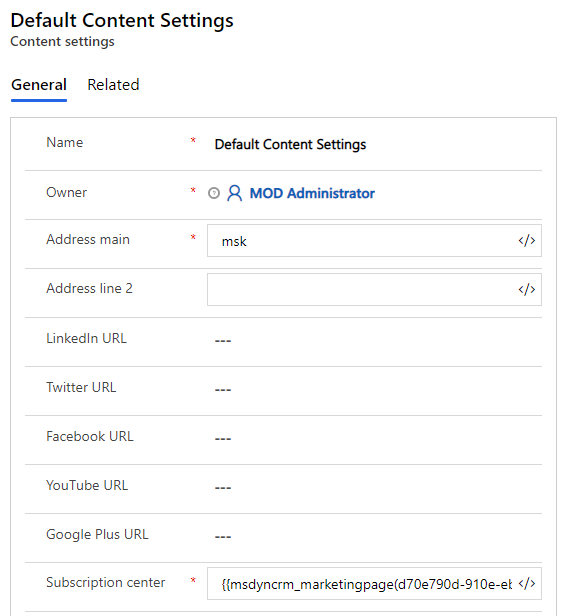
    pastedimage1605083169836v1.png

    3. Check whether content settings with valid subscription center link is applied to content settings field of customer journey. 

    pastedimage1605083300495v2.png

    4. Set up a customer journey to test.

    Regards,

    Clofly

  • backinstereo Profile Picture
    120 on at

    I sent the email to myself as part of a live journey and clicked the link from there, so it wasn't a test email.

    In my Default Marketing Page Summary tab, it has the link as the Full page URL and that is what is producing a 404 error.

    Where do I find Default Content Settings record?

  • cloflyMao Profile Picture
    25,210 on at

    Hi backinstereo,

    We can find content settings in Marketing templates > Content settings:

    By default, there should be an existing "Default Content Settings" record.

    pastedimage1605108785943v1.png

    The link to your Default Marketing Page might broke, 404 means that the target page doesn't exist.

    Try to create a new subscription center page record, add "Default Subscription Center form" to the page and go live it, 

    an URL to the new SC will be automatically generated, then check whether the new page is valid.

    If it works, replace Subscription center field of content settings with the new full page URL and run CJ to test again.

    Regards,

    Clofly

  • cloflyMao Profile Picture
    25,210 on at

    Did it still not work?

  • backinstereo Profile Picture
    120 on at

    My Customer Journey Content settings is linked to the Default Content Settings.

    This is the Subscription Center link in my Default Content Settings: {{msdyncrm_marketingpage(3831ef2c-d58a-e811-a95f-000d3a18c23c).msdyncrm_full_page_url}}

    When I go to my Default Marketing Page, under Summary, for Full Page URL, it lists the link that contains the 404 I mentioned earlier. I will note, I didn't put this URL there.

    Default-Marketing-Page.PNG

    I went to do as you suggest, make a new Subscription Center Page, made sure the Subscription Form was on the new page, added a new partial URL for my new page. How do I change this code to find my new page on the Default Content Settings page?

    {{msdyncrm_marketingpage(3831ef2c-d58a-e811-a95f-000d3a18c23c).msdyncrm_full_page_url}}

    Default-Content-Settings.PNG

  • cloflyMao Profile Picture
    25,210 on at

    Hi backinstereo,

    1. Stop the "Default Content Settings" record.

    0383.z1.JPG

    2. Click assist edit icon at right of subscription center field.

    z2.JPG

    3. Static content > Marketing page > Your new page > FullPageUrl

    z3.JPG

    Regards,

    Clofly

  • backinstereo Profile Picture
    120 on at

    I followed your steps and I'm getting these errors:

    4520.Error.PNG

    FullURL.PNG

  • cloflyMao Profile Picture
    25,210 on at

    Hi,

    The correct format should be like below:

    {{msdyncrm_marketingpage(3831ef2c-d58a-e811-a95f-000d3a18c23c).msdyncrm_full_page_url}}

    Please clear the existing value first, then insert the new URL again.

    Regards,

    Clofly

  • backinstereo Profile Picture
    120 on at

    Now it's telling me: Subscription center: The entity isn't in the data store.

    I double checked that my Subscription center was live and it wasn't, so I tried to turn it live and also got errors:

    There was a problem with the website bindings. Check the IP address, port, and host header for Event Portal

    I am not the admin of my account, and I feel like I'm now entering territory that I won't be able to fix this on my own.

  • Verified answer
    cloflyMao Profile Picture
    25,210 on at

    1. Please check whether Marketing Page entity was synced to insights-service in Settings > Marketing settings > Marketing data configuration.

    pastedimage1605507859702v1.png

    2. Check whether the marketing application was connected to your portal in Power Platform admin center > Resources > Dynamics 365 apps.

    In other word, the portal should be Event Portal instead of the others such as Customer self Service Portal once it is associated with marketing application.

    pastedimage1605508138722v2.png  

    Regards,

    Clofly

Under review

Thank you for your reply! To ensure a great experience for everyone, your content is awaiting approval by our Community Managers. Please check back later.

Helpful resources

Quick Links

Responsible AI policies

As AI tools become more common, we’re introducing a Responsible AI Use…

Neeraj Kumar – Community Spotlight

We are honored to recognize Neeraj Kumar as our Community Spotlight honoree for…

Leaderboard > Customer experience | Sales, Customer Insights, CRM

#1
Tom_Gioielli Profile Picture

Tom_Gioielli 108 Super User 2025 Season 2

#2
Jimmy Passeti Profile Picture

Jimmy Passeti 50 Most Valuable Professional

#3
Gerardo Rentería García Profile Picture

Gerardo Rentería Ga... 49 Most Valuable Professional

Last 30 days Overall leaderboard

Product updates

Dynamics 365 release plans
