web
You’re offline. This is a read only version of the page.
close
Skip to main content

Notifications

Announcements

No record found.

Community site session details

Community site session details

Session Id :
Finance | Project Operations, Human Resources, ...
Answered

Generate Budget from project forecast

(0) ShareShare
ReportReport
Posted on by

Hello,

I am trying to generate a Budget from a project forecast for Fixed-price projects. I know already that I have to go to the Budget modul and then I have to choose the button "Generate Budget Plan from Project forecast." When this is done and the Budget Plan has been approved, I choose "Generate Budget register entry" in order to create a Budget register entry from a Budget Plan.

So the process is working, but I am not able to transfer all amounts from the project forecast to the Budget.

Here is the Project forecast with the cost amount and sales amount. You will find the project forecast in the Project Management and Accounting modul.

pastedimage1619175026240v1.png

In the next step, I am going to the Budget modul and when I try to create a Budget Plan from a Project forecast, I choose the corresponding Project ID:
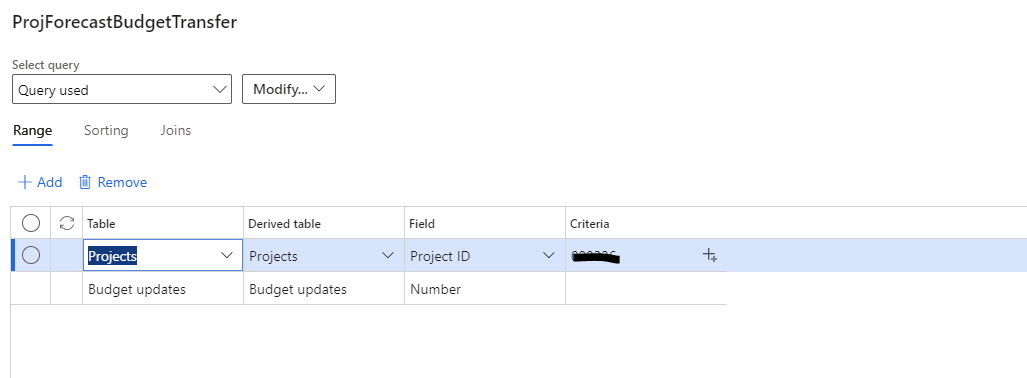
pastedimage1619175188692v2.png

Now, when I create the Budget Plan, only the expense amount will be depicted, but no revenue amount. Here is a screenshot from the budget register entries:

pastedimage1619175410979v3.png

I have checked the corresponding category groups and saw that both - the cost account and revenue account - have been setup. When I check the P&L structure for the corresponding Budget register entries I see a range from 400000 to 900000. So what am I doing wrong? Why is not possible to see the revenue amount after the transfer?

pastedimage1619175490578v4.png

Best regards
Schewa

I have the same question (0)
  • Suggested answer
    Oleksiy  Khoroshylov Profile Picture
    1,747 User Group Leader on at

    Hi Schewa,

    Revenue budgets for fixed-price project are not coming from sales price of item/hour/expense forecasts, but rather from sales price of on-account forecasts.

    Do you have on-account forecast entered on the project?

  • Community Member Profile Picture
    on at

    Hello,

    I had no on-account entries on this project. So I have created an on-account entrie and it works.

    Thanks

Under review

Thank you for your reply! To ensure a great experience for everyone, your content is awaiting approval by our Community Managers. Please check back later.

Helpful resources

Quick Links

Responsible AI policies

As AI tools become more common, we’re introducing a Responsible AI Use…

Neeraj Kumar – Community Spotlight

We are honored to recognize Neeraj Kumar as our Community Spotlight honoree for…

Leaderboard > Finance | Project Operations, Human Resources, AX, GP, SL

#1
Martin Dráb Profile Picture

Martin Dráb 664 Most Valuable Professional

#2
André Arnaud de Calavon Profile Picture

André Arnaud de Cal... 522 Super User 2025 Season 2

#3
Sohaib Cheema Profile Picture

Sohaib Cheema 303 User Group Leader

Last 30 days Overall leaderboard

Product updates

Dynamics 365 release plans
