Hi Adrian,
the Azure function I'm using is a v1 (.net framework) http trigger function, webhook passes the execution context to it, I can see that the azure function runs successfully , but this exception appears on the CRM interface for the user , here is how I registered the webhook:

and then i registered a step & image :
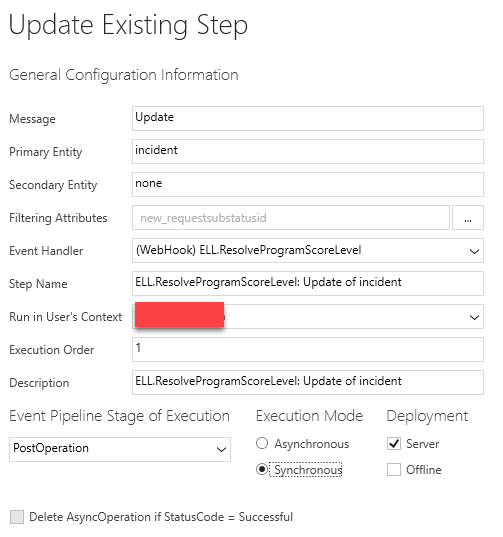

this is a snippet of my code:
 [FunctionName("ResolveProgramScoreLevel")]
        public static async Task Run([HttpTrigger(AuthorizationLevel.Admin,  "post", Route = null)]HttpRequestMessage req, TraceWriter log)
        {
            try
            {
                if(req == null)
                {
                    log.Error($"{nameof(req)} is null");
                    return new HttpResponseMessage { StatusCode = HttpStatusCode.BadRequest, Content = new StringContent($"{nameof(req)} is null") };
                }

                // Parse request data to json string and retreive relevant data from context
                string requestJsonContext = req.Content.ReadAsStringAsync().Result;
                log.Info(requestJsonContext);
                if (string.IsNullOrEmpty(requestJsonContext))
                {
                    log.Error($"[{nameof(Run)}] - Invalid request, the recieved context data from the webhook call is null or empty...");
                    return new HttpResponseMessage { StatusCode = HttpStatusCode.BadRequest, Content = new StringContent("Invalid request, the recieved context data from the webhook call is null or empty...") };
                }

                //Retrieve webhook context from request to get relevant incident data
                RemoteExecutionContext context = DeserializeJsonString(requestJsonContext);// parse request json data to RemoteExecutionContext object

                #region context validation
                //context validation

                //check if this function was requested on an update event
                if (context.MessageName.ToLower() != "update")
                {
                    log.Error($"[{nameof(Run)}] - Invalid request, this function was not triggered on update message");
                    return new HttpResponseMessage { StatusCode = HttpStatusCode.BadRequest, Content = new StringContent("Invalid request, this function was not triggered on update event") };
                }

                //check if context contains the target case
                if (!context.InputParameters.Contains("Target"))
                {
                    log.Error($"[{nameof(Run)}] - Invalid request, context doesn't contain the target entity");
                    return new HttpResponseMessage { StatusCode = HttpStatusCode.BadRequest, Content = new StringContent("Invalid request, context doesn't contain the target entity") };
                }

                //check if the context contains the image of case
                if (!context.PostEntityImages.Contains("image"))
                {
                    log.Error($"[{nameof(Run)}] - Invalid request, context doesn't contain the image entity");
                    return new HttpResponseMessage { StatusCode = HttpStatusCode.BadRequest, Content = new StringContent("Invalid request, context doesn't contain the image entity") };
                }

                #endregion

                var targetCase = ((Entity)context.InputParameters["Target"]).ToEntity();
                var casePostImage = context.PostEntityImages["image"].ToEntity();

                var testScore = casePostImage.Contains("new_testscore") ? Convert.ToDouble(casePostImage.Attributes["new_testscore"]) : (double?)null;
                var requestReason = casePostImage.Contains("new_loa_request_reason") ? (casePostImage.Attributes["new_request_reason"] as EntityReference).Id : (Guid?)null;

                if (targetCase.new_requestsubstatusid != null &&
                   targetCase.new_requestsubstatusid.Id == //some value &&
                   testScore != null &&
                   casePostImage.SubjectId != null &&
                   casePostImage.SubjectId.Id == //some value){
						// do some logic
				   }

				   return new HttpResponseMessage { StatusCode = HttpStatusCode.OK };
			}
			catch (Exception ex)
            {
                log.Error($"[{nameof(Run)}] - an error has occured, ex : {ex}");
                return new HttpResponseMessage { StatusCode = HttpStatusCode.InternalServerError, Content = new StringContent(ex.ToString()) };
            }
    	}

    	 private static RemoteContextType DeserializeJsonString(string jsonString)
        {
            //create an instance of generic type object
            RemoteContextType obj = Activator.CreateInstance();
            MemoryStream ms = new MemoryStream(Encoding.Unicode.GetBytes(jsonString));
            System.Runtime.Serialization.Json.DataContractJsonSerializer serializer = new System.Runtime.Serialization.Json.DataContractJsonSerializer(obj.GetType());
            obj = (RemoteContextType)serializer.ReadObject(ms);
            ms.Close();

            return obj;
        }
these are the invocations of my function , it runs fine:


