web
You’re offline. This is a read only version of the page.
close
Skip to main content

Notifications

Announcements

No record found.

Community site session details

Community site session details

Session Id :
Microsoft Dynamics CRM (Archived)

New business rule on existing opps

(0) ShareShare
ReportReport
Posted on by

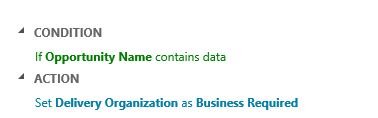
Hi - I created a business rule that works fine on new opportunities setting a field as required. (I just want it on this form, not globally.) However, on existing opps this doesn't work. Any ideas? Thanks
03680.Capture.JPG

*This post is locked for comments

I have the same question (0)
  • Suggested answer
    Walespop Profile Picture
    520 on at

    86634.Capture.PNGHello, you can change the scope of the business rule.

  • Community Member Profile Picture
    on at

    Thanks for that but it didn't help. In fact, I can go back to the new opp and remove the selection and it saves.

  • Suggested answer
    Walespop Profile Picture
    520 on at

    I think I am not sure of what you are referring to..

    If you want the rule to apply to existing opportunity records, the scope has to be "entity"

  • Community Member Profile Picture
    on at

    I had set the scope to that particular form. I changed the scope to Opportunity. Still not being required on existing opps.

  • Suggested answer
    Walespop Profile Picture
    520 on at

    What about setting it to "Entity"

  • Community Member Profile Picture
    on at

    There is no choice for entity. There's "All Forms", then each of our forms, "Opportunity", "Information".

  • Suggested answer
    Walespop Profile Picture
    520 on at

    Oh, sorry, that seems not to be available for CRM 2013. That option applies to CRM 2015 and above.

    I will advise you upgrade or a walk - around of having to write a workflow which you can run for all the existing records and allowing the business rule to work for new records should be a way to go.

  • ashlega Profile Picture
    34,477 on at

    Hi,

     Any chance you could post a screenshot of your business rule and , also, the form where it's not set to required? Also, could you confirm the rule has been activated and the scope has been set toe all form or to that particular form?

    PS. As I understand it, the problem is that you are opening one of the existing opportunities and the rule does not work for some reason. Right?

  • Community Member Profile Picture
    on at

    Walespop - we will be upgrading to the latest version in the next few months.

    Alex - the screenshot of the rule is in the initial post, it's simple. The rule works on new opps but opening an existing opp and making a change the field isn't required. I can go to one of the new opps that was saved and removed the selection. The form is huge so I don't know what part would be worth posting.

  • ashlega Profile Picture
    34,477 on at

    Hi kbearhome,

     I guess I'm just trying to confirm if the form you are looking at is the form that rule applies to(don't see form name on the original screenshot). Parts of the form that would be interesting are:

    - Form name at the top left corner - if it matches the form name for the rule

    - Opportunity name field (if there is a value)

    - Delivery organization field (if it's required or not)

     If you've checked all that, just ignore it, though.

Under review

Thank you for your reply! To ensure a great experience for everyone, your content is awaiting approval by our Community Managers. Please check back later.

Helpful resources

Quick Links

Responsible AI policies

As AI tools become more common, we’re introducing a Responsible AI Use…

Neeraj Kumar – Community Spotlight

We are honored to recognize Neeraj Kumar as our Community Spotlight honoree for…

Leaderboard > 🔒一 Microsoft Dynamics CRM (Archived)

#1
SA-08121319-0 Profile Picture

SA-08121319-0 4

#1
Calum MacFarlane Profile Picture

Calum MacFarlane 4

#3
Alex Fun Wei Jie Profile Picture

Alex Fun Wei Jie 2

Last 30 days Overall leaderboard

Featured topics

Product updates

Dynamics 365 release plans
