web
You’re offline. This is a read only version of the page.
close
Skip to main content

Announcements

No record found.

News and Announcements icon
Community site session details

Community site session details

Session Id :
Finance | Project Operations, Human Resources, ...
Answered

Wrong Labels on Dex Modified Form

(0) ShareShare
ReportReport
Posted on by 1,588

I've customized a window for an organization by adding fields and labels to SOP Entry and also re-labeled the Misc field. On my machine it displays as expected, but on the client's test server the new field's labeled shows as [Not Found] and the Misc re-label shows the wrong text. 
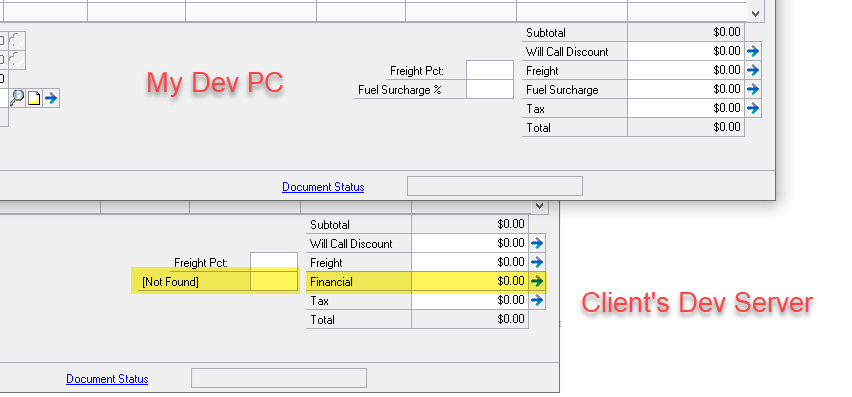
issue-comparison.png

This customization project is one I didn't do originally and so I thought perhaps the original developer didn't make use of source control and the Index.txt file and that string Resource IDs have been "corrupted" or mis-assigned in some way. When I view the Index.txt file I've been using I don't see any problems to fix. 

I also grabbed the extracted dictionary from the client's server and opened it in Dexterity. The labels are correct there. 
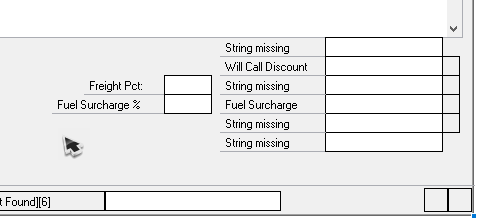
extracted.png

Categories:
I have the same question (0)
  • David Musgrave MVP GPUG All Star Legend Moderator Profile Picture
    14,137 Most Valuable Professional on at

    Hi Chad

    The extracted dictionary will always show string missing and [Not Found] resources as it does not include anything with an ID < 22,000.

    How did you transfer the customization to the customer's system?

    Regards

    David

  • chadbruels Profile Picture
    1,588 on at

    My strings having a Resource ID greater than 22,000 are showing correctly in the extracted dictionary >> Fuel Surcharge % and Fuel Surcharge. I opened that as a sort of exploration to see if they were incorrect there.

    I transferred the chunk file to them through a web-based file transfer utility that creates temporary SFTP sites for file exchange. It is how we transfer all files to clients; I believe it is internally built and managed.

    What could be happening at runtime to display strings that are wrong? Is there something else I can review that might aid in diagnosis? 

  • Verified answer
    David Musgrave MVP GPUG All Star Legend Moderator Profile Picture
    14,137 Most Valuable Professional on at

    Delete the old .dic file before installing the .cnk to get a newly created .dic rather than updating the existing one.

    Check that the modifier has not been used against your custom dictionary. The modifier copies strings across when it is first used and new strings might not be copied across.

    If they have used modifier, export the form or report changes with Customization maintenance, rename the custom forms dictionary and then reimport the packages. 

    Note: that recreate the modified dictionary like this will not copy any format, string or message changes made.

    Good luck

    David

  • chadbruels Profile Picture
    1,588 on at

    I got back onto the client's server and we renamed the forms dictionary for the custom product, launched GP, and now the Sales Transaction Entry form displays those labels as expected. 

    We then also re-imported the package file with the modified version of Sales Transaction Entry for that custom product and the labels are still showing correctly. 

    Thanks very kindly for your assistance, David.

Under review

Thank you for your reply! To ensure a great experience for everyone, your content is awaiting approval by our Community Managers. Please check back later.

Helpful resources

Quick Links

Introducing the 2026 Season 1 community Super Users

Congratulations to our 2026 Super Stars!

Meet the Microsoft Dynamics 365 Contact Center Champions

We are thrilled to have these Champions in our Community!

Congratulations to the March Top 10 Community Leaders

These are the community rock stars!

Leaderboard > Finance | Project Operations, Human Resources, AX, GP, SL

#1
Giorgio Bonacorsi Profile Picture

Giorgio Bonacorsi 658

#2
André Arnaud de Calavon Profile Picture

André Arnaud de Cal... 468 Super User 2026 Season 1

#3
Syed Haris Shah Profile Picture

Syed Haris Shah 333 Super User 2026 Season 1

Last 30 days Overall leaderboard

Product updates

Dynamics 365 release plans
