Hi All:
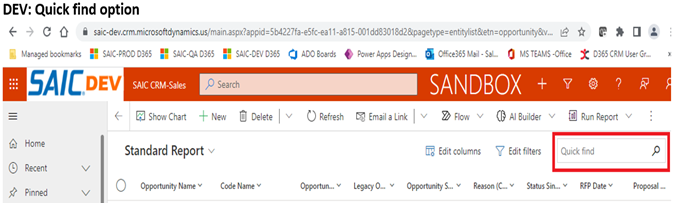
I have a couple of quick questions regarding the Grid search options “Search this view” and “Quick find”.
1 - The “Search this view” is already set up in Production and QA. The “Quick find” is setup in DEV.
Based on the documentation, this can be changed by an Admin. I want to change the Grid search in DEV from the "Quick find" to the “Search this view” option.
The documentation states that I can change the option in the General tab under System Settings. Where can I find the System Settings?
2 – The “Search this view” in QA and Prod seems to be limited in its search. It seems to only search for certain fields (maybe just those identified as “searchable”).
I know the Quick Find is a view and the search items can be configured to search for fields listed in its index.
Can the “Search this view” option also be configured to look for other custom fields as well, like Gameboard and Capture Manager values …etc.?

Thanks.


