web
You’re offline. This is a read only version of the page.
close
Skip to main content

Announcements

No record found.

News and Announcements icon
Community site session details

Community site session details

Session Id :
Microsoft Dynamics AX (Archived)

Ledger Calendar form is not opening

(0) ShareShare
ReportReport
Posted on by 134

Hello Everyone,

I have Imported Demo data to my Virtual machine and tried to do Purchase order Invoice and showing that "Fiscal Year of ... does not exist".

So, I have tried to open ledger calendar from  this path General Ledger > Setup> Ledger > Ledger Calendar but, ledger calendar grid is not coming.

Attached is the screenshot.

Thank you
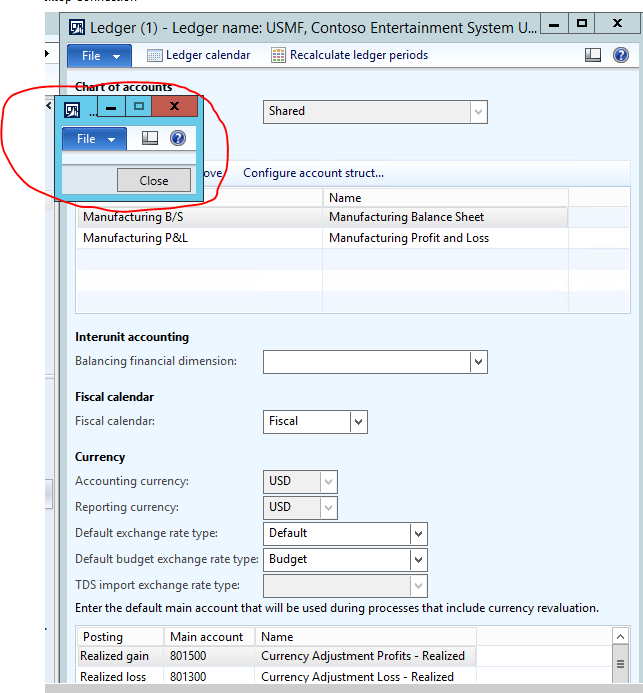
pastedimage1562230566841v1.png

*This post is locked for comments

I have the same question (0)
  • Suggested answer
    André Arnaud de Calavon Profile Picture
    304,500 Super User 2026 Season 1 on at

    Hi Laxmi,

    Possibly, a personalization was done to hide the grid? If you do a right click on the form, you can see if a control was hidden. You can also go to the usage data and try to remove personalizations for this form or clear all usage data.

  • Suggested answer
    Ludwig Reinhard Profile Picture
    Microsoft Employee on at

    Hi Laxmi,

    Is it possible that this issue is related to an expired license in your demo machine?

    Best regards,

    Ludwig

  • Laxmi Narayana Profile Picture
    134 on at

    Hi André Arnaud de Calavon,

    Thank you for the reply!

    I have cleared the usage data and tried but, no change and Also tried to personalise to add the fields but, it is showing empty.

    I did one thing, Added "Period status" in Fiscal calendar but, unable to change the status for the column.

    Please find the attached screenshots for reference.

    pastedimage1562305907143v1.png

    Thank you again!

    [quote user="Laxmi Narayana"]

    Hello Everyone,

    I have Imported Demo data to my Virtual machine and tried to do Purchase order Invoice and showing that "Fiscal Year of ... does not exist".

    So, I have tried to open ledger calendar from  this path General Ledger > Setup> Ledger > Ledger Calendar but, ledger calendar grid is not coming.

    Attached is the screenshot.

    Thank you

    pastedimage1562230566841v1.png

    [/quote]
  • Laxmi Narayana Profile Picture
    134 on at

    Hi Ludwig!

    Thank you for the reply.

    No, license was not expired. from day 1 it is showing the same.

  • Suggested answer
    Ludwig Reinhard Profile Picture
    Microsoft Employee on at

    Hi Laxmi,

    Is your VM running an older AX2012 version?

    In older versions there were some form related issues that have been fixed over time with hotfixes.

    Please check LCS for details.

    Best regards,

    Ludwig

  • Laxmi Narayana Profile Picture
    134 on at

    Hi Ludwig!

    Thanks for the reply!

    Yes, VM is running on Older AX 2012 version. below are the details of current version

    Kernal version: 6.3.5000.5032

    Application version: 6.3.2000.326

    If possible, could you please share the hotfix for the above?

    Best Regards

    Laxmi Narayana

Under review

Thank you for your reply! To ensure a great experience for everyone, your content is awaiting approval by our Community Managers. Please check back later.

Helpful resources

Quick Links

Introducing the 2026 Season 1 community Super Users

Congratulations to our 2026 Super Stars!

Meet the Microsoft Dynamics 365 Contact Center Champions

We are thrilled to have these Champions in our Community!

Congratulations to the March Top 10 Community Leaders

These are the community rock stars!

Leaderboard > 🔒一 Microsoft Dynamics AX (Archived)

#1
CP04-islander Profile Picture

CP04-islander 26

#2
Michel ROY Profile Picture

Michel ROY 14

#3
imran ul haq Profile Picture

imran ul haq 8

Last 30 days Overall leaderboard

Featured topics

Product updates

Dynamics 365 release plans
