web
You’re offline. This is a read only version of the page.
close
Skip to main content

Notifications

Announcements

No record found.

Community site session details

Community site session details

Session Id :
Microsoft Dynamics AX (Archived)

Unable Deploy Element in Ax 2012

(0) ShareShare
ReportReport
Posted on by 1,602

Hi Guys,

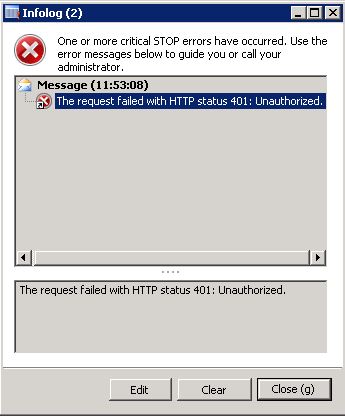
I am facing problem in Ax 2012 while deploying an element from AOT. Recently, I have restored db from Production to Test env. Initially I have faced many problem in EP then I have registered site , deployed server, webapplication and website as per test env. Now I have imported a model to fix an issue and it deal with one or two Web Controls. I have completed Compilation, Synchronization and Full CIL without any error. But, when i am trying to deploy the respective element in Ax I got he below error even I run Ax in Administrator mode. Please help me to get over this.
Thanks in Advance!!!!

// Vasanth Arivali.

*This post is locked for comments

I have the same question (0)
  • Suggested answer
    VasanthArivali Profile Picture
    1,602 on at

    The error is due to the server unable to recognize the actual web server. Because the website form has more than one line and the first one was wrong. The deployment form will always take the first and try to deploy.

    Go to -> System Administration -> Web Sites -> Keep the one which you going to deploy/use, delete the rest and paste the web URL in two text boxes which in the bottom then Save. Then go  to deployment form and try once, try the same with AOT nodes.

    // Vasanth Arivali.

  • Verified answer
    VasanthArivali Profile Picture
    1,602 on at

    The error is due to the server unable to recognize the actual web server. Because the website form has more than one line and the first one was wrong. The deployment form will always take the first and try to deploy.

    Go to -> System Administration -> Web Sites -> Keep the one which you going to deploy/use, delete the rest and paste the web URL in two text boxes which in the bottom then Save. Then go  to deployment form and try once, try the same with AOT nodes.

    // Vasanth Arivali.

Under review

Thank you for your reply! To ensure a great experience for everyone, your content is awaiting approval by our Community Managers. Please check back later.

Helpful resources

Quick Links

Responsible AI policies

As AI tools become more common, we’re introducing a Responsible AI Use…

Neeraj Kumar – Community Spotlight

We are honored to recognize Neeraj Kumar as our Community Spotlight honoree for…

Leaderboard > 🔒一 Microsoft Dynamics AX (Archived)

#1
Martin Dráb Profile Picture

Martin Dráb 4 Most Valuable Professional

#1
Priya_K Profile Picture

Priya_K 4

#3
MyDynamicsNAV Profile Picture

MyDynamicsNAV 2

Last 30 days Overall leaderboard

Featured topics

Product updates

Dynamics 365 release plans
