web
You’re offline. This is a read only version of the page.
close
Skip to main content

Notifications

Announcements

No record found.

Community site session details

Community site session details

Session Id :
Microsoft Dynamics NAV (Archived)

Microsoft.Xrm.Sdk

(0) ShareShare
ReportReport
Posted on by

Hi All, 

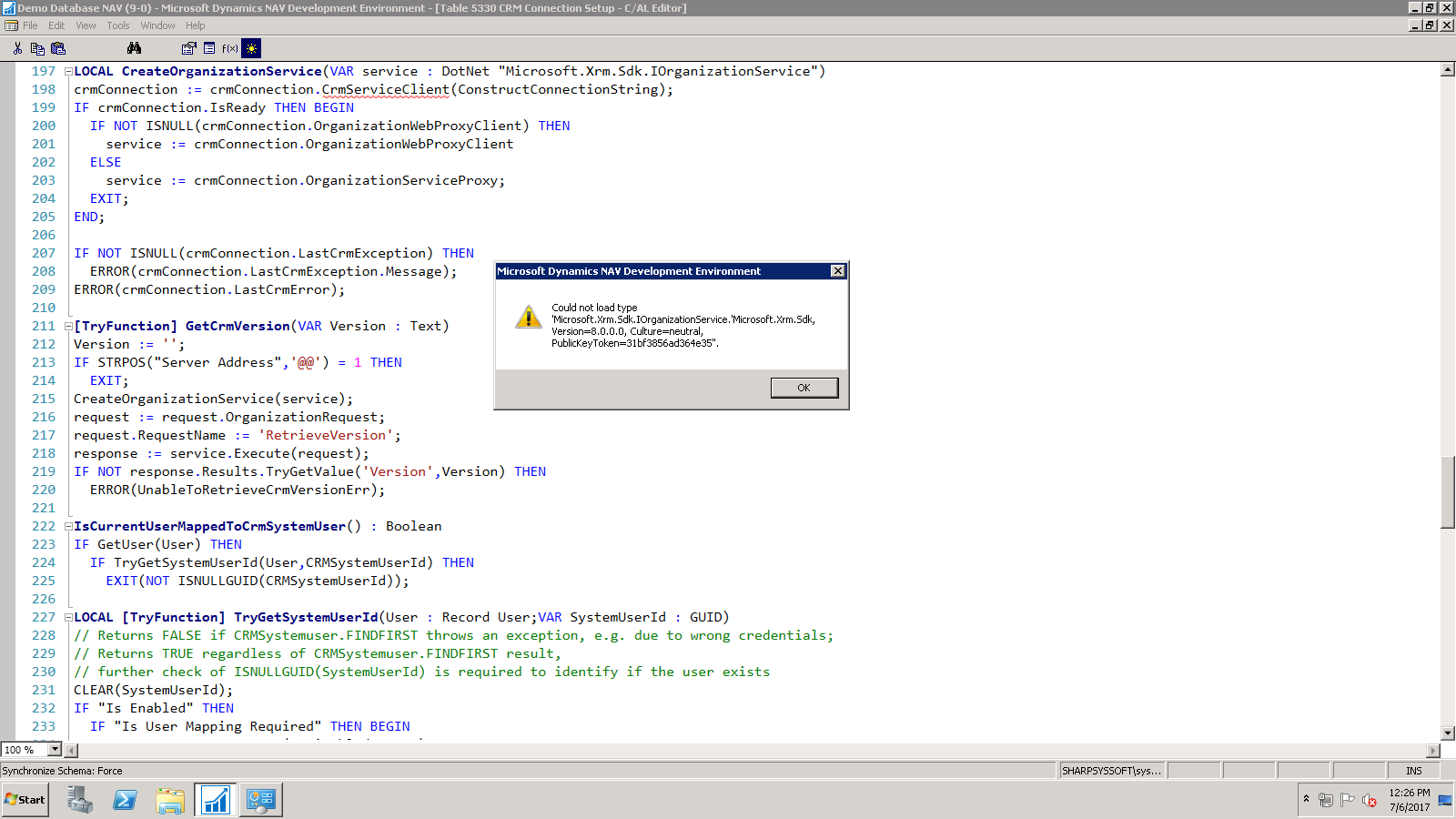
 I am getting this error after compile. please give me a solution.

thanks in advance. 

---------------------------
Microsoft Dynamics NAV Development Environment
---------------------------
Could not load type 'Microsoft.Xrm.Sdk.IOrganizationService.'Microsoft.Xrm.Sdk, Version=8.0.0.0, Culture=neutral, PublicKeyToken=31bf3856ad364e35''.
---------------------------
OK
---------------------------
---------------------------
Microsoft Dynamics NAV Development Environment
---------------------------
Could not load type 'Microsoft.Xrm.Tooling.Connector.CrmServiceClient.'Microsoft.Xrm.Tooling.Connector, Version=2.2.0.0, Culture=neutral, PublicKeyToken=31bf3856ad364e35''.
---------------------------
OK
---------------------------
---------------------------
Microsoft Dynamics NAV Development Environment
---------------------------
You have specified an unknown variable. CrmServiceClient Define the variable under 'Global C/AL symbols'.
---------------------------
OK
---------------------------
crm.xrm-nav-error.png6281.error_5F00_nav.png

*This post is locked for comments

I have the same question (0)
  • Tina Menezes Profile Picture
    2,582 on at

    Hi,

    You have to select the Dotnet variables subtype manually as maybe after upgradation they are referring to the older version. Once this is done, compile the objects again.

  • Community Member Profile Picture
    on at

    Microsoft.Xrm.Sdk, Version=8.0.0.0, Culture=neutral, PublicKeyToken=31bf3856ad364e35,

    this file is missing while selecting manually.  where to download this file and how to import here .

  • Suggested answer
    Mohana Yadav Profile Picture
    61,001 Super User 2025 Season 2 on at

    please copy all dll's from DVD to your machine/server. seems some dlls are missing

  • Community Member Profile Picture
    on at

    my build number is 9.00.45778

    I can't find the DVD. is any other option0842.temp.png

  • Verified answer
    Tina Menezes Profile Picture
    2,582 on at

    NAV DVD is the folder from where you performed NAV installation. i.e. it contains the setup of NAV and all other folders related to NAV. You must have saved it in some location manually.

  • Verified answer
    keoma Profile Picture
    32,729 on at

    Here you can find ideas to solve that.

    stackoverflow.com/.../cant-access-microsoft-xrm-namespace

Under review

Thank you for your reply! To ensure a great experience for everyone, your content is awaiting approval by our Community Managers. Please check back later.

Helpful resources

Quick Links

Responsible AI policies

As AI tools become more common, we’re introducing a Responsible AI Use…

Neeraj Kumar – Community Spotlight

We are honored to recognize Neeraj Kumar as our Community Spotlight honoree for…

Leaderboard > 🔒一 Microsoft Dynamics NAV (Archived)

Last 30 days Overall leaderboard

Featured topics

Product updates

Dynamics 365 release plans
