web
You’re offline. This is a read only version of the page.
close
Skip to main content

Announcements

News and Announcements icon
Community site session details

Community site session details

Session Id :
Microsoft Dynamics GP (Archived)

The user could not be added to one or more databases"

(0) ShareShare
ReportReport
Posted on by 550

I created a new company with the user DYNSA (administrator), but when I try to give access to the user DYNSA gives error

Error Message:  

"The user could not be added to one or more databases"

How Can I add the user DYNSA to new company ??

Path GP:

Microsoft Dynamics GP -> Tools -> Configuration -> System -> User Access

(user access settings)
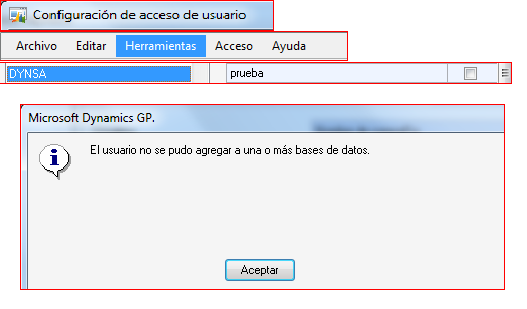
3823.ErrorDynsa.png

*This post is locked for comments

I have the same question (0)
  • Verified answer
    Beat Bucher  GP Geek  GPUG All Star Profile Picture
    28,061 Moderator on at

    Hi Carolina,

    You need to check your SQL Security.. There are either 2 scenarios :

    1. DYNSA does not have the privileges to manage user security in SQL (check to see if DYNSA is a member of 'securityadmin' in the global SQL Security)

    2. That user account already exists in that company, but wasn't linked properly to SQL, maybe it was inherited from another server due to a database restore.

    If option 1. does turn out to be set correctly, than you could check the users belonging to the company DB in SQL and delete the user from there, then try to remove and re-add the user in GP to provide access to this company.

    If you're not sure about all the actions, ask someone from your IT dept to assist.

  • Carolina Hernandez Profile Picture
    550 on at

    I can´t associate the user Dynamics with a company.

    Message Error:

    The user could not be added to one or more databases

    Path:

    Tool -> Configuration -> Systems -> user access  -> user access configuration.

    Please your advice.

  • Verified answer
    Richard Wheeler Profile Picture
    75,852 Moderator on at

    You need to use SSMS to remove this user from the database. You can't add them because they are already there, according to SQL but GP does not know that.

  • Carolina Hernandez Profile Picture
    550 on at

    Thanks for your advice.  I did it.

  • Verified answer
    Beat Bucher  GP Geek  GPUG All Star Profile Picture
    28,061 Moderator on at

    Carolina,

    glad you were able to solve your problem.. Please mark either response as the solution, so the question gets checked off with a good answer.

Under review

Thank you for your reply! To ensure a great experience for everyone, your content is awaiting approval by our Community Managers. Please check back later.

Helpful resources

Quick Links

Season of Sharing Community Challenge Winners!

Congratulations to our community stars!

Women in Power Builds Momentum

Expanding mentorship, skilling, and AI innovation

Congratulations to the June Top 10 Community Leaders

These are the community rock stars!

Leaderboard > 🔒一 Microsoft Dynamics GP (Archived)

Last 30 days Overall leaderboard

Featured topics

Product updates

Dynamics 365 release plans
