web
You’re offline. This is a read only version of the page.
close
Skip to main content

Notifications

Announcements

No record found.

Community site session details

Community site session details

Session Id :
Microsoft Dynamics AX (Archived)

Cannot import released product variants

(0) ShareShare
ReportReport
Posted on by 698 User Group Leader

Hi All,

I am able to import released products and released product masters.

The problem is when I try to publish variants for an item, system (OData) service throws an error saying "Matching record for the read-only data source 'EcoResConfiguration' does not exist."
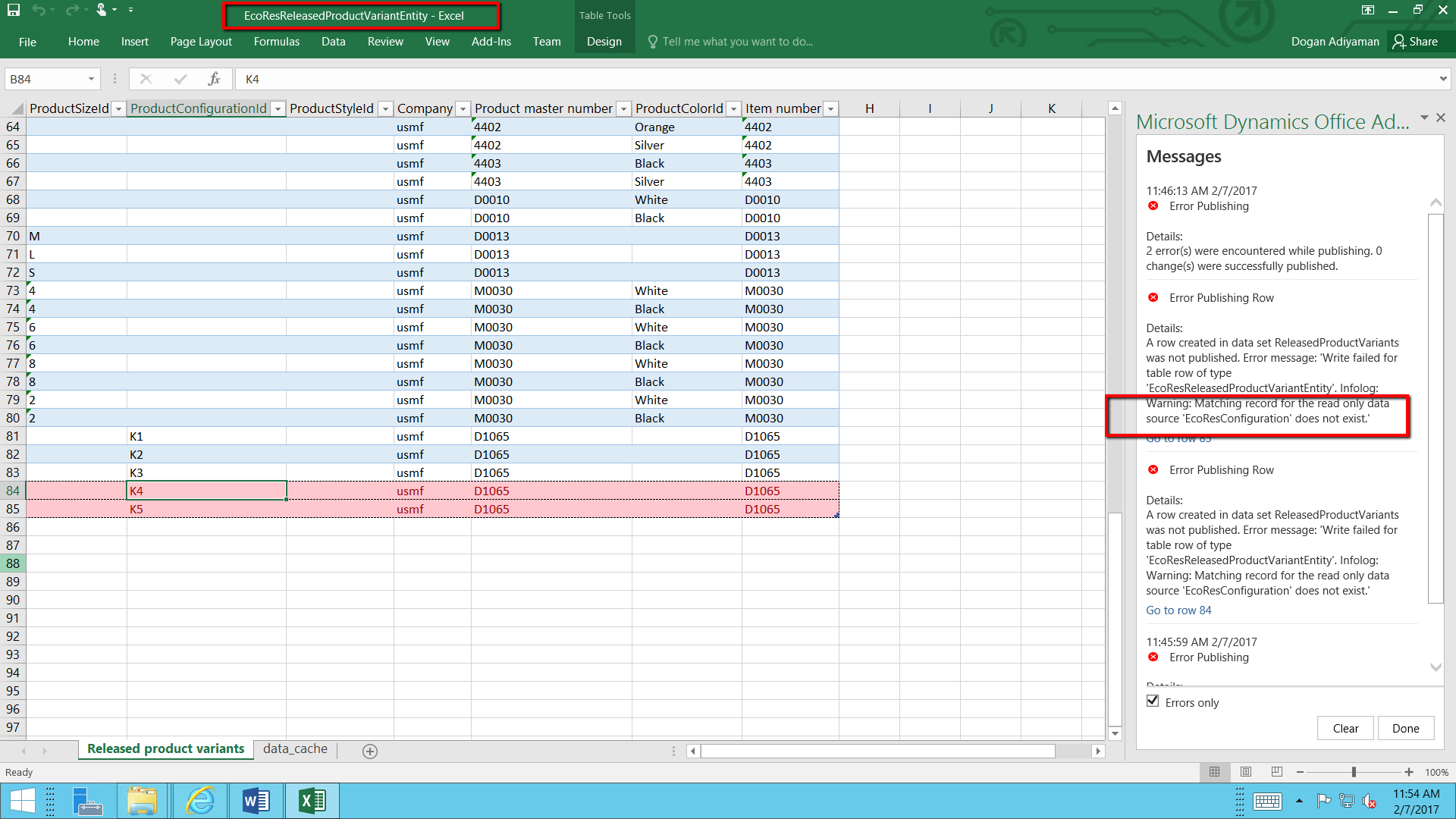
0508.1.png

The only entities we have regarding variants are: 

Released product creation
Released product variants
Product variants
Retail Kit Configurations

and none of them is useful because of above error. How about you? How do you import var

*This post is locked for comments

I have the same question (0)
  • rafik_ Profile Picture
    225 on at

    For Product Variants I would suggest using this :

    prodvariants.png

  • Dogan Adiyaman Profile Picture
    698 User Group Leader on at

    Thank you for your reply Rafal.

    But my situtation is much more different than this. I am talking about data migration, not releasing variants one by one. Beyond that, I am using Dynamics 365 instead of 2012 R3.

    No one has experience regarding variant import with data entities in Dynamics 365?

  • Community Member Profile Picture
    on at

    Hi - did you find an answer to this issue? I have the same thing with project categories. It has a similar architecture (shared and then legal entity specific ones). I was wondering if it has anything to do with the fact that the shared categories were not created with a data entity but manually entered. Now I'm trying to move my project categories from one entity to the next and see this exact same error. 

  • Kar_Gilson Profile Picture
    410 on at

    Did you find a solution please?

  • Teemu Miettinen Profile Picture
    65 on at

    I am suffering exactly the same issue with the Project Categories. Some has suggested that there is a bug in the entity. community.dynamics.com/.../228117

  • Dogan Adiyaman Profile Picture
    698 User Group Leader on at

    There is no solution yet.

  • add Profile Picture
    on at

    Hello Greyman,

    Have you looked at the data entity dependencies here? When we did data migration from R3 to 365 (we did it with excel files import) we followed this exact order of import and we didn't have problems with product variants:

    1. Products
    2. Product specific unit conversions
    3. Product master colors
    4. Product variants
    5. Released products
    6. Released product variants

    I hope this helps. 

    Thank you

  • Suggested answer
    BrynS Profile Picture
    5 on at

    Hi Dogan,

    Perhaps you've figured this out, but I found that two additional data entities must be loaded before the product master variants data entity: "Configurations" and "Product master configurations".

    For example,

    Product-Upload.jpg

    Hope that helps,

    Bryn

Under review

Thank you for your reply! To ensure a great experience for everyone, your content is awaiting approval by our Community Managers. Please check back later.

Helpful resources

Quick Links

Responsible AI policies

As AI tools become more common, we’re introducing a Responsible AI Use…

Neeraj Kumar – Community Spotlight

We are honored to recognize Neeraj Kumar as our Community Spotlight honoree for…

Leaderboard > 🔒一 Microsoft Dynamics AX (Archived)

#1
Martin Dráb Profile Picture

Martin Dráb 4 Most Valuable Professional

#1
Priya_K Profile Picture

Priya_K 4

#3
MyDynamicsNAV Profile Picture

MyDynamicsNAV 2

Last 30 days Overall leaderboard

Featured topics

Product updates

Dynamics 365 release plans
