web
You’re offline. This is a read only version of the page.
close
Skip to main content

Announcements

No record found.

News and Announcements icon
Community site session details

Community site session details

Session Id :
Microsoft Dynamics AX (Archived)

Add Product Dimension datasource to query for display in form.

(0) ShareShare
ReportReport
Posted on by 93

DAX Tribe,

I'm in a pickle. I'm baffled by how I can get a specific dimension into a query that feeds a form so that that form can display (through Personalize) the dimension classification.

From the image you'll see that if I open the query for filter mode, I can then select a Dimension.Product and then theoretically filter on that. 

The question is, how can I get that added range filter into the query proper so that it's available when personalizing the form that this query feeds?

Any help would be greatly appreciated.

Thanks,

-DC
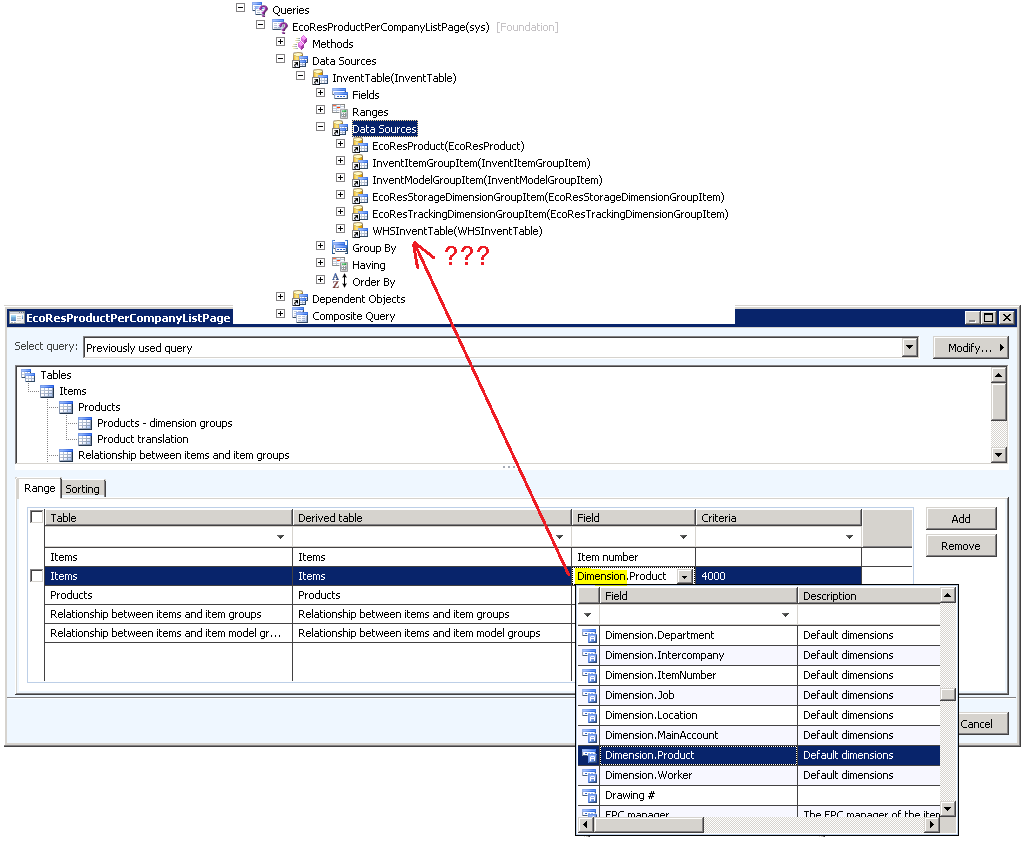
EcoResProductPerCompanyListPageQuery.png

*This post is locked for comments

I have the same question (0)
  • Suggested answer
    André Arnaud de Calavon Profile Picture
    304,138 Super User 2026 Season 1 on at

    Hi DC,

    The query form is enriched to expose the fields for the default dimension as "table fields". The table itself contains only one DefaultDimension reference record ID which holds information about the dimension attributes and the values. It is not possible using a personalization to add these fields. A customization would be required to display individual dimension fields with their value.

  • Suggested answer
    DaveCline Profile Picture
    93 on at

    Thanks for your reply, Andre'.

    Yes, we found that this is indeed true - no personalization for the dynamic dimension fields.

    However, we were able to create a VIEW which exposed the dimensions. When joined to the target table (InventTable) and filtered for the Name (Product) were were able to allow the Dimension to be included in the query.

    Here's the view for those of you who might be curious.

    SELECT TOP 100
    T1.DISPLAYVALUE AS DISPLAYVALUE,
    T1.DIMENSIONATTRIBUTEVALUESET AS DEFAULTDIMENSION,
    T1.RECID AS RECID,
    T2.ENTITYINSTANCE AS ENTITYINSTANCE,
    T3.REPORTCOLUMNNAME AS REPORTCOLUMNNAME,
    T3.RECID AS DIMENSIONATTRIBUTEID,
    T3.BACKINGENTITYTYPE AS BACKINGENTITYTYPE,
    T3.KEYATTRIBUTE AS KEYATTRIBUTE,
    T3.NAMEATTRIBUTE AS NAMEATTRIBUTE,
    T3.NAME AS NAME
    FROM DIMENSIONATTRIBUTEVALUESETITEM T1
    CROSS JOIN DIMENSIONATTRIBUTEVALUE T2
    CROSS JOIN DIMENSIONATTRIBUTE T3
    WHERE
    (T1.DIMENSIONATTRIBUTEVALUE=T2.RECID AND (T1.PARTITION = T2.PARTITION))
    AND
    (T2.DIMENSIONATTRIBUTE=T3.RECID AND (T2.PARTITION = T3.PARTITION))


Under review

Thank you for your reply! To ensure a great experience for everyone, your content is awaiting approval by our Community Managers. Please check back later.

Helpful resources

Quick Links

Introducing the 2026 Season 1 community Super Users

Congratulations to our 2026 Super Stars!

Meet the Microsoft Dynamics 365 Contact Center Champions

We are thrilled to have these Champions in our Community!

Congratulations to the March Top 10 Community Leaders

These are the community rock stars!

Leaderboard > 🔒一 Microsoft Dynamics AX (Archived)

#1
CP04-islander Profile Picture

CP04-islander 16

#2
GiacomoRovai Profile Picture

GiacomoRovai 4

#3
Douglas Noel Profile Picture

Douglas Noel 2

Last 30 days Overall leaderboard

Featured topics

Product updates

Dynamics 365 release plans
