web
You’re offline. This is a read only version of the page.
close
Skip to main content

Announcements

No record found.

News and Announcements icon
Community site session details

Community site session details

Session Id :
Microsoft Dynamics AX (Archived)

Invoicing purchase order crash in AccountingDistributionProcessor.isMonetaryAmountFullyMatching

(0) ShareShare
ReportReport
Posted on by 302

Hi guys, 

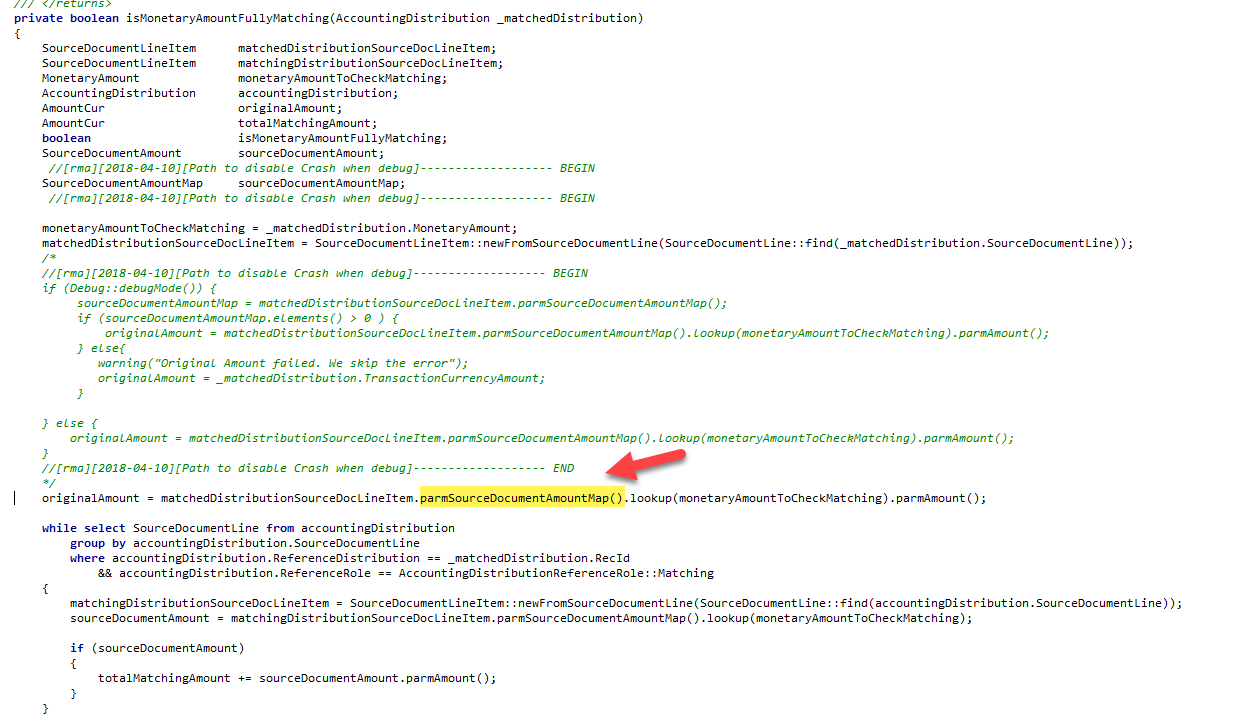
I have specific question which I cannot find a solution. From time to time, when I post an invoice from PO, the system crash at highlighted code (see image below). As I can see, each time we generate an invoice the system generate records in SourceDocumentLine table. In our case I check there is one record for the quantity amount and one for tax TaxUncommitted - Uncommitted sales tax 2757 - ). During distribution amount process, the system save infomation in some kind of system cache. The records with this code 2757 are not placed in this cache. So, when this method try to recover the information, it finds nothing. Is when the system crash with no object initialized. I can skip this line from the code by calculating the originalamount from _matcheddistribution record but I understand the system do that for a particular reason. So, I guess there is something wrong during the creation of purchase order or maybe I have something missconfigured in TAX. any ideas?
2018_2D00_04_2D00_12_5F00_13_2D00_27_2D00_54.png

*This post is locked for comments

I have the same question (0)
  • Sohaib Cheema Profile Picture
    49,664 Super User 2026 Season 1 on at

    Though you were not very impressive at explanation of your issue, that makes many to ignore to answer questions. e.g. we don't know version of you AX etc.

    Anyways, I see this issue as recognized and KB has been provided by Microsoft for that.

    For AX 2012 R3, it is KB Number 4011348

    For AX 2012 R2 it is KB Number 4089177

    Please proceed with what is applicable to your version

  • Roger M. Profile Picture
    302 on at

    Thank you for the answer. It is R3. Sometimes it is difficult to know where exactly address the problem. It looks like code error but it coud be user error or misconifugration. link to support.microsoft.com/.../4011348 is not enough clear. Of course the map is empty. But I don't know the reason.

  • Sohaib Cheema Profile Picture
    49,664 Super User 2026 Season 1 on at

    That should be KB Number 4011348 for you, if you have R3

Under review

Thank you for your reply! To ensure a great experience for everyone, your content is awaiting approval by our Community Managers. Please check back later.

Helpful resources

Quick Links

Introducing the 2026 Season 1 community Super Users

Congratulations to our 2026 Super Stars!

Meet the Microsoft Dynamics 365 Contact Center Champions

We are thrilled to have these Champions in our Community!

Congratulations to the April Top 10 Community Leaders

These are the community rock stars!

Leaderboard > 🔒一 Microsoft Dynamics AX (Archived)

#1
CP04-islander Profile Picture

CP04-islander 24

#2
Michel ROY Profile Picture

Michel ROY 14

#3
Jagadabi Profile Picture

Jagadabi 6

Last 30 days Overall leaderboard

Featured topics

Product updates

Dynamics 365 release plans
