web
You’re offline. This is a read only version of the page.
close
Skip to main content

Notifications

Announcements

No record found.

Community site session details

Community site session details

Session Id :
Microsoft Dynamics AX (Archived)

How to make workflow sending notification email to users in AX 2012

(0) ShareShare
ReportReport
Posted on by

Hi,

I've just completed a requisition workflow & it runs quite smoothly during my testing in testing environment. Now I want to the workflow send notification email to each user in the workflow instead of just a notification in AX. Please help me.
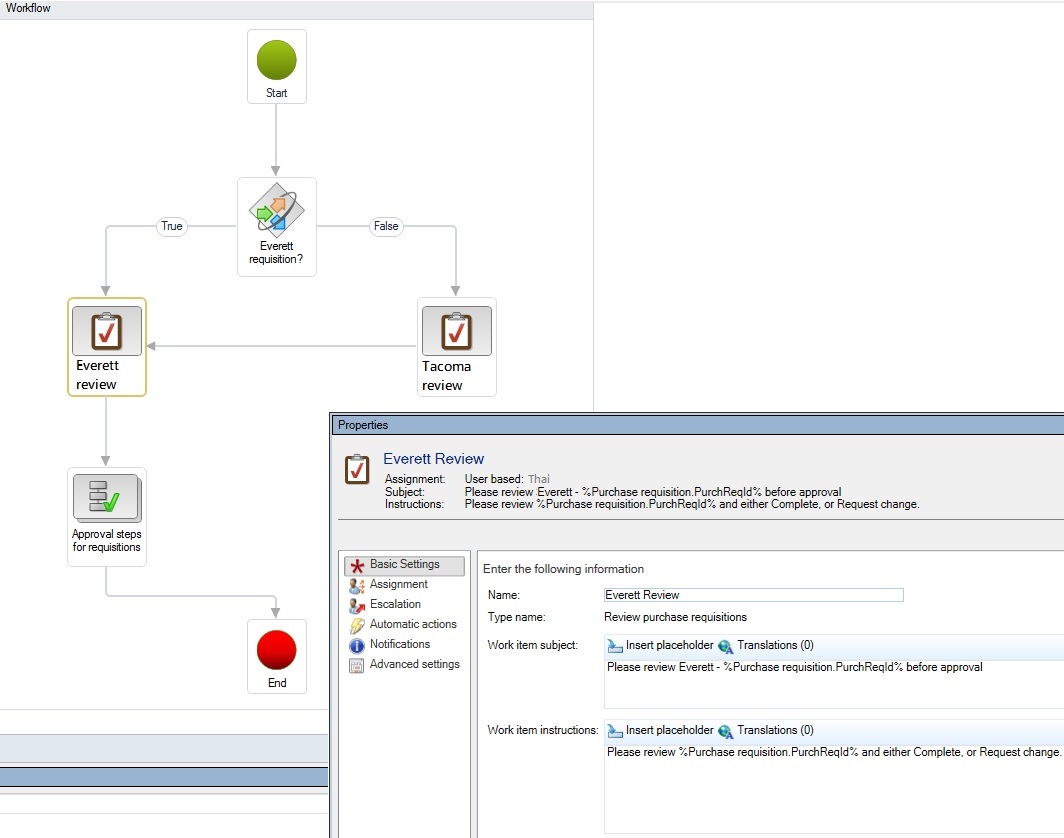
Email4Workflow.jpg

Thanks so much

Thai

*This post is locked for comments

I have the same question (0)
  • Verified answer
    Sohaib Cheema Profile Picture
    49,443 User Group Leader on at

    Too much material is available on Google

    and there are some posts written in a self-explanatory way

  • Verified answer
    Darsh Profile Picture
    615 on at

    Hello Thai,

    You can also look to URL below which can help you step by step.

    Configure e-mail notification on workflow

  • Ruben Diaz Profile Picture
    20 on at

    Can any one Help me with this Issue

    Stopped (error): X++ Exception: No message was sent. Language EN-US was not found.

    at SysWorkflowWorkItem-create

    SysWorkflowWorkItem-createWorkItems

    SysWorkflow-save

    SysWorkflowQueue-resume

  • Community Member Profile Picture
    on at

    Hi Ruben,,

    There are a few people having the same issue as you do.

    Please try to review this link.

    Thanks

    Thai

  • Ruben Diaz Profile Picture
    20 on at

    Do you Know Where is the 'Warning Parameters'? "And then you need to assign that email template into Warning Parameters"

    Thanks

    Ruben

  • Community Member Profile Picture
    on at

    It's in the same Setup section called "Alerts":

    Organizations administration > Setup > Alerts > Alert parameters . Then you can assign Email ID (i.e. email template).

    Thanks

    Thai

  • Suggested answer
    Darsh Profile Picture
    615 on at

    is your issue resolved? if not pl. chech below.

    Which default language is setup in you configuration ?

    check here, go to System administratation > setup > system parameter

Under review

Thank you for your reply! To ensure a great experience for everyone, your content is awaiting approval by our Community Managers. Please check back later.

Helpful resources

Quick Links

Responsible AI policies

As AI tools become more common, we’re introducing a Responsible AI Use…

Neeraj Kumar – Community Spotlight

We are honored to recognize Neeraj Kumar as our Community Spotlight honoree for…

Leaderboard > 🔒一 Microsoft Dynamics AX (Archived)

#1
Martin Dráb Profile Picture

Martin Dráb 4 Most Valuable Professional

#1
Priya_K Profile Picture

Priya_K 4

#3
MyDynamicsNAV Profile Picture

MyDynamicsNAV 2

Last 30 days Overall leaderboard

Featured topics

Product updates

Dynamics 365 release plans
