web
You’re offline. This is a read only version of the page.
close
Skip to main content

Notifications

Announcements

No record found.

Community site session details

Community site session details

Session Id :
Microsoft Dynamics CRM (Archived)

Dependent Components with Blank Ids

(0) ShareShare
ReportReport
Posted on by

Hi,

We are on Dynamics CRM 2015 on-premise version. When I try to delete an entity, it gives me an error message saying that dependent components detected. However, when I go to the details page, I cannot see the components. They seem to not have any names or ids (empty guids) and I also cannot find these dependencies in the SDK Message Processing Step and SDK Message Processing Step Image tables.

Anyone has any idea on how I can delete these dependencies?
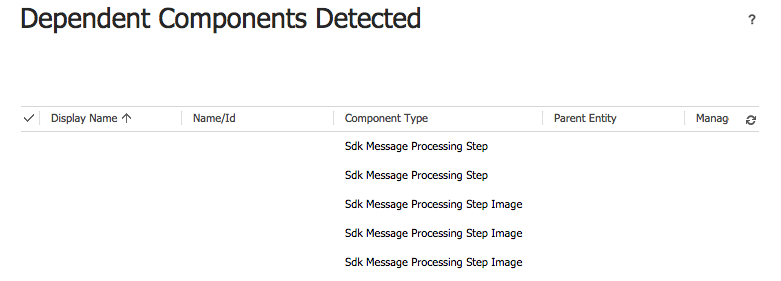
6886.crm.png

Thanks,

Bob

*This post is locked for comments

I have the same question (0)
  • Suggested answer
    Community Member Profile Picture
    on at

    Looks like some plugins associated. Can you please check any plugins are registered for this ?

  • Community Member Profile Picture
    on at

    The plugins don't show up on the Plugin Registration Tool and are also not in the SDK Message table in the database. They however show up here. Any recommendations on where to find them?

  • Community Member Profile Picture
    on at

    are you able to de-activate these steps ?

  • Suggested answer
    Durgaprasad Profile Picture
    80 on at

    There is a business rule which has "Entity" level scope which is causing this issue. Please deactivate the business rule and then delete the business rule.

    Now try to delete the entity that should work.

  • Suggested answer
    Abdul Wahab Profile Picture
    12,119 Moderator on at

    I was facing the same issue but after the deletion of processes on that table, it is resolved

Under review

Thank you for your reply! To ensure a great experience for everyone, your content is awaiting approval by our Community Managers. Please check back later.

Helpful resources

Quick Links

Responsible AI policies

As AI tools become more common, we’re introducing a Responsible AI Use…

Neeraj Kumar – Community Spotlight

We are honored to recognize Neeraj Kumar as our Community Spotlight honoree for…

Leaderboard > 🔒一 Microsoft Dynamics CRM (Archived)

#1
SA-08121319-0 Profile Picture

SA-08121319-0 4

#1
Calum MacFarlane Profile Picture

Calum MacFarlane 4

#3
Alex Fun Wei Jie Profile Picture

Alex Fun Wei Jie 2

Last 30 days Overall leaderboard

Featured topics

Product updates

Dynamics 365 release plans



