web
You’re offline. This is a read only version of the page.
close
Skip to main content

Announcements

News and Announcements icon
Community site session details

Community site session details

Session Id :
Supply chain | Supply Chain Management, Commerce
Suggested Answer

UoM on Sales order Pick Work

(1) ShareShare
ReportReport
Posted on by 43

I am trying to force sales order pick work to be created with UoM as each.

The product definition has unit conversions between Each > Case and the unit sequence group also has both UoM's on it.

Even when I have ‘restrict by unit’ enabled on the location directive (with EA marked as the restrict by unit) the pick work always gets Case on it.

I understand that the UoMs on unit sequence group are used from biggest to smallest units when creating pick work and if the pick quantity is an exact conversion between UoMs system will use the biggest UoM.

But is there no OOTB way to override this behavior in the system?

I have the same question (0)
  • Suggested answer
    Syed Haris Shah Profile Picture
    1,872 Super User 2026 Season 2 on at

    Hi @RA-06031857-0 ,

    Please check the Default unit for purchase and transfer parameter in the Unit Sequence Group. Once it is enabled for a unit, try the transaction again. The system should automatically pick the unit for which this parameter is enabled.


    Regards,

    Syed Haris Shah

  • RA-06031857-0 Profile Picture
    43 on at

    hi Syed,

    Isn't that checkbox for selecting default UoM for Purchase and Transfer order transactions?

    I am working with sales order work transactions.

  • Suggested answer
    Syed Haris Shah Profile Picture
    1,872 Super User 2026 Season 2 on at

    Hi @RA-06031857-0 ,


    That's correct based on the description of the field name. However, I remember having the same requirement before, and when I tested it at that time, this setting worked for me. With this setting enabled, when I started picking the item on the WHS device, the unit defaulted to Each. Have you tried using this setting?


    Reagrds,

    Syed Haris Shah

  • Suggested answer
    Laurens vd Tang Profile Picture
    5,041 Super User 2026 Season 2 on at

    Good day,


    Can you update the unit to “Each” on the work template for sales orders? 


    Best regards,

    Laurens van der Tang

  • Venkat Profile Picture
    225 on at

    Hi,

    What is the Sales UOM for the item?

    Regards,

    Venkat


  • RA-06031857-0 Profile Picture
    43 on at

    Hi Syed,

    I have that toggle enabled on the unit sequence group.


    Hi Laurens,

    I tried working with that unit field on the work template as well but it did not help, the UoM on sales pick work line is still coming as Case.


    Hi Venkat,

    The sales UoM for the item is EA.


    Regards,

    Rohit

  • Suggested answer
    Syed Haris Shah Profile Picture
    1,872 Super User 2026 Season 2 on at

    Hi @RA-06031857-0 ,

    I tested the same scenario in my test environment, and the result is working as expected based on your requirement.

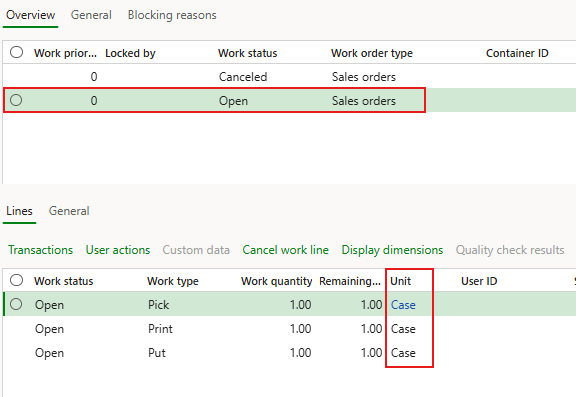
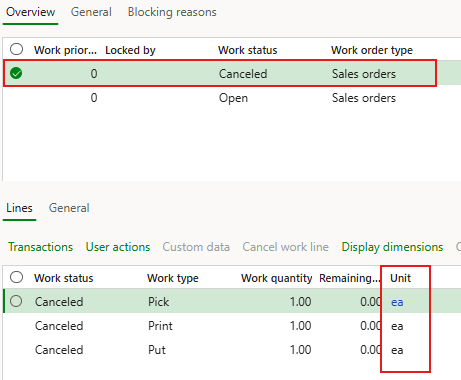
    In the first scenario, the Work Order with cancelled status was without marking a Default Unit in the Unit Sequence Group. As a result, the Work Order picked Each, which is the item’s inventory unit.

    However, when I marked Case as the Default Unit and released the Work Order again, it correctly picked Case, as shown in the screenshot below.

    Therefore, the behavior appears to be working as expected.


    Regards,

    Syed Haris Shah

  • RA-06031857-0 Profile Picture
    43 on at

    Hi Syed,

    The work quantity is important in the test.

    Test when the work quantity is an exact conversion between the case and each quantity for your item.

    For e.g. if 1 case for your item is equal to 10 each, test where the quantity being picked is 10 and see if it appears as 10 EA on the work line or 1 case.

    For me it is always appearing as 1 case.

    If the pick quantity is not an exact conversion, then it appears as EA on the work line.

    Regards,

    Rohit

Under review

Thank you for your reply! To ensure a great experience for everyone, your content is awaiting approval by our Community Managers. Please check back later.

Helpful resources

Quick Links

Season of Sharing Community Challenge Winners!

Congratulations to our community stars!

Women in Power Builds Momentum

Expanding mentorship, skilling, and AI innovation

Congratulations to the July Top 10 Community Leaders

These are the community rock stars!

Leaderboard > Supply chain | Supply Chain Management, Commerce

#1
André Arnaud de Calavon Profile Picture

André Arnaud de Cal... 99 Super User 2026 Season 2

#2
Laurens vd Tang Profile Picture

Laurens vd Tang 75 Super User 2026 Season 2

#3
Paolo Cecchelli Profile Picture

Paolo Cecchelli 54 Super User 2026 Season 2

Last 30 days Overall leaderboard

Product updates

Dynamics 365 release plans