web
You’re offline. This is a read only version of the page.
close
Skip to main content

Notifications

Announcements

No record found.

Community site session details

Community site session details

Session Id :
Microsoft Dynamics CRM (Archived)

Incorrect Time Stamps - Project Service Automation

(0) ShareShare
ReportReport
Posted on by

Hey gang! Running into a bit of a problem.

I'm doing a preliminary setup of a PSA Environment, and I'm seeing that the time stamps are off.

In the screen-shot below you'll see I changed the project status and saved the record. But the time stamp is 5 hours ahead of my current time.
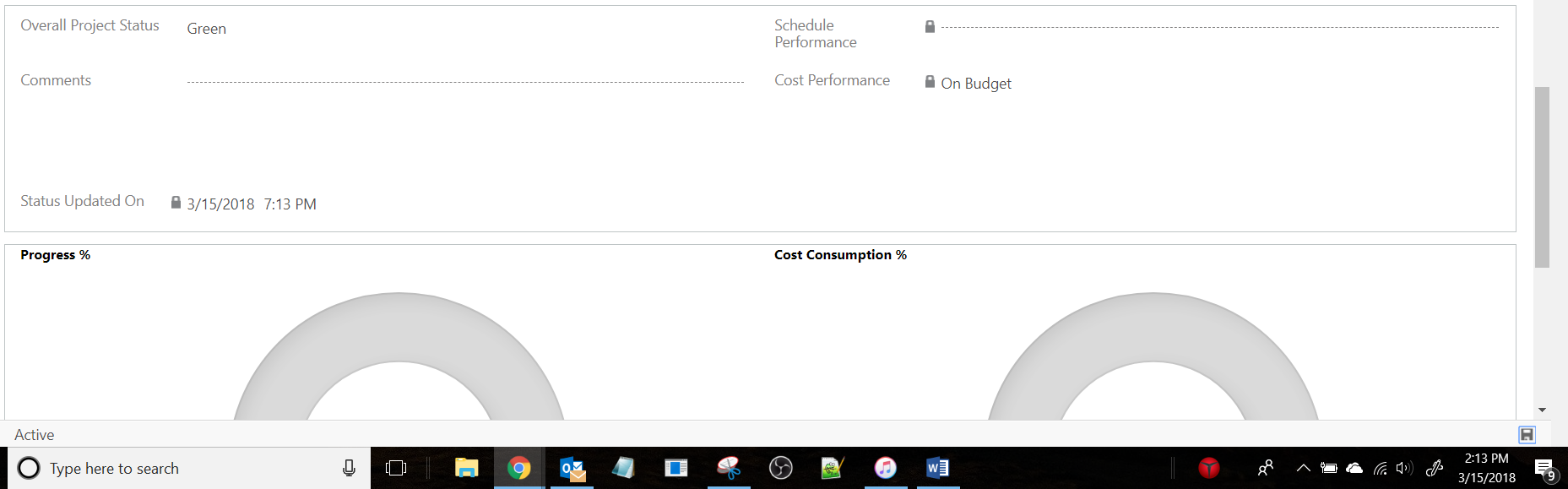
timezone1.PNG

I obviously thought my time-zone was set incorrectly, but went to setting and it is actually correct. I am located in the Central Time-Zone.

timezone2.PNG

Is there another time zone setting somewhere that I'm missing? I want to fix this before I start creating resources and have to change things around later. Maybe in the Office 365 Admin Center? I'm not seeing one but I could be missing it.

*This post is locked for comments

I have the same question (0)
  • Community Member Profile Picture
    on at

    Doing research on the Office 365 Admin Center, there should be an option directly under settings to change the time zone. But it appears that I'm not given that option.

    timezone3.PNG

    I'm not sure if this is because the Environment is still in a trial period or not.

  • Suggested answer
    RaviKashyap Profile Picture
    55,410 Moderator on at

    Hi,

    Can you check & confirm if this is happening for all date related fields or just this field. There are few setting for the datetime field which may affect the time.

    Take a look here: docs.microsoft.com/.../behavior-format-date-time-field

    If it is just this field then there may be something wrong with this field , but if all the date field across your CRM even for other entities showing incorrect date then it must be some general system setting missing.

    Hope this helps.

  • Community Member Profile Picture
    on at

    Ravi,

    Thanks for the suggestion. The only other field that I can automatically get to generate the time is the "Start time" field when I go to book a resource. That field shows the correct time.

    When I check the field properties in the Solution it says it is a User Local field. This makes me think that my Office 365 User is set up in the wrong time zone. However, as I mentioned in my previous comment, I do not see a way to change it within my Office 365 Admin Center.

Under review

Thank you for your reply! To ensure a great experience for everyone, your content is awaiting approval by our Community Managers. Please check back later.

Helpful resources

Quick Links

Responsible AI policies

As AI tools become more common, we’re introducing a Responsible AI Use…

Neeraj Kumar – Community Spotlight

We are honored to recognize Neeraj Kumar as our Community Spotlight honoree for…

Leaderboard > 🔒一 Microsoft Dynamics CRM (Archived)

#1
SA-08121319-0 Profile Picture

SA-08121319-0 4

#1
Calum MacFarlane Profile Picture

Calum MacFarlane 4

#3
Alex Fun Wei Jie Profile Picture

Alex Fun Wei Jie 2

Last 30 days Overall leaderboard

Featured topics

Product updates

Dynamics 365 release plans



