web
You’re offline. This is a read only version of the page.
close
Skip to main content

Notifications

Announcements

Community site session details

Community site session details

Session Id :
Microsoft Dynamics AX (Archived)

tempdb table field cannot be empty for recid

(0) ShareShare
ReportReport
Posted on by 112

Dear All,

when I  run Trial balance report system give below error message and other reports like vendor and customer are running perfectly.

 "tempdb table field cannot be empty for recid"


I am running Dynamics AX 2012 R3 CU8

Kernal Version 6.3.1000.2347

Application Version 6.3.1000.309
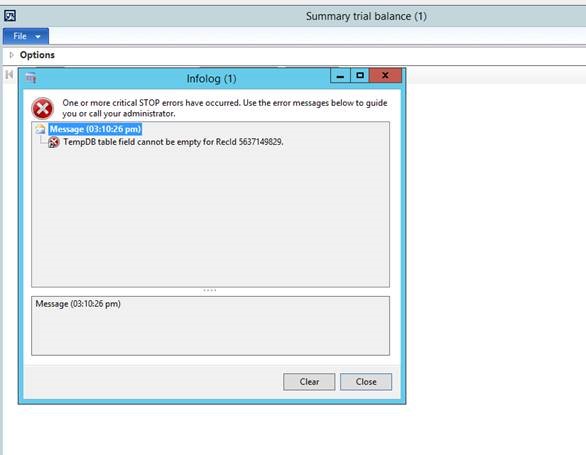
 

6874.error.jpg

any help will be appreciated.

*This post is locked for comments

I have the same question (0)
  • Iulian Cordobin Profile Picture
    8,201 on at

    Is this a standard instance or do you have customizations on it?

  • DeepakKalra Profile Picture
    112 on at

    it's standard instance..no customization.

  • Community Member Profile Picture
    on at

    Dear DeepakKalra,

    I face this problem some times ago, so as i understand from your problem, you have a standard instance of Trial Balance and you've got mentioned problem. So what i thinks is you need a Full CIL to fix the problem, but just before running Full CIL you should delete all DLL file from following location in your server:

    C:\Program Files\Microsoft Dynamics AX\60\Server\DynamicsAX2012\bin

    My problem solved by this, hope this solution help you too.

  • DeepakKalra Profile Picture
    112 on at

    Thanks for reply.I tried the solution you suggested but its not working.even i have done re-installation of reporting extensions but nothing made any difference.

    one thing i noticed i am able to see this report without any issue on another AOS.

  • Iulian Cordobin Profile Picture
    8,201 on at

    I think  you might have an issue with the client / aos versions. Can you try to run the latest (kernel) update you installed on your AOS server to the client machine as well (because I can see you have a very high version number on the AOS compared to the client)?

  • DeepakKalra Profile Picture
    112 on at

    I have 2 AOS with same versions but one AOS is working perfectly. one thing i forgot to mention each aos is connected to different report servers.i tried to connect reverse aos vs report servers.AOS 2 is also throwing same error similar to aos 1 but when i connect AOS 2 with report servers 2 the its working fine.

  • atef@83 Profile Picture
    805 on at

    any one solve this issue iam facing to also

  • DeepakKalra Profile Picture
    112 on at

    Can you please share the error reproduce steps ?

  • Suggested answer
    Community Member Profile Picture
    on at

    Solved with this:

    in SSRS server open file: C:\Program Files\Microsoft SQL Server\MSRS12.MSSQLSERVER\Reporting Services\ReportServer\rssrvpolicy.config

    and find "Name=”Report_Expressions_Default_Permissions”"

    change permissions to FullTrust (instead of PermissionSetName=”Execution”)

  • atef@83 Profile Picture
    805 on at

    Did you find any solution I'm facing the same error with the same report

Under review

Thank you for your reply! To ensure a great experience for everyone, your content is awaiting approval by our Community Managers. Please check back later.

Helpful resources

Quick Links

Responsible AI policies

As AI tools become more common, we’re introducing a Responsible AI Use…

Congratulations to our 2025 Community Spotlights

Thanks to all of our 2025 Community Spotlight stars!

Leaderboard > 🔒一 Microsoft Dynamics AX (Archived)

#1
TAHER_El_Mehdi Profile Picture

TAHER_El_Mehdi 3

#2
Martin Dráb Profile Picture

Martin Dráb 2 Most Valuable Professional

#2
Mea_ Profile Picture

Mea_ 2

Last 30 days Overall leaderboard

Featured topics

Product updates

Dynamics 365 release plans
