web
You’re offline. This is a read only version of the page.
close
Skip to main content

Announcements

No record found.

News and Announcements icon
Community site session details

Community site session details

Session Id :
Microsoft Dynamics AX (Archived)

Filtering a Forum's Data Source

(0) ShareShare
ReportReport
Posted on by

I have created a new inquiry form to display all posted vendor invoices across legal entities. My form currently shows only the invoice amount, excluding any applied payments to the invoice. I need to also add a field to show what is left to pay of the invoice. So I added VendTrans to my data sources to display the open balance amount. The issue I am running into is VendTrans shows all transaction types, payments, credit notes, invoices, etc. I need to filter this data source to only show the TransType of invoice. I have added the code below by overriding the executeQuery() on my data source: 
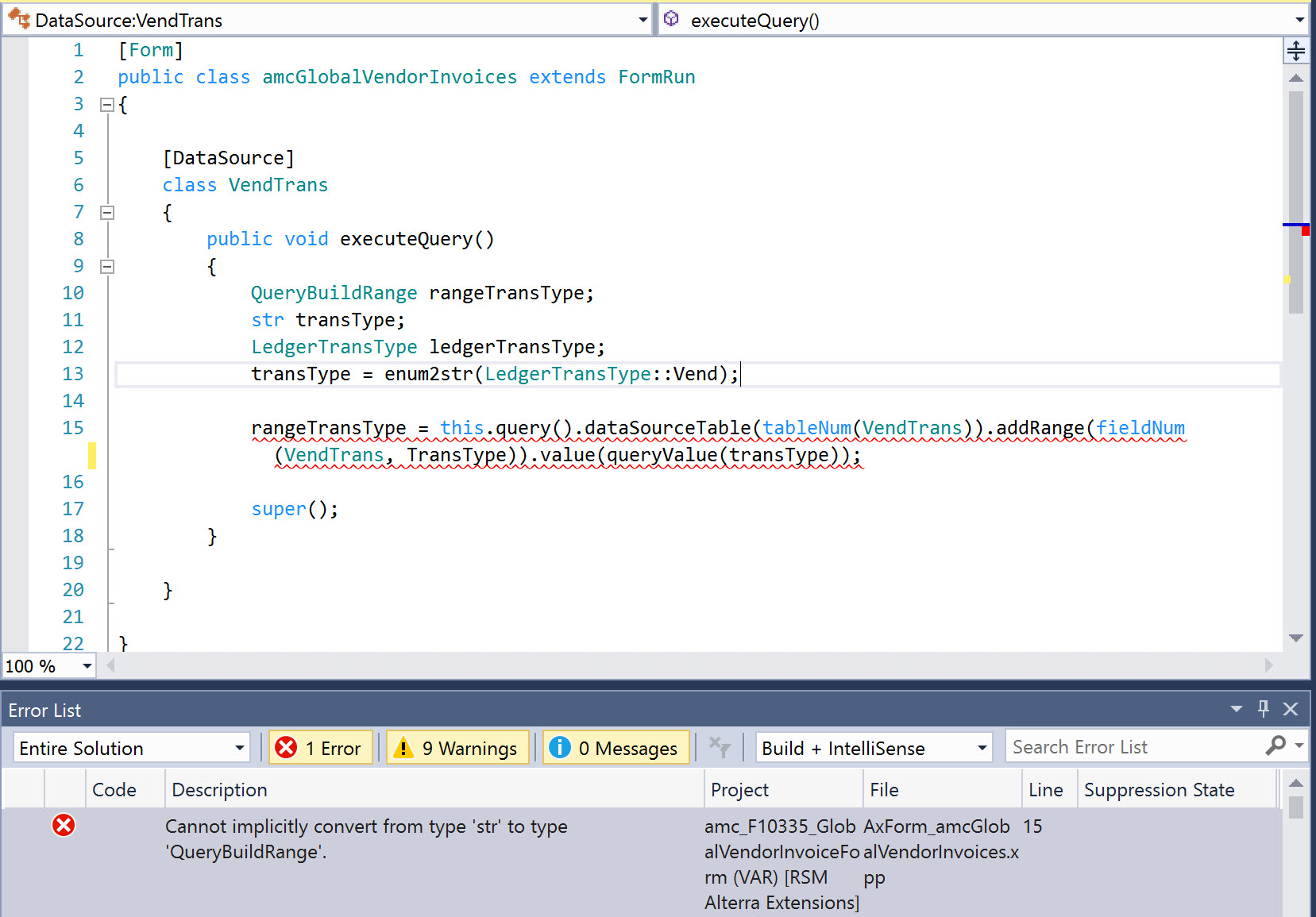
rangeFilter.jpg

I am not sure why I am getting the error above, as I have seen similar code being used by other developers. Just a different table and field. Please review my code and advise me on what I should do. I am still new to developing in X++.

*This post is locked for comments

I have the same question (0)
  • Verified answer
    Sohaib Cheema Profile Picture
    49,679 Super User 2026 Season 1 on at

    You don't need to do extra effort of declaration for variables. here, just specify a line before super() as following

    this.query().dataSourceTable(tableNum(VendTrans)).addRange(fieldnum(VendTrans,TransType)).value(SysQuery::value(LedgerTransType::Vend));

    Notes:

    1) LedgerTransType is of your choice, you can change if you want, compared to my example.

    2) if you need to add multiple LedgerTransTypes, you would need to build strFmt

  • Verified answer
    Martin Dráb Profile Picture
    239,274 Most Valuable Professional on at

    I would simplify it even more. :)

    this.queryBuildDataSource().addRange(fieldNum(VendTrans, TransType)).value(queryValue(LedgerTransType::Vend));

    And to explain the error, you get it because you're trying to assign the return value of value() method (which is string) to a variable of type QueryBuildRange. This clearly can't work. You could assign there the value returned by addRange() and then use the variable to call value():

    rangeTransType = ...addRange(...);
    rangeTransType.value(...);
  • Community Member Profile Picture
    on at

    Thank you guys for your help, this fixed the immediate issue. What I did for my next step is create a new field on my data grid, called "Remaining Balance." On this field I have the data source set as VendTrans and the data method as remainAmountMST. My goal is show the remaining balance of the invoice, i.e. the invoice amount minus any applied payments. Currently I am just seeing the payment.

    Ex: I had an invoice of $5000 and paid $1000 of it using a payment journal. I only see $1000 in my new field in the data grid, it should be $4000.

  • Martin Dráb Profile Picture
    239,274 Most Valuable Professional on at

    Hi D365_PA, I'm glad that your issue get solved.

    Your new question doesn't seem to be related to the topic of "Filtering a Form's Data Source", therefore please create a new thread and explain the problem in detail there. Try to debug remainAmountMST() first and include your findings there.

Under review

Thank you for your reply! To ensure a great experience for everyone, your content is awaiting approval by our Community Managers. Please check back later.

Helpful resources

Quick Links

Introducing the 2026 Season 1 community Super Users

Congratulations to our 2026 Super Stars!

Meet the Microsoft Dynamics 365 Contact Center Champions

We are thrilled to have these Champions in our Community!

Congratulations to the March Top 10 Community Leaders

These are the community rock stars!

Leaderboard > 🔒一 Microsoft Dynamics AX (Archived)

#1
CP04-islander Profile Picture

CP04-islander 26

#2
imran ul haq Profile Picture

imran ul haq 8

#3
André Arnaud de Calavon Profile Picture

André Arnaud de Cal... 4 Super User 2026 Season 1

Last 30 days Overall leaderboard

Featured topics

Product updates

Dynamics 365 release plans
