web
You’re offline. This is a read only version of the page.
close
Skip to main content

Notifications

Announcements

No record found.

Community site session details

Community site session details

Session Id :
Small and medium business | Business Central, N...
Suggested Answer

Report Builder - Calculated field. Report item expressions can only refer to fields within the current dataset scope or, if inside an aggregate

(0) ShareShare
ReportReport
Posted on by 891

I'm trying to use a calculated field that I've added to my Dataset in Microsoft Report Builder launched from an AL extension built in Visual Studio Code.

I've added the Calculated field ("TimeInDays") OK, (Expression below):-

=iif(Fields!UnitOfMeasure.Value = "DAY", Fields!Quantity.Value, Fields!Quantity.Value * 7.5)

I've dragged it on to the body of the report, OK.

However, when I try and view the report in Business Central, I get the error below:

Rendering output for the report failed and the following error occurred: The Value expression for the text box ‘TimeInDays’ refers to the field ‘TimeInDays’. Report item expressions can only refer to fields within the current dataset scope or, if inside an aggregate, the specified dataset scope. Letters in the names of fields must use the correct case.
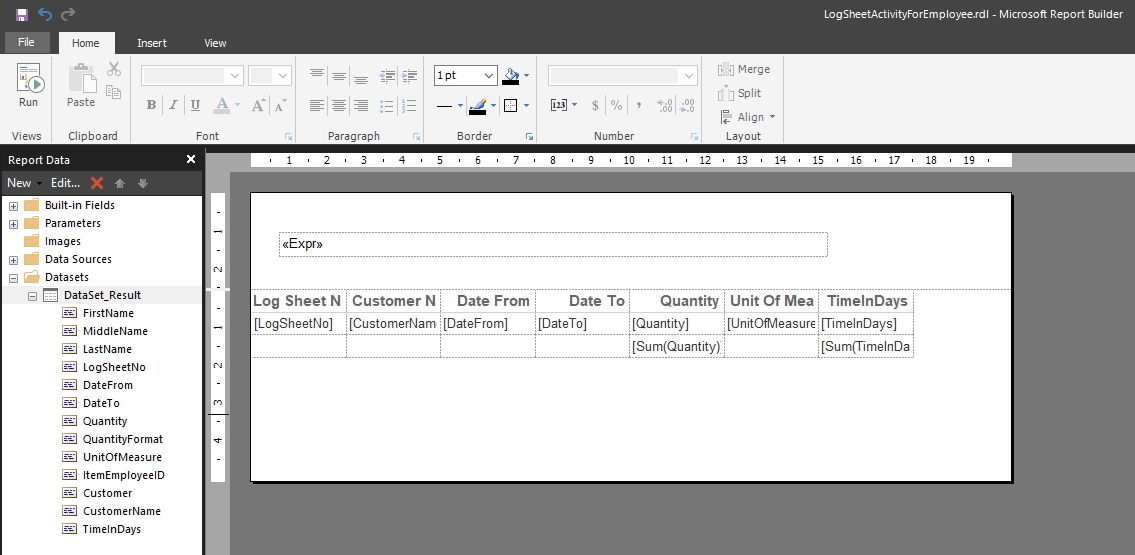
anydesk00286.png

Where am going wrong?

I have the same question (0)
  • Suggested answer
    Amit Profile Picture
    2,557 on at

    Hi,

    Pls check this expression in AL code "‘TimeInDays’". If it is there, then publish the extension in sandbox and then open the report editor and assign the variable  "‘TimeInDays’"  in the formula.

    Regards

    Amit Sharma

    www.erpconsultors.com

  • Nick Webb Profile Picture
    891 on at

    Thanks for your response.

    After I've created the calculated field, saved the report, exited MS Report Builder and returned to VSCode, if I then view the .rdl in VSCode I see the TimeInDays Field node in the XML (as below). As soon as I hit Ctrl-F5 to deploy and test it, this Field node disappears, and it errors as previously reported..

    <DataSet Name="DataSet_Result">
       <Query>
          <DataSourceName>DataSource</DataSourceName>
          <CommandText />
       </Query>
       <Fields>
          <Field Name="FirstName">
          <DataField>FirstName</DataField>
       </Field>
    ....
       <Field Name="TimeInDays">
          <Value>=iif(Fields!UnitOfMeasure.Value = "DAY", Fields!Quantity.Value, Fields!Quantity.Value / 7.5)</Value>
       </Field>

    Any thoughts?

  • Nick Webb Profile Picture
    891 on at

    I don't know if this is the text-book solution but, I got round this by adding a couple of dummy columns in the AL Report module as below:

                    column(TimeInDays; gdecTimeInDays) { }

                    column(TimeInHours; gdecTimeInHours) { }
       var
            gdecTimeInDays: Decimal;
            gdecTimeInHours: Decimal;
     
  • Suggested answer
    Inge M. Bruvik Profile Picture
    1,105 Moderator on at

    The solution you picked is just the way you have to do it. So a pretty good text-book example in my eyes.

    Keep up the good work!

Under review

Thank you for your reply! To ensure a great experience for everyone, your content is awaiting approval by our Community Managers. Please check back later.

Helpful resources

Quick Links

Responsible AI policies

As AI tools become more common, we’re introducing a Responsible AI Use…

Neeraj Kumar – Community Spotlight

We are honored to recognize Neeraj Kumar as our Community Spotlight honoree for…

Leaderboard > Small and medium business | Business Central, NAV, RMS

#1
OussamaSabbouh Profile Picture

OussamaSabbouh 3,226

#2
Jainam M. Kothari Profile Picture

Jainam M. Kothari 2,047 Super User 2025 Season 2

#3
YUN ZHU Profile Picture

YUN ZHU 1,257 Super User 2025 Season 2

Last 30 days Overall leaderboard

Featured topics

Product updates

Dynamics 365 release plans
