web
You’re offline. This is a read only version of the page.
close
Skip to main content

Notifications

Announcements

No record found.

Community site session details

Community site session details

Session Id :
Microsoft Dynamics CRM (Archived)

Hide Template from global email Template

(0) ShareShare
ReportReport
Posted on by 179

hi  ,

i have question , in my Email form when i click insert Tempalte , i want to hide an email template from list of tempaltes.

the template is global.

how can i do that , i want to hide Two templates.

there is  image
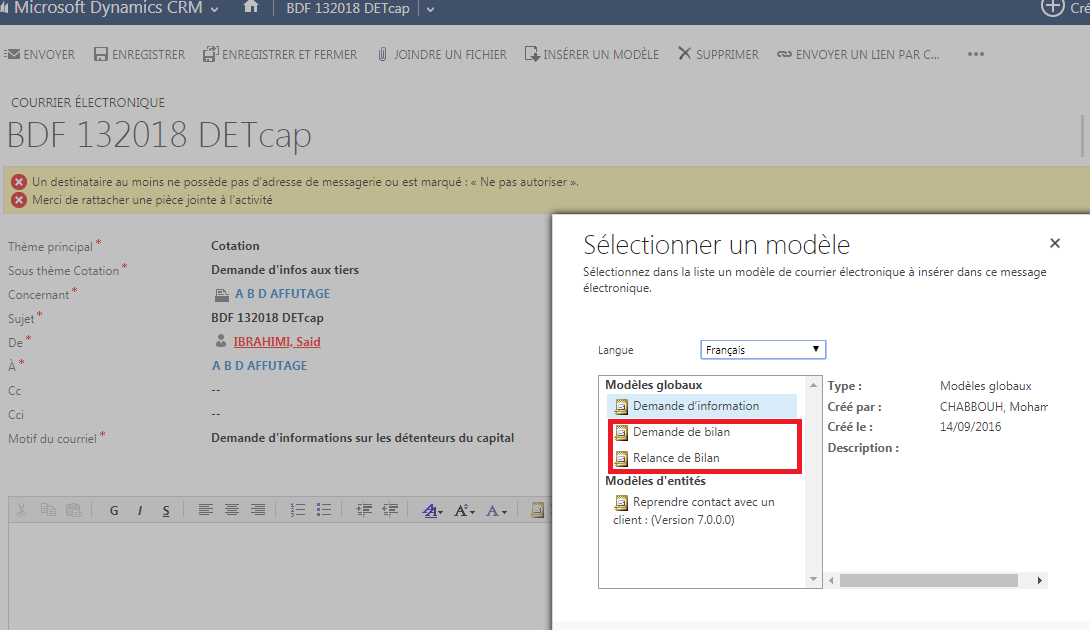
TempalteImage.PNG

Thank you in advance.

Regards

*This post is locked for comments

I have the same question (0)
  • Suggested answer
    Dynamics365 Rocker Profile Picture
    7,755 on at

    No, You have to delete it if you do not want it.

  • CrmMouss Profile Picture
    179 on at

    Ok , so there is no way to do that , the only solution to delete temaplate ?

    our client said , i  wants all tempaltes , but he needs to hide specefic template , when inserting templates.

  • Dynamics365 Rocker Profile Picture
    7,755 on at

    Not possible.

  • Suggested answer
    StefanS365 Profile Picture
    3,575 Most Valuable Professional on at

    Hi there,

    You could change the language of the template you want to hide, so it won't show up with the other French templates.

    2018_2D00_09_2D00_25-16_5F00_54_5F00_56_2D00_Email-Template.png

  • CrmMouss Profile Picture
    179 on at

    thank's , i have an other question about Job System Template for email templates , in what case can i use that ?

    i underestand for global and based entity , but no idea for  Job System Template  ?

  • CrmMouss Profile Picture
    179 on at

    Hi Thank you for answer but in this crm there juste one language (French) :(

  • CrmMouss Profile Picture
    179 on at

    about Email Template type System Job ?  Do you know How can I test it?

  • Suggested answer
    StefanS365 Profile Picture
    3,575 Most Valuable Professional on at

    You could create a duplicate detection job via Settings > Data Management and let the e-mail send to you.

  • CrmMouss Profile Picture
    179 on at

    ah ok i see , thank you very much for help

  • Suggested answer
    StefanS365 Profile Picture
    3,575 Most Valuable Professional on at

    About the Email templates. You could try to assign the email template records to another owner, for instance the Team of the User's Business Unit with the help of a workflow action Assign.

    The ownership of the Email Template entity is User/Team, so by setting the Read privilege to Business Unit you can Hide the templates that belongs to the SYSTEM user that belongs to the global Business Unit.

    EmailtemnplateEnt.png

Under review

Thank you for your reply! To ensure a great experience for everyone, your content is awaiting approval by our Community Managers. Please check back later.

Helpful resources

Quick Links

Responsible AI policies

As AI tools become more common, we’re introducing a Responsible AI Use…

Neeraj Kumar – Community Spotlight

We are honored to recognize Neeraj Kumar as our Community Spotlight honoree for…

Leaderboard > 🔒一 Microsoft Dynamics CRM (Archived)

#1
SA-08121319-0 Profile Picture

SA-08121319-0 4

#1
Calum MacFarlane Profile Picture

Calum MacFarlane 4

#3
Alex Fun Wei Jie Profile Picture

Alex Fun Wei Jie 2

Last 30 days Overall leaderboard

Featured topics

Product updates

Dynamics 365 release plans



