web
You’re offline. This is a read only version of the page.
close
Skip to main content

Notifications

Announcements

No record found.

Community site session details

Community site session details

Session Id :
Microsoft Dynamics CRM (Archived)

Sorting Legends Alphabetically in CRM

(0) ShareShare
ReportReport
Posted on by 1,280

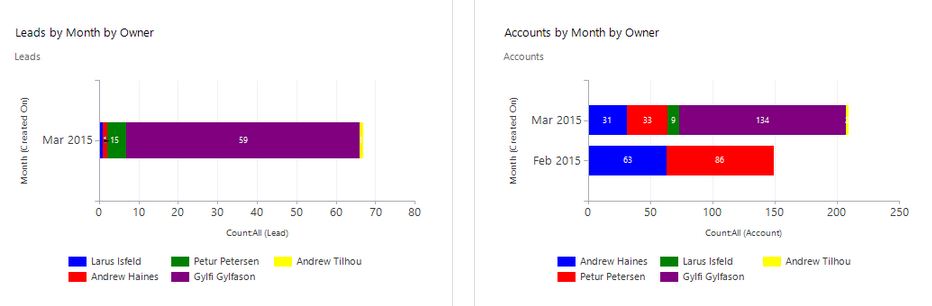
I have two graphs in CRM that are the exact same except one is for 'Leads' and the other is for 'Accounts'.

The Legends I use are the different 'USERS' (Salesman).

I would like each USER to have a particular color for all graphs.  

But if you look at picture below you can see that, for instance, Larus Isfeld is 'BLUE' in first graph and 'GREEN' in second graph.

Is there a way to sort alphabetically or what would be the best solution?

(Instead of sending a link to a page can someone please just sent me the line I have to put into XML format?  Ex: <order alias="some-alias" descending="false"/>
*This post is locked for comments

I have the same question (0)
  • Suggested answer
    Aileen Gusni Profile Picture
    44,524 on at

    Hi Gylfi,

    I found an interesting article

    crmchartguy.wordpress.com/.../specify-exact-colors-for-each-priority-in-the-microsoft-dynamics-crm-2011-case-chart

    That might help you.

    Thank you.

  • Gylfi Aron Profile Picture
    1,280 on at

    Thanks, but I have been reading about this for last 2-3 hours and I am no closer.  Could you please just tell me how to order based on the data in the graph?

  • Aileen Gusni Profile Picture
    44,524 on at

    Gylfi,

    Try to use:

    <order alias="some-alias" descending="false"/>

    Then change the pallet scheme

    all is based on the reading.

    Thanks.

  • Gylfi Aron Profile Picture
    1,280 on at

    some-alias??  That is just a dummy example I found...  I doubt I use that...

    I have changed the color pallet scheme to be the same for both graphs.  As you can see, it worked because the order of the colors are the same for both graphs.  BUT the Users are in different orders, so I need to figure out how to sort alphabetically or choose which colors should go with which users.  

    How would I do that?

  • Aileen Gusni Profile Picture
    44,524 on at

    Gylfi,

    You see this one

    crmchartguy.files.wordpress.com/.../order-chart-xml-code-high-on-top.png

    Not some-alias, I mean you must set accordingly by the attribute grouping name alias

    Then after that you need to follow the step 3

    To achieve that we will:

    •Create a set of dummy records. Three records, one for each Priority type

    •Adjust our View to include the dummy records

    •Modify our CRM Chart xml to not show them, but only create them in the Legend

  • Gylfi Aron Profile Picture
    1,280 on at

    I tried using this order alias, see below marked in RED.  I want to sort by OwnerID but when I import I get an error saying:  The specified XML file 'New Accounts.xml' is either not valid XML or does not conform to the chart schema. 

    Can you please help??

    <fetchcollection>
    <fetch mapping="logical" aggregate="true">
    <entity name="account">
    <order alias="ownerid" descending="true" />
    <attribute alias="_CRMAutoGen_aggregate_column_Num_0" name="accountid" aggregate="count" />
    <attribute groupby="true" alias="_CRMAutoGen_groupby_column_Num_0" dategrouping="month" name="createdon" />
    <attribute groupby="true" alias="_CRMAutoGen_groupby_column_Num_13" name="ownerid" />
    </entity>
    </fetch>

  • Suggested answer
    Aileen Gusni Profile Picture
    44,524 on at

    Hi Gylfi,

    <attribute groupby="true" alias="_CRMAutoGen_groupby_column_Num_13" name="ownerid" />

    Try to use the alias name not the name

    Use this name in your order

    _CRMAutoGen_groupby_column_Num_13

    Hope this helps.

    Thanks.

Under review

Thank you for your reply! To ensure a great experience for everyone, your content is awaiting approval by our Community Managers. Please check back later.

Helpful resources

Quick Links

Responsible AI policies

As AI tools become more common, we’re introducing a Responsible AI Use…

Neeraj Kumar – Community Spotlight

We are honored to recognize Neeraj Kumar as our Community Spotlight honoree for…

Leaderboard > 🔒一 Microsoft Dynamics CRM (Archived)

#1
SA-08121319-0 Profile Picture

SA-08121319-0 4

#1
Calum MacFarlane Profile Picture

Calum MacFarlane 4

#3
Alex Fun Wei Jie Profile Picture

Alex Fun Wei Jie 2

Last 30 days Overall leaderboard

Featured topics

Product updates

Dynamics 365 release plans



