web
You’re offline. This is a read only version of the page.
close
Skip to main content

Notifications

Announcements

No record found.

Community site session details

Community site session details

Session Id :
Small and medium business | Business Central, N...
Suggested Answer

Purchase Journal - Vat Calculation Type Issue

(0) ShareShare
ReportReport
Posted on by 10

Hi everyone,

I need help with the following situation on BC onpremise W1.17.1

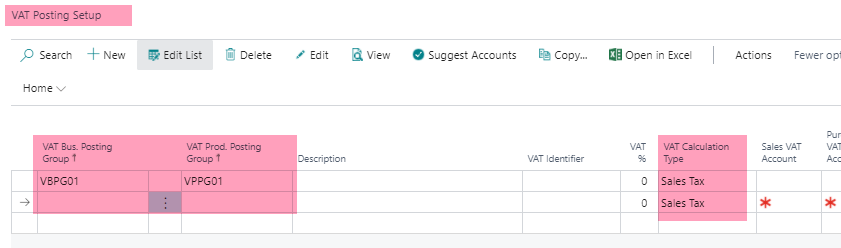
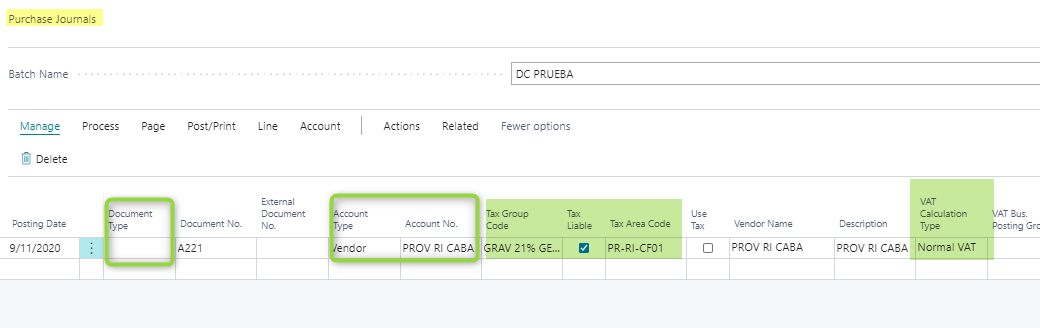
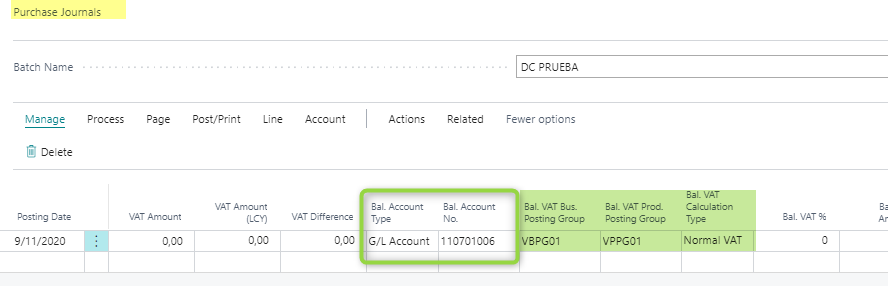
Currently there are Sales Tax codes (such as Tax Group code and Tax Area code) available on the Purchase Journal, however, they offer no functionality. On the Purchase Invoices these fields allow us to use the tax information we have setup in order to actually do tax calculations.

 However, on the Purchase Journal none of this functionality is triggered. When i tried to change the 'Normal Vat' for 'Sales Tax' the field are not available to change.
pastedimage1604940283640v1.pngpastedimage1604940299421v2.pngpastedimage1604940313542v3.png

Does anybody knows how to fix it?

 Thanks in advance.

 Regards,

Adriana

I have the same question (0)
  • Suggested answer
    Franziska Fiegler Profile Picture
    on at

    Hello Adriana,

    I would suggest, to create a support case when you can reproduce the scenario in a non modified CRONUS company, feel free to raise a support request via your partner or CSP.

    https://docs.microsoft.com/en-us/dynamics365/business-central/product-help-and-support

    https://docs.microsoft.com/en-us/dynamics365/business-central/dev-itpro/administration/manage-technical-support#escalating-support-issues-to-microsoft

  • AGonzalez2020 Profile Picture
    10 on at

    Hi Franziska, how are you? I hope fine.

    I was able to change the calculation type on purchase journal.

    First i to put the G/L account, then the vendor, and for the last, put in 'Gen Posting type' the option 'Purchase'. Then i select the Tax Group code and Tax Area code and the vat amount appears.

    pastedimage1605098204630v1.png

    Thanks .

    Regards.

    Adriana González

Under review

Thank you for your reply! To ensure a great experience for everyone, your content is awaiting approval by our Community Managers. Please check back later.

Helpful resources

Quick Links

Responsible AI policies

As AI tools become more common, we’re introducing a Responsible AI Use…

Neeraj Kumar – Community Spotlight

We are honored to recognize Neeraj Kumar as our Community Spotlight honoree for…

Leaderboard > Small and medium business | Business Central, NAV, RMS

#1
OussamaSabbouh Profile Picture

OussamaSabbouh 2,066

#2
YUN ZHU Profile Picture

YUN ZHU 658 Super User 2025 Season 2

#3
Sumit Singh Profile Picture

Sumit Singh 595

Last 30 days Overall leaderboard

Featured topics

Product updates

Dynamics 365 release plans