web
You’re offline. This is a read only version of the page.
close
Skip to main content

Notifications

Announcements

No record found.

Community site session details

Community site session details

Session Id :
Microsoft Dynamics CRM (Archived)

Create a View Using the Hierarchy

(0) ShareShare
ReportReport
Posted on by

Dear Colleagues,

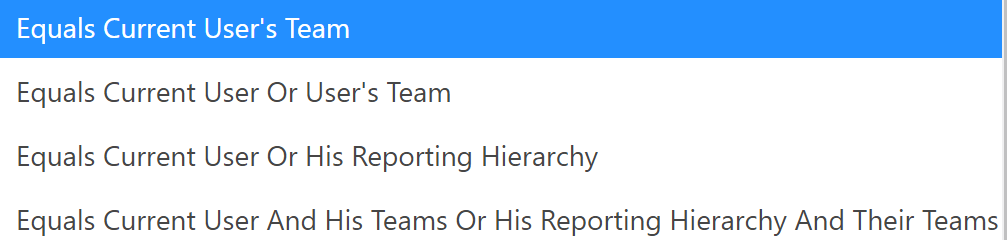
I want to create a view based on the My Open Opportunities. I want my sales rep to see only her deals (but not the deals where she is the member of a team), her manager should see his deals and his subordinate's deals. Sales Director should be able to see both manager's and sales rep's deals. 

which is the right filter to choose? I am between #3 and #4. 
1781.hierarchy-views-filters.png

*This post is locked for comments

I have the same question (0)
  • Suggested answer
    LeoAlt Profile Picture
    16,331 Moderator on at

    Hi partner,

    You should achieve this requirement by setting security roles.

    Go to Settings->Security->Security roles and set up permissions.

    For example, you want the sales only see her own deals, you could create a new security role or open an existing role and find opportunity entity under Core Records tab. Then you give this role a user level permission of read, so that the sales will only see her own deals.

    0702.WeChat-Screenshot_5F00_20181113100400.png

    In the same way, you could create another 2 roles named "sales manager" and "sales director" and assign different level permissions for them.

    After completing the above steps, you just need to create a view of opportunity with state "open".

    You could also refer to the following links for more details.

    Video of description of security roles and how to set up.

    https://www.youtube.com/watch?v=I1FvMyiPByk

    Microsoft Docs of security roles.

    https://docs.microsoft.com/en-us/dynamics365/customer-engagement/admin/security-roles-privileges

    https://crmbook.powerobjects.com/system-administration/business-administration/security-roles/

    Hope it helps.

    Best Regards

    Leo

  • Community Member Profile Picture
    on at

    Thank you, Leo! I already have a hierarchy set up. My question is more on which criteria for the filter I need to select to achieve what I want.

  • Verified answer
    LeoAlt Profile Picture
    16,331 Moderator on at

    Hi partner,

    You could refer to this picture.

    2055.WeChat-Screenshot_5F00_20181116101706.png

    From https://community.dynamics.com/crm/b/mscrmcustomization/archive/2016/09/27/advanced-find-operator

    Hope it helps.

    Best Regards

    Leo

Under review

Thank you for your reply! To ensure a great experience for everyone, your content is awaiting approval by our Community Managers. Please check back later.

Helpful resources

Quick Links

Responsible AI policies

As AI tools become more common, we’re introducing a Responsible AI Use…

Neeraj Kumar – Community Spotlight

We are honored to recognize Neeraj Kumar as our Community Spotlight honoree for…

Leaderboard > 🔒一 Microsoft Dynamics CRM (Archived)

#1
SA-08121319-0 Profile Picture

SA-08121319-0 4

#1
Calum MacFarlane Profile Picture

Calum MacFarlane 4

#3
Alex Fun Wei Jie Profile Picture

Alex Fun Wei Jie 2

Last 30 days Overall leaderboard

Featured topics

Product updates

Dynamics 365 release plans



