web
You’re offline. This is a read only version of the page.
close
Skip to main content

Notifications

Announcements

No record found.

Community site session details

Community site session details

Session Id :
Small and medium business | Business Central, N...
Suggested Answer

Pending Approval field on General Journal - how to get it checked?

(0) ShareShare
ReportReport
Posted on by 309

Morning, 

Why there is no "Set Approval Request to Pending Approval"  response in any of the Journal workflows? I thought I would be able to add it as a record restriction when sending the record for approval, but it isn't there. If it is not there, how can I get the field automatically checked when sending the record for approval?

Many thanks

Alejandra 

I have the same question (0)
  • Suggested answer
    Nitin Verma Profile Picture
    21,708 Moderator on at

    Hi,

    If you are talking about the standard workflow, then its well managed how records blocks when it sends for the approval.

    And in your custom one you can define that method how the standard is working.

    Thanks.

  • AleAlonso Profile Picture
    309 on at

    Hi Nitin,

    Sorry, but I do not understand your answer. If you check the PO approval workflow, you have the option to put the record as "pending approval". To see this, just go to the "Approval of a purchase document is requested" event in the PO workflow, and then one of the responses is for this event is "Set document status to Pending Approval". There is no such a response in the General Journal Batch or General Journal Line Approval Workflows.

    Thanks

    Alejandra

  • Suggested answer
    Nitin Verma Profile Picture
    21,708 Moderator on at

    The simple answer is, you can set the condition with filter when you are sending for notifications.

    pastedimage1663204162439v1.png

  • AleAlonso Profile Picture
    309 on at

    Hi Nitin,

    Adding "pending approval"  as a condition will not solve my issue, what I need it this field to be automatically checked once lines have been sent for approval 

    pastedimage1663659507749v1.png

    but I cannot add it as a response as there is no "set document status to pending approval" response in the "Approval of a general journal line is requested" event.

    pastedimage1663659952468v2.png

    Many thanks

    Alejandra

  • Suggested answer
    Nitin Verma Profile Picture
    21,708 Moderator on at

    Ok,

    Find the page as per the below image and Tick mark on the field as per the red box, and check if you can find the Workflow response now? Also you can take an idea about General Journal workflow, how they are using Events and responses.

    pastedimage1663661357230v1.png

  • AleAlonso Profile Picture
    309 on at

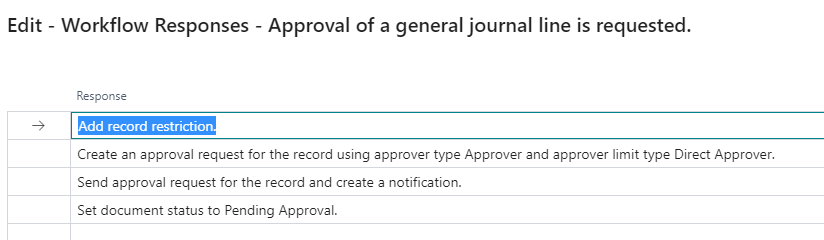
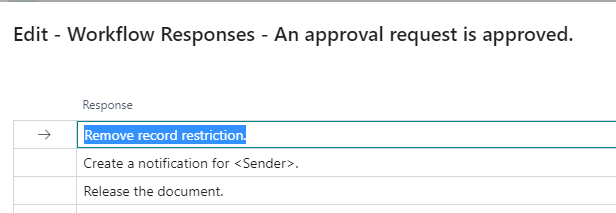
    Thanks Nitin, I've now updated the workflow event/response as you've told me. I've then updated the responses for the approval is requested/is approved events.

    Workflow:

    pastedimage1663666211423v1.png

    Approval is requested event:

    pastedimage1663666299224v1.png

    Approval is approved event:

    pastedimage1663666323667v2.png

    and tried to send a JNL for approval, but I got the message below, do you know why I'm getting it?

    pastedimage1663666383226v3.png

     Many thanks for all your help,

    Alejandra

  • Suggested answer
    Nitin Verma Profile Picture
    21,708 Moderator on at

    Hi,

    Please refer the below link, it seems to have the same problem.

    community.dynamics.com/.../workflow-processes---record-type-vendor-was-not-supported-by-this-workflow-response

  • Suggested answer
    Amit Baru Profile Picture
    3,037 on at

    Hi,

    Adding info.

    https://learn.microsoft.com/en-us/dynamics365/business-central/across-workflow

    Regards

    Amit Sharma

    www.erpconsultors.com

Under review

Thank you for your reply! To ensure a great experience for everyone, your content is awaiting approval by our Community Managers. Please check back later.

Helpful resources

Quick Links

Responsible AI policies

As AI tools become more common, we’re introducing a Responsible AI Use…

Neeraj Kumar – Community Spotlight

We are honored to recognize Neeraj Kumar as our Community Spotlight honoree for…

Leaderboard > Small and medium business | Business Central, NAV, RMS

#1
OussamaSabbouh Profile Picture

OussamaSabbouh 2,238

#2
YUN ZHU Profile Picture

YUN ZHU 773 Super User 2025 Season 2

#3
Sumit Singh Profile Picture

Sumit Singh 630

Last 30 days Overall leaderboard

Featured topics

Product updates

Dynamics 365 release plans