web
You’re offline. This is a read only version of the page.
close
Skip to main content

Announcements

No record found.

News and Announcements icon
Community site session details

Community site session details

Session Id :
Microsoft Dynamics AX (Archived)

Year end close

(0) ShareShare
ReportReport
Posted on by

Hi All, 

I have a scenario where I am trying to run a year end close and getting an error " The fiscal year that ends with the date 10/31/... is already closed. 

However, the fiscal year is open, the 13th period is open as well. 

can some one help please!!

8875.Capture.PNG

2500.capture2.PNG

*This post is locked for comments

I have the same question (0)
  • Suggested answer
    Ludwig Reinhard Profile Picture
    Microsoft Employee on at

    Hi Suganthi Arulrajan,

    For which of your company/ies have you run the fiscal year closing process before?

    Can it be that for one of those companies the previous year has been closed already?

    Best regards,

    Ludwig

  • Community Member Profile Picture
    on at

    Hi Ludwig,

    Thank you for your response. The year end function has been run to transfer the balances. However, I understand that this can be run for as many times I want to until it is permanently closed. The period is not permanently closed. THis makes it trickier. The user runs with the option of undo previous close and still the error persists.

    Attaching the screenshots.

    Many Many Thanks

    Ramya

    Yend1.jpgYend1.jpg

  • Suggested answer
    Ludwig Reinhard Profile Picture
    Microsoft Employee on at

    Hi Suganthi Arulrajan,

    I double check this behavior in one of my demo machines and would suggest you trying to run a YE Close in another demo/test machine to verify whether you can replicate the issue.

    There seems nothing wrong from what you describe and I believe that there must be an issue with one of your periods but i would double check first in a demo/test environment.

    Best regards,

    Ludwig

  • Community Member Profile Picture
    on at

    Hi Ludwig,

    Thank you for the suggestion. I tried this in another test environment. I am able to replicate this there as well. One information I think I need to provide is this was upgraded to the latest version. Update 11.. A strange thing that happened during this upgrade was the account structure was not activated and It is still in activating stage.

    Though this doesn't seem to be relevant to the current issue at hand, I am bit concerned if this has something to do with this.

    Thank you very much for your inputs.

    Thanks,

    Ramya

  • Suggested answer
    Ludwig Reinhard Profile Picture
    Microsoft Employee on at

    Hi Ramya,

    Can you test two things:

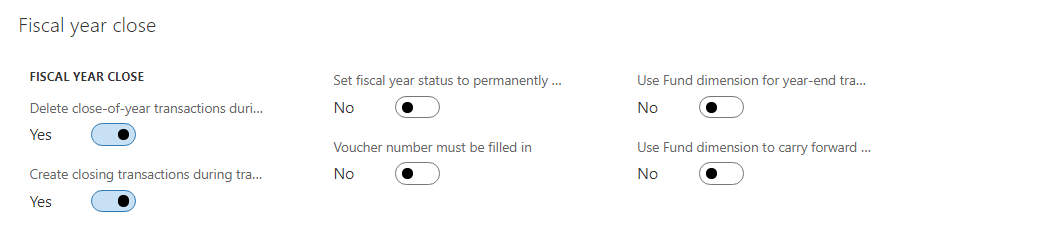
    1) Deactivate the parameter 'create closing transactions during...' and

    2) If you selected to post the opening Transactions also with financial dimensions, then please deactivate also this setting and see if this overcomes the issue.

    Best regards,

    Ludwig

  • Carina Santos Profile Picture
    5 on at

    Hi Suganthi,

    Have you fixed this issue? I have the same error and the periods are all open... 

    Thank you

    Carina

Under review

Thank you for your reply! To ensure a great experience for everyone, your content is awaiting approval by our Community Managers. Please check back later.

Helpful resources

Quick Links

Introducing the 2026 Season 1 community Super Users

Congratulations to our 2026 Super Stars!

Meet the Microsoft Dynamics 365 Contact Center Champions

We are thrilled to have these Champions in our Community!

Congratulations to the March Top 10 Community Leaders

These are the community rock stars!

Leaderboard > 🔒一 Microsoft Dynamics AX (Archived)

#1
Basit Profile Picture

Basit 1

#1
GL-01081504-0 Profile Picture

GL-01081504-0 1

#1
Roya Profile Picture

Roya 1

Last 30 days Overall leaderboard

Featured topics

Product updates

Dynamics 365 release plans