web
You’re offline. This is a read only version of the page.
close
Skip to main content

Notifications

Announcements

No record found.

Community site session details

Community site session details

Session Id :
Microsoft Dynamics AX (Archived)

Workflow approval tasks does not finish

(0) ShareShare
ReportReport
Posted on by 40

Hi all!

We have a problem in a customer production environment, with Microsoft Dynamics AX 2012 R3. We have set up multiple workflows of PurchTableTemplate and PurchReqReview type. These workflows worked fine, but some days ago we have started to detect an unexpected behavior.

In some instance of any of this Workflows when there is an approval tasks and the users approves it, the work item is approved (we can see it in the detail of the workflow execution), but the system doesn't create the step finished item, and the approval task doesn't finish. This behavior is absolutly random. The workflow instances with this problem have no any work ítem pending, no any user has the workflow instance asigned, but it continues like "pending" and there is no any action to do with them.

Because of this , the instance is still in "pending" status , but it is as if it was stopped, since it not advance and we can not make any operation on it.

Has anyone detected a similar behavior?

I attach the workflow history of one of this instances to better understanding of the problem.

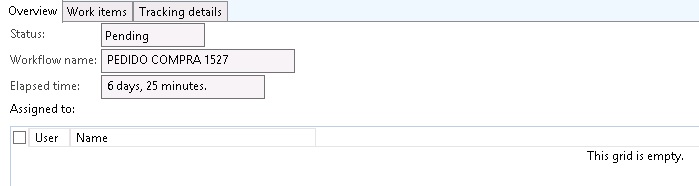
Overview (status pending):

WFOverview.jpg

WFDetail overview (no user asigned):

WFDetailOverview.jpg

WFDetail work items (no pending work item):
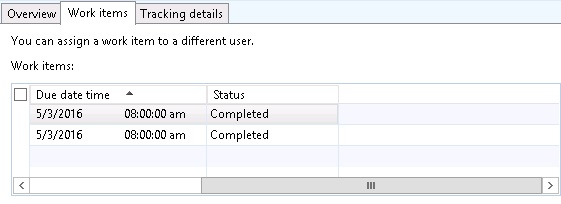
WFDetailWorkItems.jpg

WFDetail tracking details (Approval, completed):

WFDetailTrackingDetailsApprovalCompleted.jpg

WFDetail tracking details (Approval with work item approved, but never completed):

WFDetailTrackingDetailsApprovalNOCompleted.jpg

Thanks in advance

*This post is locked for comments

I have the same question (0)
  • Verified answer
    André Arnaud de Calavon Profile Picture
    300,904 Super User 2025 Season 2 on at

    Hi Jose,

    Can you check the history of the batch job for workflow processing? There might be an issue that it will fail every ten minutes. You can review the log to actually see what is happening.

    You can also check the table SysWorkflowMessageTable. This is a work list for the batch job. If the field batch affinity has a value other than an empty GUID and the MessageLifeCycleState is Queued you have to check the ModifiedDateTime field. Check if this date is prior to the current or last batch run. If so, there might be an issue with one or more of the tasks.

    There is a retry every 10 minutes. Then older tasks with a batch affinity filled and modified date/time older than 10 minutes will also be picked up together with new workflow messages. Depending on the issue it will fail again together with new messages. Then the list of workflows which "hangs" will grow and grow every 10 minutes.

  • Jose Alonso Foubelo Profile Picture
    40 on at

    Hi André,

    First of all, thanks for your answer.

    I have checked the history of the batch job as you suggested, and I can see the error every ten minutes (more or less). I have taken a look to the log, but it doesn't give so many information (or I am not able to find it), such as the incorrect register that generates the error.

    This is the error log I get:

    LogError.jpg

    I have changed the language to en-us but some lines still appear in Spanish, I can try to translate them if you think they can give us more important information. The call stack is:

    Microsoft.Dynamics.Ax.Xpp.ErrorException: Exception of type 'Microsoft.Dynamics.Ax.Xpp.ErrorException' was thrown.

       at Dynamics.Ax.Application.WorkflowTrackingTable.saveTracking(SysWorkflowTracking _tracking) in WorkflowTrackingTable.saveTracking.xpp:line 147

       at Dynamics.Ax.Application.SysWorkflow.faultWorkflowInstance(SysWorkflowTable _workflowTable, String _user, String _faultMessage) in SysWorkflow.faultWorkflowInstance.xpp:line 74

       at Dynamics.Ax.Application.SysWorkflow.internalFault(WorkflowContext _workflowContext, String _user, String _faultMessage) in SysWorkflow.internalFault.xpp:line 56

       at Dynamics.Ax.Application.SysWorkflow.fault(WorkflowContext _workflowContext, String _user, String _faultMessage) in SysWorkflow.fault.xpp:line 32

       at Dynamics.Ax.Application.SysWorkflowQueue.dispatch(Guid _affinity) in SysWorkflowQueue.dispatch.xpp:line 185

       at Dynamics.Ax.Application.SysWorkflowQueueTask.Run() in SysWorkflowQueueTask.run.xpp:line 13

       at Dynamics.Ax.Application.BatchRun.runJobStaticCode(Int64 batchId) in BatchRun.runJobStaticCode.xpp:line 54

       at Dynamics.Ax.Application.BatchRun.runJobStatic(Int64 batchId) in BatchRun.runJobStatic.xpp:line 13

       at BatchRun::runJobStatic(Object[] )

       at Microsoft.Dynamics.Ax.Xpp.ReflectionCallHelper.MakeStaticCall(Type type, String MethodName, Object[] parameters)

       at BatchIL.taskThreadEntry(Object threadArg)

    Any idea?

  • Jose Alonso Foubelo Profile Picture
    40 on at

    Hi again André,

    I have been investigating SysWorkflowMessageTable and I think I have found the line that makes the error occurs: there is one task for VendDisbursementTemplate with a WorkflowContextRecId that already does not exist in the LedgarJournalTable.

    I suppose that if I delete that line, the error would desappear, but... will be neccesary to delete the register in the SysWorkflowTable too?

  • Verified answer
    Jose Alonso Foubelo Profile Picture
    40 on at

    Finally, we deleted the wrong records on SysWorkflowMessageTable as André indicated in another post:

    community.dynamics.com/.../195136

    Workflows work ok again.

    Thanks André!

  • Community Member Profile Picture
    on at

    HI

  • PK Axapta Profile Picture
    140 on at

    Hi Jose, I am also facing the same issue - batch job erroring out after every 10 mins. Could you please share some steps or details, how you resolved this.

    Many thanks in advance!!

  • André Arnaud de Calavon Profile Picture
    300,904 Super User 2025 Season 2 on at

    Hi Pankaj,

    You also created a new question on the forum. Let's continue on you new post.

    community.dynamics.com/.../290036

Under review

Thank you for your reply! To ensure a great experience for everyone, your content is awaiting approval by our Community Managers. Please check back later.

Helpful resources

Quick Links

Responsible AI policies

As AI tools become more common, we’re introducing a Responsible AI Use…

Neeraj Kumar – Community Spotlight

We are honored to recognize Neeraj Kumar as our Community Spotlight honoree for…

Leaderboard > 🔒一 Microsoft Dynamics AX (Archived)

#1
Martin Dráb Profile Picture

Martin Dráb 4 Most Valuable Professional

#1
Priya_K Profile Picture

Priya_K 4

#3
MyDynamicsNAV Profile Picture

MyDynamicsNAV 2

Last 30 days Overall leaderboard

Featured topics

Product updates

Dynamics 365 release plans