web
You’re offline. This is a read only version of the page.
close
Skip to main content

Notifications

Announcements

No record found.

Community site session details

Community site session details

Session Id :
Service | Customer Service, Contact Center, Fie...
Answered

Cannot change the view to Active Customers for the lookup customer field in Case form

(0) ShareShare
ReportReport
Posted on by 235

Hello Customer Service Experts,

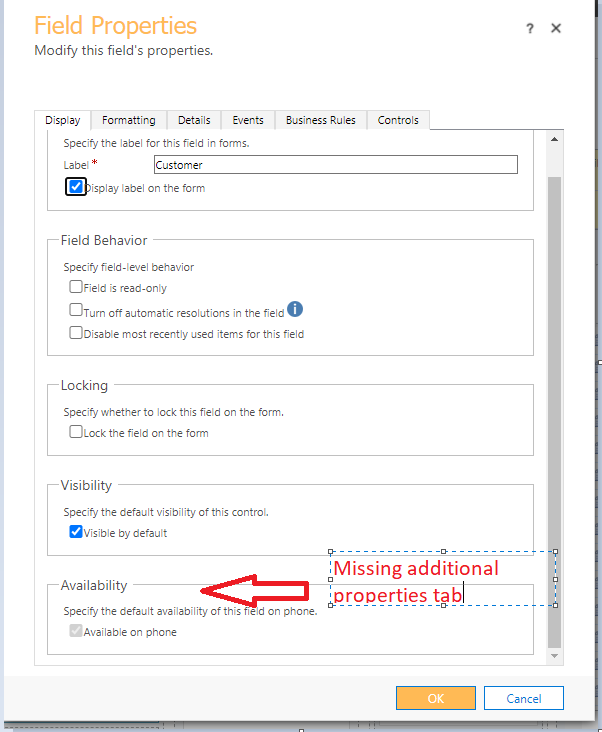
After we enabled the Advanced lookup in the customer field in case form, we can no longer change the view for the lookup field.
Active_5F00_view.png

The Additional Properties tab is no longer visible.

In the customer field, we have accounts and contacts available for selection.

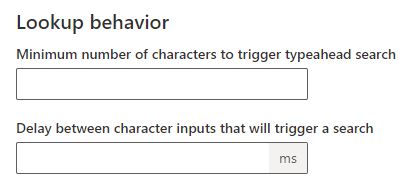
I've also checked from the admin.powerplatform to try to disable the Lookup Behavior, but even the On/Off switch is not visible.
Lookup.JPG

Is there still a way to change the view to Active Accounts?

Regards,

Jolas365

I have the same question (0)
  • Suggested answer
    Amit Katariya007 Profile Picture
    10,409 Super User 2025 Season 2 on at

    Hello Jolas,

    I guess the options which are described in the image are available only for single-entity lookup fields. And you are using this single lookup for the Account as well as for the contact correct ?

    docs.microsoft.com/.../special-field-properties-legacy

    Thank you,

    Amit Katariya

  • Jolas365 Profile Picture
    235 on at

    Hello Amit,

    Yes, for the customer  lookup, we are using both accounts and contacts. Is there still a way to set the default view to Active Accounts?

    Regards,

    Jolas365

  • Verified answer
    Amit Katariya007 Profile Picture
    10,409 Super User 2025 Season 2 on at

    Hello Jolas,

    This is the limitation for the multi entity look up field.

    Thank you,

    Amit katariya

  • Suggested answer
    Bipin D365 Profile Picture
    28,983 Moderator on at

    Hello,

    Have you tried setting Active Account as Default view on Entity level by navigating to settings->CUstomization-> CUstomize the system ->Entity-> Account-> Views-> Select Active Account-> Click More actions-> Set Default

    Please mark my answer verified if this is helpful!

    Regards,

    Bipin Kumar

    Follow my Blog: xrmdynamicscrm.wordpress.com/

Under review

Thank you for your reply! To ensure a great experience for everyone, your content is awaiting approval by our Community Managers. Please check back later.

Helpful resources

Quick Links

Responsible AI policies

As AI tools become more common, we’re introducing a Responsible AI Use…

Neeraj Kumar – Community Spotlight

We are honored to recognize Neeraj Kumar as our Community Spotlight honoree for…

Leaderboard > Service | Customer Service, Contact Center, Field Service, Guides

#1
Tom_Gioielli Profile Picture

Tom_Gioielli 60 Super User 2025 Season 2

#2
Siv Sagar Profile Picture

Siv Sagar 52 Super User 2025 Season 2

#3
Daniyal Khaleel Profile Picture

Daniyal Khaleel 36 Most Valuable Professional

Last 30 days Overall leaderboard

Featured topics

Product updates

Dynamics 365 release plans
