web
You’re offline. This is a read only version of the page.
close
Skip to main content

Announcements

No record found.

News and Announcements icon
Community site session details

Community site session details

Session Id :
Customer experience | Sales, Customer Insights,...
Answered

Marketing form fields, not create lead

(0) ShareShare
ReportReport
Posted on by 160

Hi all,

I want to be able to create an event, with a marketing form. When people register i want to see who registred, but i don't want the data to be saved. (like creating a new lead etc)

Like a field that's just empty.

Is this possible?

I have the same question (0)
  • Verified answer
    Nya Profile Picture
    29,060 on at

    Hi,

    For preventing the creation of lead, please switch off the option “Create leads for event registrations” in the Website and form tab of the Event form.
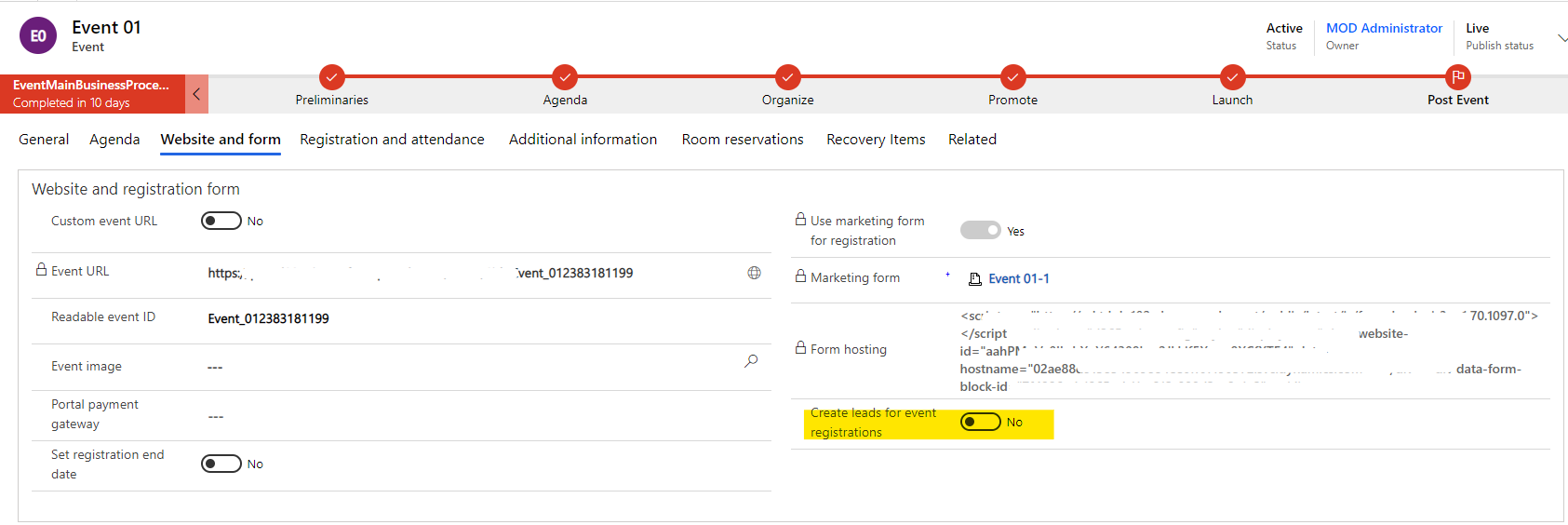
    pastedimage1616568641308v1.png

    So that no corresponding lead is created after the event is registered.


    But I don't know what data you mention here other than LEAD.

    For example, if the contact for registration does not exist, the contact will be created anyway, as it is a required field in the Event Registration entity.


    If this helped you, I'd appreciate it if you'd mark this as a Verified Answer, which may in turn help others as well.

    Best Regards,

    Nya

  • Filippa f Profile Picture
    160 on at

    Hi Nya,

    Thank you, this helped a lot.

    I created new empty marketing fields, added them into a event registration form, and also turned off creating contacts and leads. Then i inserted this form into the event with the "use marketing form for registration".

    But If I understand you right, this is another, much easier way? I can just turn off the button without having to create new form fields etc? :)

    Filippa

  • Verified answer
    Nya Profile Picture
    29,060 on at

    Hi Filippa,

    Do you mean that create Marketing form fields and do not map them with the Contact or Lead entity?

    The fields created in this way will not be logged though, the fields “firstname; lastname; emailaddress1” must be added in an Event registration form as it is required. So the contact will always be created if it is not an existing one.


    However, if you turn this option off, the Lead will not be created due to time registration, regardless of whether your marketing form fields are mapped to a Lead entity or not.


    If this helped you, I'd appreciate it if you'd mark this as a Verified Answer, which may in turn help others as well.

    Best Regards,

    Nya

  • Filippa f Profile Picture
    160 on at

    Thank you for taking your time! I'm going with your solution,

    Filippa

Under review

Thank you for your reply! To ensure a great experience for everyone, your content is awaiting approval by our Community Managers. Please check back later.

Helpful resources

Quick Links

Introducing the 2026 Season 1 community Super Users

Congratulations to our 2026 Super Stars!

Congratulations to our 2025 Community Spotlights

Thanks to all of our 2025 Community Spotlight stars!

Leaderboard > Customer experience | Sales, Customer Insights, CRM

#1
ManoVerse Profile Picture

ManoVerse 131 Super User 2026 Season 1

#2
Jimmy Passeti Profile Picture

Jimmy Passeti 46 Most Valuable Professional

#3
NeerajPawar Profile Picture

NeerajPawar 41

Last 30 days Overall leaderboard

Product updates

Dynamics 365 release plans
