web
You’re offline. This is a read only version of the page.
close
Skip to main content

Announcements

No record found.

News and Announcements icon
Community site session details

Community site session details

Session Id :
Microsoft Dynamics CRM (Archived)

Dynamic CRM 2016 Upgrade Guide

(0) ShareShare
ReportReport
Posted on by 107

Hi 

In our Organization we are using

  • Dynamic CRM 2013
  • SQL Server 2014  
  • ADFS 2.0 
  • RESCO Mobile Application 

with Claim Based and  IFD based configuration in the virtual machine Hyper V Host.

They want to upgrade entire system

  • Dynamic CRM 2016 
  • SQL Server 2016

I have gone some of the documentation got some ideas please refer below and also i need some good advise & procedure someone who did the in their real time experience.
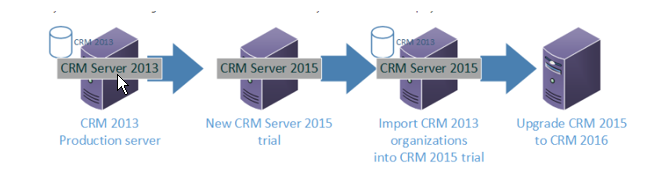
 CRM-Upgrade.png

https://technet.microsoft.com/en-us/library/hh699673.aspx

https://community.dynamics.com/crm/f/117/t/194239

http://www.qgate.co.uk/knowledge/dynamics-crm/sysreqs-crm2016/

Please advise what is the procedure what are the steps need to taken care and need to consider before and after upgrading.

Thanks

Saravanan C

*This post is locked for comments

I have the same question (0)
  • Suggested answer
    Aric Levin - MVP Profile Picture
    30,190 Moderator on at

    You pretty much go it right.

    Is your CRM 2013 SP1 BTW?

    Basically Set up two server - SQL Server 2014 and CRM 2015 Trial.

    Per Microsoft Documentation, SQL Server 2016 is not supported with CRM 2015:

    technet.microsoft.com/.../hh699671(v=crm.7).aspx

    Back up your CRM 2013 database and restore in to the CRM 2015 Trial. Import the Organization. Test it is working.

    Upgrade you CRM 2015 to 2016 In Place. Test it is working.

    Upgrade your SQL Server to SQL Server 2016 with CU2. This is the version that is supported for CRM 2016.

    Configure your ADFS, IFD for the new server.

    Hope this helps.

  • saravananc Profile Picture
    107 on at

    Thanks for the Reply. 

    Our CRM 2013 was Heavily Customized java script and some plugins was running.

    please advise what is there anything to taken care . our customized entity ill get upgrade automatically ?

    and please go through below comments and documents guide me what are the steps need to be taken care and concentrate while upgrading

    Documents as Follows 

    Here i have design the DFD Process for the Current CRM Server in our organization and upgrade process .

    in PDF Documents.

    Currently CRM server was hosted in the Hyper V Host in 3 different server in Production and Test Network

    • CRM Application 
    • CRM Database Server
    • ADFS Server

    From Oracle we are pulling Transaction to CRM one time. 

    From CRM to Client Online Service we pushing all the data monthly once when they statement was closed customer can view their statement online.

    CRM-UPGRADE-PROCESS.jpg

    CRM-UPGRADE-PROCESS.jpg

    Please review the document process and current organization setup and advice. If anything wrong.


    Thanks & Regards

    Saravanan C

Under review

Thank you for your reply! To ensure a great experience for everyone, your content is awaiting approval by our Community Managers. Please check back later.

Helpful resources

Quick Links

Introducing the 2026 Season 1 community Super Users

Congratulations to our 2026 Super Stars!

Meet the Microsoft Dynamics 365 Contact Center Champions

We are thrilled to have these Champions in our Community!

Congratulations to the March Top 10 Community Leaders

These are the community rock stars!

Leaderboard > 🔒一 Microsoft Dynamics CRM (Archived)

#1
JS-09031509-0 Profile Picture

JS-09031509-0 3

#2
AS-17030037-0 Profile Picture

AS-17030037-0 2

#2
Mark Eckert Profile Picture

Mark Eckert 2

Last 30 days Overall leaderboard

Featured topics

Product updates

Dynamics 365 release plans
