web
You’re offline. This is a read only version of the page.
close
Skip to main content

Announcements

No record found.

News and Announcements icon
Community site session details

Community site session details

Session Id :
Microsoft Dynamics CRM (Archived)

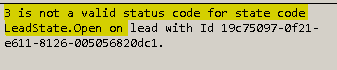
Create Lead Exception: 3 is not a valid status code for state code LeadState.Open on lead with Id

(0) ShareShare
ReportReport
Posted on by 25

While creating new lead from SDK in CRM 2016, I am passing statecode=1(Qualified) and statuscode=3(Qualified) but getting below exception. Could not figure out the root cause of it.


Requesting experts to help.
Lead-Error.PNG

*This post is locked for comments

I have the same question (0)
  • Suggested answer
    Community Member Profile Picture
    on at

    Please check the available Statecodes and Status codes on lead in your environment. I think statecode and statuscode values are different in your environment.

  • Suggested answer
    RaviKashyap Profile Picture
    55,410 Moderator on at

    Hi,

    Based on the error message, the code is not setting the statecode 1, it is still setting the statecode as o (Open). Debug your code and see if the field statecode is correctly setting.

    You can also share your code here for review.

    Hope this helps.

  • Nishant Arora Profile Picture
    25 on at

    I checked the statecode and statuscode  are same what we got in vanilla version.

    Also If you see I am passing statecode=1(Qualified) and statuscode=3(Qualified) which is what we have by default for lead.

    I want to understand is there any thing which I am missing as I am trying to create lead status as Qualified.

  • Suggested answer
    Community Member Profile Picture
    on at

    Please share you code.

    Refer the standard code in below links. Advise you to check to which version of crm this code applies.

    https://msdn.microsoft.com/en-us/library/hh547458.aspx

    https://www.inogic.com/blog/2016/11/qualify-lead-using-web-api-in-dynamics-365/

  • Verified answer
    RaviKashyap Profile Picture
    55,410 Moderator on at

    Hi,

    Are you trying to create a lead with status as Qualified? If yes it won't work because by default crm create the record in open state. You could create the lead and then call set state post creation-

    Sample code-

    ---------

    using (service = new OrganizationServiceProxy(new Uri(_organizationURI), null, _credential, null))

               {

                   var newLead = new Entity("lead");

                   newLead["subject"] = "new lead 1";

                   newLead["firstname"] = "Test";

                   newLead["lastname"] = "Last1";                

                   var leadiId = service.Create(newLead);

                   SetStateRequest setStateRequest = new SetStateRequest();

                   setStateRequest.EntityMoniker = new EntityReference("lead", leadiId);

                   setStateRequest.State = new OptionSetValue(1);

                   setStateRequest.Status = new OptionSetValue(3);

                   service.Execute(setStateRequest);

               }

    ---------

    Hope this helps.

Under review

Thank you for your reply! To ensure a great experience for everyone, your content is awaiting approval by our Community Managers. Please check back later.

Helpful resources

Quick Links

Introducing the 2026 Season 1 community Super Users

Congratulations to our 2026 Super Stars!

Meet the Microsoft Dynamics 365 Contact Center Champions

We are thrilled to have these Champions in our Community!

Congratulations to the April Top 10 Community Leaders

These are the community rock stars!

Leaderboard > 🔒一 Microsoft Dynamics CRM (Archived)

Last 30 days Overall leaderboard

Featured topics

Product updates

Dynamics 365 release plans
