web
You’re offline. This is a read only version of the page.
close
Skip to main content

Notifications

Announcements

No record found.

Community site session details

Community site session details

Session Id :
Supply chain | Supply Chain Management, Commerce
Suggested Answer

Defining Product Attributes in PO

(0) ShareShare
ReportReport
Posted on by

Dear Champions,

 I am trying to figure out on how to add a product attribute while creating a Purchase Order. I have completed the following activities:

  • Created Attribute Type : 1 - ‘Brand – Mobile’ with Value Apple, Samsung, Nokia    2 - Model
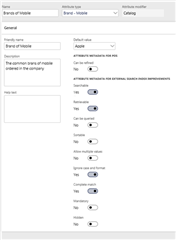
  • Created Attribute : 1 - ‘Brands of Mobile’ mapped to attribute with following configurations, 2- Model
pastedimage1572010247157v1.png

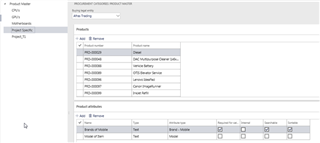
  • Assigned attribute to a Procurement Category as below:
pastedimage1572010247158v2.png

  • Define Attribute Against a Product

 pastedimage1572010247158v3.png

  • Unable to view Brand in PO to view / change the Brand or the Model of the Product. Please assist in how to address this.

pastedimage1572010247159v4.png

As I have Brands and Model defined in Attribute, I expect to create PO 1 with Huawei MediPad 5 with Color, Style, Configuration, Size and then create PO 2 with Apple iPAD Air with another Color, Style, Configuration & Size

Many Thanks,

Sarath

I have the same question (0)
  • Suggested answer
    Rahul Mohta Profile Picture
    21,032 on at

    try to assign the attributes in PROCUREMENT CATEGORIES and then assign the category value to the item and then it would be seen

  • Community Member Profile Picture
    on at

    Hi Rahul -

    I just tried as you suggested.  Still I couldn't view the attributes anywhere in the page.  Could you please point out where exactly these attributes can be viewed / selected ? I might not be checking the correct section.

    Regards,

    Sarath

  • Community Member Profile Picture
    on at

    Dear Champions,

     I am trying to figure out on how to add a product attribute while creating a Purchase Order. I have completed the following activities:

    • Created Attribute Type : 1 - ‘Brand – Mobile’ with Value Apple, Samsung, Nokia    2 - Model
    • Created Attribute : 1 - ‘Brands of Mobile’ mapped to attribute with following configurations, 2- Model

    1667.pastedimage1572002608555v1.png

    • Assigned attribute to a Procurement Category as below:

    4382.pastedimage1572002608555v2.png

    • Define Attribute Against a Product

     7462.pastedimage1572002608555v3.png

    • Unable to view Brand in PO to view / change the Brand or the Model of the Product. Please assist in how to address this.

    6457.pastedimage1572002608556v4.png

    As I have Brands and Model defined in Attribute, I expect to create PO 1 with Huawei MediPad 5 with Color, Style, Configuration, Size and then create PO 2 with Apple iPAD Air with another Color, Style, Configuration & Size

    Many Thanks,

    Sarath

  • Suggested answer
    Richard Wehmeyer Profile Picture
    1,004 on at

    As I understand it attribute values are specified on the product itself.  This means that for the attribute "MODEL" the product can only have one value.

    Once you specify product a as a Huawei MediPad 5 it will always be a Huawei MediPad 5 for that item.

    What you are attempting to do is define a new product dimension.  For this you need to create a new item since you have nearly maxed out your dimensions.  For stock purposes all you have left is batch and serial number

  • Community Member Profile Picture
    on at

    Hi All -

    Firstly, I need to validate if the Product Attributes can be pulled up in a 'Purchase Order'.

    I was able to confirm that these attributes can be made to reflect in Retail Categories. However, I am skeptical if the same can be applied in a Purchase Order or a Purchase Requisition.

    Regards,

    Sarath Pillai

  • Community Member Profile Picture
    on at

    Since D365FO claims to support unlimited attributes, the reality is that these attributes can be associated with Retail Category to be used there. I am skeptical if these attributes can be used in a Purchase Order unless, of course, you do some customization to pull these up during PO.

    Many Thanks,

    Sarath

  • Ludwig Reinhard Profile Picture
    Microsoft Employee on at

    Hi Sarath Pillai,

    Please don't post the same question in multiple forums.

    I merged your questions.

    Next time select the right forum and then post your question.

    Best regards,

    Ludwig

  • qianwang Profile Picture
    7,168 on at

    Hi Sarath,

    As far as I know, product attributes cannot be extracted and modified from purchase orders.

    Based on your needs, i recommend that you try to create a constraint-based configuration for the product. And then the product configuration model can then be configured from the purchase order.

    Regards,

    QianQW

  • Community Member Profile Picture
    on at

    Can you shed some more light on this? If possible, attach the relevant reference links?

    So, by using constraint based configuration technology, I can add brand name, power wattage, energy rating configured for 'Electronics' Procurement Category.

    Many Thanks,

    Sarath

  • Suggested answer
    Rahul Mohta Profile Picture
    21,032 on at

    the attributes belong to product and not PO line hence the relationship is PO line to item and then item to attributes

    could consider an extension to show attributes in a grid

Under review

Thank you for your reply! To ensure a great experience for everyone, your content is awaiting approval by our Community Managers. Please check back later.

Helpful resources

Quick Links

Responsible AI policies

As AI tools become more common, we’re introducing a Responsible AI Use…

Neeraj Kumar – Community Spotlight

We are honored to recognize Neeraj Kumar as our Community Spotlight honoree for…

Leaderboard > Supply chain | Supply Chain Management, Commerce

#1
Laurens vd Tang Profile Picture

Laurens vd Tang 301 Super User 2025 Season 2

#2
André Arnaud de Calavon Profile Picture

André Arnaud de Cal... 120 Super User 2025 Season 2

#3
Siv Sagar Profile Picture

Siv Sagar 105 Super User 2025 Season 2

Last 30 days Overall leaderboard

Product updates

Dynamics 365 release plans



