web
You’re offline. This is a read only version of the page.
close
Skip to main content

Announcements

No record found.

News and Announcements icon
Community site session details

Community site session details

Session Id :
Finance | Project Operations, Human Resources, ...
Answered

Error when generating ISO20022 file

(3) ShareShare
ReportReport
Posted on by

Hi


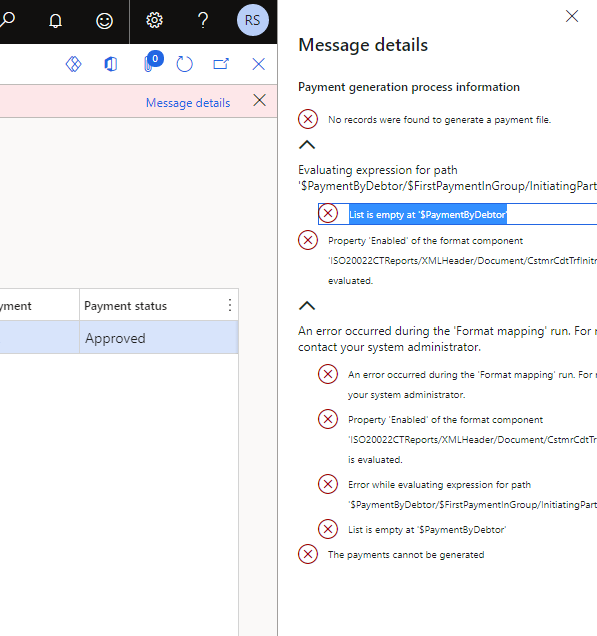
I am receiving an error message when we try to create an ISO20022 Credit transfer payment file in test-environment. It does not matter which ISO20022 country specific I choose, same symptom with DE, SE etc.

Error message: 

No records were found to generate a payment file.
Evaluating expression for path '$PaymentByDebtor/$FirstPaymentInGroup/InitiatingParty/$convertedName'.
List is empty at '$PaymentByDebtor'
Property 'Enabled' of the format component 'ISO20022CTReports/XMLHeader/Document/CstmrCdtTrfInitn/GrpHdr/InitgPty/Nm' is evaluated.
An error occurred during the 'Format mapping' run. For more information, contact your system administrator.
Property 'Enabled' of the format component 'ISO20022CTReports/XMLHeader/Document/CstmrCdtTrfInitn/GrpHdr/InitgPty/Nm' is evaluated.
Error while evaluating expression for path '$PaymentByDebtor/$FirstPaymentInGroup/InitiatingParty/$convertedName'.
List is empty at '$PaymentByDebtor'
The payments cannot be generated
pastedimage1623661117145v1.png

The bank account on the vendor and "own" bank account contains IBAN, Adress. The method of payment is connected to a bank account as well. 

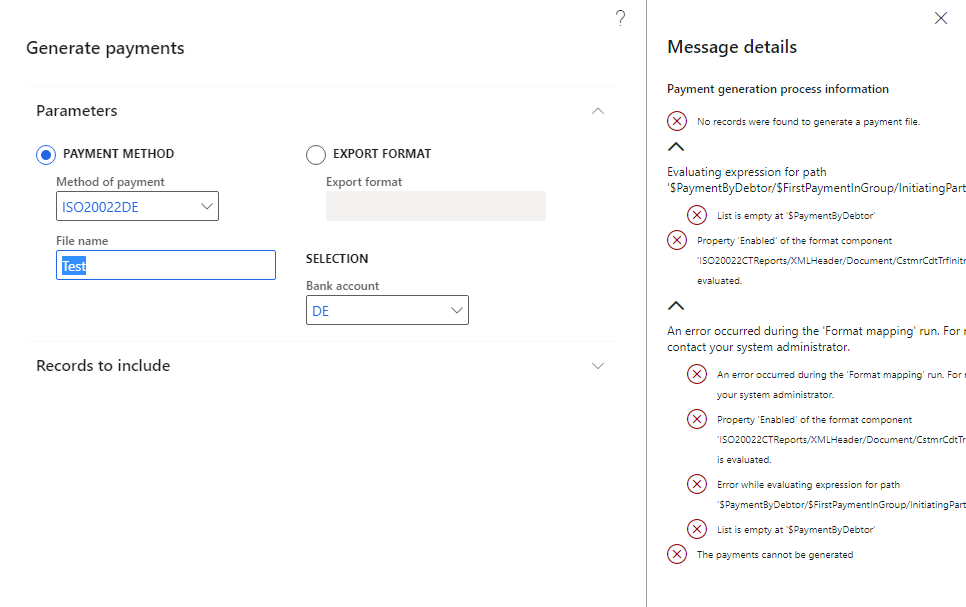
Selection parameters when generating payment file:
pastedimage1623661195321v2.png

No modifications has been made in ER. Any ideas?

I have the same question (0)
  • Suggested answer
    Ludwig Reinhard Profile Picture
    Microsoft Employee on at

    Hi,

    Are you operating the very latest D365FO environment and are you using the latest ER templates from MS?

    Can you please share the method of payment setup and details about the linked ER format?

    Many thanks,

    Ludwig

  • Community Member Profile Picture
    on at

    Hi,

    Yes, using latest D365FO environment and latest ER templates from MS.

    Method of payment:

    pastedimage1623665384209v3.png

    ER:

    pastedimage1623665416177v4.png

    pastedimage1623665440668v5.png

  • Suggested answer
    Ludwig Reinhard Profile Picture
    Microsoft Employee on at

    Hi Radi,

    I use the very same version and things work fine for me.

    Can you check that your payment data are correctly setup especially your company's bank account (IBAN+BIC) and the vendor bank account details (default bank account plus IBAN/BIC).

    If this is the case, can you try replicating the problem in a different demo / dev environment?

    Best regards,

    Ludwig

  • Community Member Profile Picture
    on at

    Yes IBAN+BIC is in place in "Cash bank management" bank account and the Vendor Bank Account as well. I have testet in CONTOSO Demo environment within private tenant, same error messsage.

    Could be something with the environment setup? I have not tested on MS tentant..

  • Community Member Profile Picture
    on at

    community.dynamics.com/.../electronic-payment-file-iso20022-gb-error-when-generating-a-payment

    I think your issue is the same as mine - have  look at my discussion please

  • Microsoft Profile Picture
    on at

    I have the same issue, what where the solution here?

  • Verified answer
    Alireza Eshaghzadeh Profile Picture
    14,849 Super User 2026 Season 1 on at

    Hei Anine,

    Please make sure that vendor, vendor bank account, and vendor transaction has required info.

    On legal entity, please check that bank account that is associated to the vendor payment method has required info (CompanyID, IBAN, Swift, Account number, currency and address)

  • Kristina K Profile Picture
    270 on at

    Hello!

    I am having the same error problem. I have checked all setup for the LE bank info and vendor info.

    Any more suggestions what to look for?

  • Suggested answer
    Joshua Ojo Profile Picture
    8 on at
    Hi!
    I guess this is resolved already. If not, I wonder if current method of payment was selected at the line level and, also, ensure that the payment status is either 'None' or 'Rejected'. You need 'Approved' payment status when you want to post, not when generating the payment file that goes your bank. Your screenshot is showing 'Approved' while trying to generate the vendor payment file.
    Cheers!
     

Under review

Thank you for your reply! To ensure a great experience for everyone, your content is awaiting approval by our Community Managers. Please check back later.

Helpful resources

Quick Links

Introducing the 2026 Season 1 community Super Users

Congratulations to our 2026 Super Stars!

Meet the Microsoft Dynamics 365 Contact Center Champions

We are thrilled to have these Champions in our Community!

Congratulations to the March Top 10 Community Leaders

These are the community rock stars!

Leaderboard > Finance | Project Operations, Human Resources, AX, GP, SL

#1
Giorgio Bonacorsi Profile Picture

Giorgio Bonacorsi 688

#2
André Arnaud de Calavon Profile Picture

André Arnaud de Cal... 524 Super User 2026 Season 1

#3
CP04-islander Profile Picture

CP04-islander 301

Last 30 days Overall leaderboard

Product updates

Dynamics 365 release plans
