web
You’re offline. This is a read only version of the page.
close
Skip to main content

Announcements

No record found.

News and Announcements icon
Community site session details

Community site session details

Session Id :
Microsoft Dynamics AX (Archived)

Change Delivery date in Planned Order

(0) ShareShare
ReportReport
Posted on by 997

Hi all,

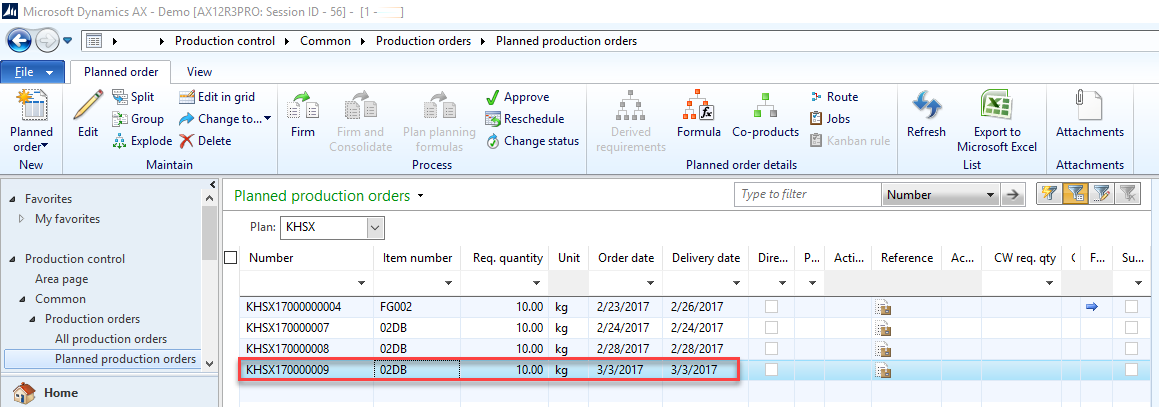
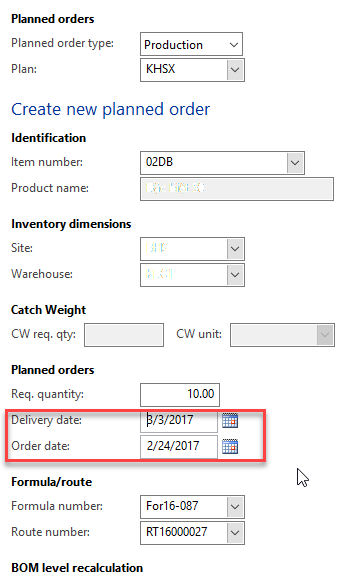
I create a planned production order manually.

Order date = system date = current date

I try to change delivery date. However, after I save that planned production order, system always change order date = delivery date. Please tell me what setup that I were wrong.

I do not setup leadtime for this item.
BSD_5F00_Planned-Production-Orders.png

1563.BSD_5F00_Planned-Production-Orders_5F00_2.png

Thank you.

*This post is locked for comments

I have the same question (0)
  • Suggested answer
    Community Member Profile Picture
    on at

    Hi Cam Phung,

    Please check both the fields are same or not, and check whether any method is overriding this field with Deliverydate. 

    Thanks

    Suresh

  • Cam Phung Profile Picture
    997 on at

    Hi Suresh potlakayala,

    Could you please tell me more detail?

  • Suggested answer
    Pravasti AK Profile Picture
    2,985 on at

    Hi Phung,

    I think the only one option is to change the code in this method if you want to use the date of the planned order.Check the table level method and add order date to be the current date.

  • Community Member Profile Picture
    on at

    Hi Phung Luong,

          previously it is happend with this field?

          This is becuase of some override methods, it may be main table or form level datasource > table > methods. Please wait i will check this and let you know.

    Thanks

    Suresh

  • Suggested answer
    Community Member Profile Picture
    on at

    Hi Phung Luong,

        I think order date is customized field?

        Please find your table and form with order date, definitely you will find where it is overriding.

       try find as i said, you can easily find the order date.

    Thanks

    Suresh

Under review

Thank you for your reply! To ensure a great experience for everyone, your content is awaiting approval by our Community Managers. Please check back later.

Helpful resources

Quick Links

Introducing the 2026 Season 1 community Super Users

Congratulations to our 2026 Super Stars!

Meet the Microsoft Dynamics 365 Contact Center Champions

We are thrilled to have these Champions in our Community!

Congratulations to the April Top 10 Community Leaders

These are the community rock stars!

Leaderboard > 🔒一 Microsoft Dynamics AX (Archived)

#1
CP04-islander Profile Picture

CP04-islander 24

#2
Michel ROY Profile Picture

Michel ROY 14

#3
Jagadabi Profile Picture

Jagadabi 6

Last 30 days Overall leaderboard

Featured topics

Product updates

Dynamics 365 release plans