web
You’re offline. This is a read only version of the page.
close
Skip to main content

Announcements

No record found.

News and Announcements icon
Community site session details

Community site session details

Session Id :
Finance | Project Operations, Human Resources, ...
Suggested Answer

Qty value populated in line while creating a new PO

(0) ShareShare
ReportReport
Posted on by 30

Hi Team,

When i select Item and then ConfigId in line, then automatically Qty field showing the value while creating a new PO.

Kindly let me know from where the Qty value got populate?
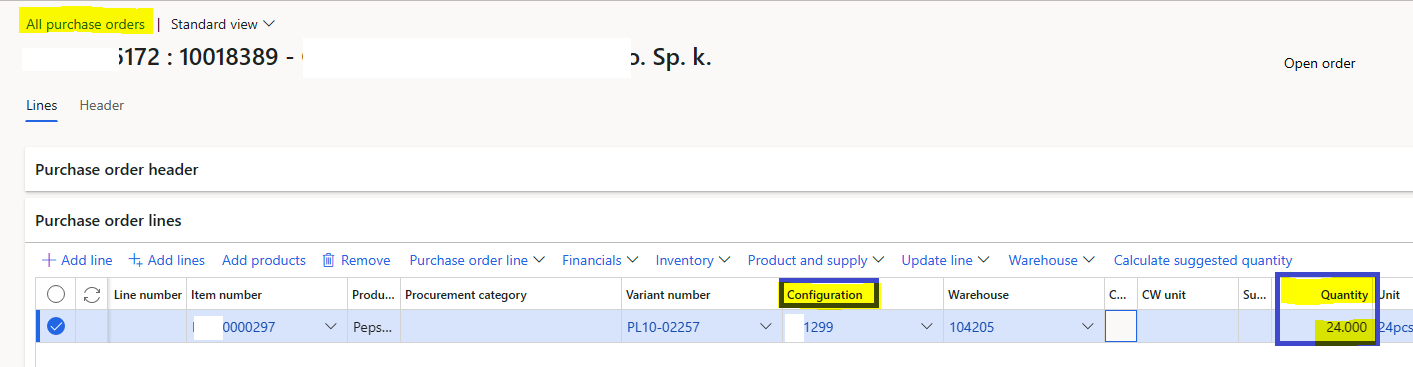
Which class is it? I am looking for the code.

I debugged it but not found appropriate class

Pls give me more shed on this.

I have the same question (0)
  • Suggested answer
    Anton Venter Profile Picture
    20,635 Super User 2026 Season 1 on at

    Have you looked at the default order settings of the product in question? It should be there. Go to Product information management -> Released products. Select the item in question, click on the Manage inventory tab, click on Default order settings.

  • @rp@n Profile Picture
    30 on at

    Thanks Anton. So, the QTY is populated from there only based on the item.

    My requirement is to make QTY default 0 while select the itemid and config I'd.

    Kindly let me know how will acheive this?

    Pls give me more shed on this 

  • @rp@n Profile Picture
    30 on at

    Hi Anton,

    for testing purpose i made min qty value to 0.00

    pastedimage1685037907123v2.png

    but when i added new line PO with same Tem number with the same config id , it took the QTY value 0.050 which was mentioned earlier. I changed to 0.00

    Why it took 0.050? It should be 0.00 correct?

    Kindly let me know if i missed something.

    waiting fior the reply

  • Anton Venter Profile Picture
    20,635 Super User 2026 Season 1 on at

    If I look at your setup, I see this

    2023_2D00_05_2D00_26-07_5F00_59_5F00_16_2D00_Qty-value-populated-in-line-while-creating-a-new-PO-_2D00_-Dynamics-365-Finance-Forum.png

Under review

Thank you for your reply! To ensure a great experience for everyone, your content is awaiting approval by our Community Managers. Please check back later.

Helpful resources

Quick Links

Introducing the 2026 Season 1 community Super Users

Congratulations to our 2026 Super Stars!

Congratulations to our 2025 Community Spotlights

Thanks to all of our 2025 Community Spotlight stars!

Leaderboard > Finance | Project Operations, Human Resources, AX, GP, SL

#1
André Arnaud de Calavon Profile Picture

André Arnaud de Cal... 521 Super User 2026 Season 1

#2
Giorgio Bonacorsi Profile Picture

Giorgio Bonacorsi 438

#3
Adis Profile Picture

Adis 261 Super User 2026 Season 1

Last 30 days Overall leaderboard

Product updates

Dynamics 365 release plans
