web
You’re offline. This is a read only version of the page.
close
Skip to main content

Announcements

No record found.

News and Announcements icon
Community site session details

Community site session details

Session Id :
Finance | Project Operations, Human Resources, ...
Answered

Data Management standard Data Entity Customers V3 fails to import

(0) ShareShare
ReportReport
Posted on by

Goedermorgen, everyone,

I exported Customer V3 data entity, a standard data entity without any customizations,  exported into XML Element format.

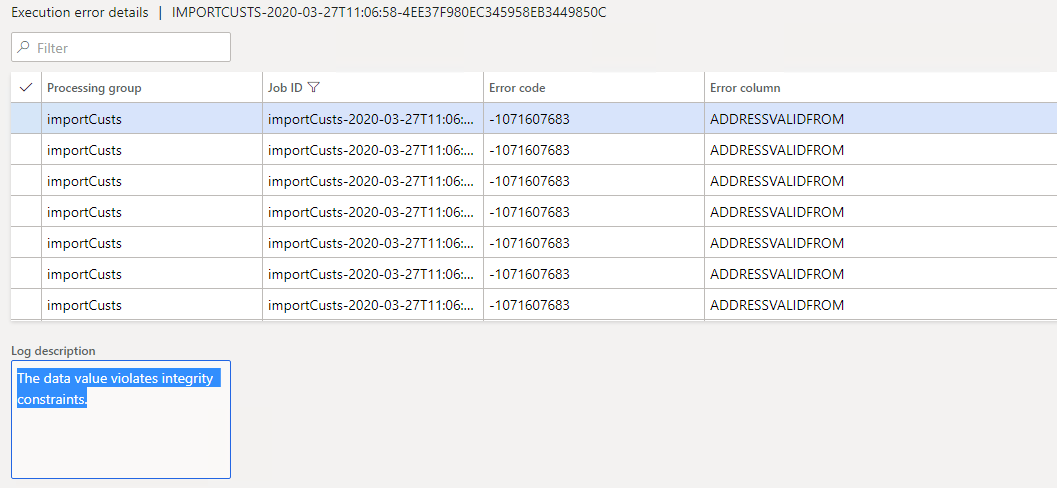
Now I have a problem with importing standard data entity Customer V3, the records do no go into staging table even, there is an error 

"The data value violates integrity constraints.'
8640.png

However file itself I just exported and have not done any changes, simple export - import - failed...

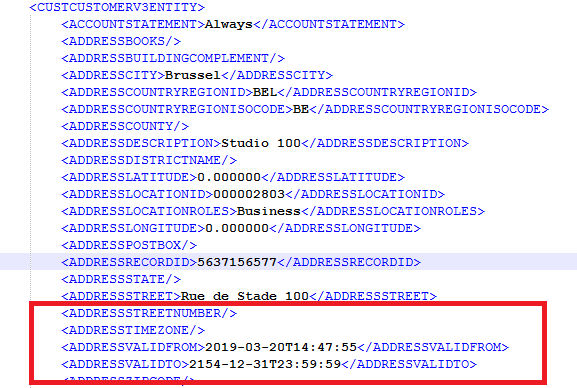
If i open file the record itself contains ValidFrom value assigned, 
2275.png

When I tried export\import to EXCEL format then Import works correctly updating the records\creating new records in other company.

But we need XML.

Anyone had any problems with UTCDateTime in XML? How to import date\time?

I have the same question (0)
  • Sergei Minozhenko Profile Picture
    23,095 on at

    Hi Volodymyr,

    DateTime value looks correct on the screenshot. I have a feeling that it's not related to the formating. Are you trying to update existing customers? Could it be that you are trying to update the address that was already updated and you are trying to update the "closed" record? (ValidTimeState feature) Try to use today date instead of the 20th of March.

  • Community Member Profile Picture
    on at

    Today's day does not work also,

    The problem occurs before any X++ code executed, upon inserting data into staging table and that is being executed by external libraries,

    D365 is using"Microsoft.Dynamics.ApplicationFoundation.DIXF" external libraries to process XML.

    So external library proccesses XML, and inserts data into Staging table, upon this inserting error occured related to AdressValidFrom which is DateTime format, D 365 catches that error return and shows on screen.

  • Sergei Minozhenko Profile Picture
    23,095 on at

    Hi Volodymyr,

    Is it devbox or sandbox or prod? If it's devbox or sandbox have you changed regional setting on the server?

    I quickly tested this entity in my environment and data was imported with the same format without issues. If data doesn't meet ValidTimeState requirement it will end up in error in staging data.

  • Verified answer
    André Arnaud de Calavon Profile Picture
    304,711 Super User 2026 Season 1 on at

    Hi Volodymyr,

    Have you also tried to complete the date/time value with a 'Z' character as per ISO 8601 format?

    So e.g. "2019-03-20T14:47:55Z"?

    More explanation can be found here: en.wikipedia.org/.../ISO_8601

  • Suggested answer
    Rahul Mohta Profile Picture
    21,046 on at

    you may already have for the location ID an address already created/imported earlier

    try to give a future date and suggest

Under review

Thank you for your reply! To ensure a great experience for everyone, your content is awaiting approval by our Community Managers. Please check back later.

Helpful resources

Quick Links

Introducing the 2026 Season 1 community Super Users

Congratulations to our 2026 Super Stars!

Meet the Microsoft Dynamics 365 Contact Center Champions

We are thrilled to have these Champions in our Community!

Congratulations to the April Top 10 Community Leaders

These are the community rock stars!

Leaderboard > Finance | Project Operations, Human Resources, AX, GP, SL

#1
Giorgio Bonacorsi Profile Picture

Giorgio Bonacorsi 608

#2
André Arnaud de Calavon Profile Picture

André Arnaud de Cal... 591 Super User 2026 Season 1

#3
CP04-islander Profile Picture

CP04-islander 430

Last 30 days Overall leaderboard

Product updates

Dynamics 365 release plans
