web
You’re offline. This is a read only version of the page.
close
Skip to main content

Notifications

Announcements

No record found.

Community site session details

Community site session details

Session Id :
Microsoft Dynamics CRM (Archived)

Building a custom options set from a table can't getValue

(0) ShareShare
ReportReport
Posted on by 1,532

Hi,

I can't seem to assign build and Option set from an array.  I have tried converting to a string and that still does not work.

What am I doing wrong.

function sampleCodeCallBack(retrievedData) {
    var opt = new Option();

    var sampleCodeControl = Xrm.Page.getControl("new_samplecode")

    if (retrievedData.length > 0) {
        for (var i = 0; i < retrievedData.length; i++) {
            var sample = retrievedData[i];
            opt[i].text = sample.new_name;       This is text
            opt[i].value = sample.new_sampleId;  This is Guid
            sampleCodeControl.addOption(opt[i]);
        }
        Xrm.Page.getAttribute("new_samplecode").setValue(sampleCodeControl);
    }
}
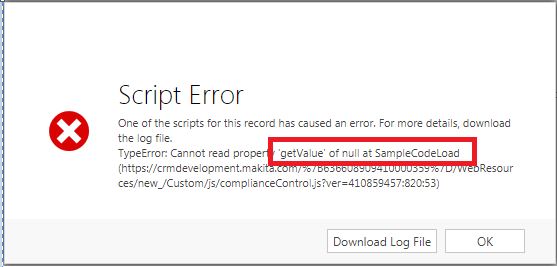
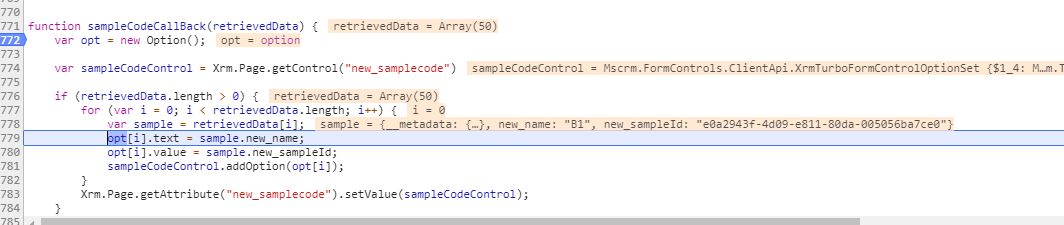
4503.ErrorMessage.JPG

0753.optionset.JPG

*This post is locked for comments

I have the same question (0)
  • Suggested answer
    a33ik Profile Picture
    84,331 Most Valuable Professional on at

    Hello,

    Even you add values to optionset it would not save data to CRM. It expects that value is int and in the list of options available.

    Are you sure you have new_samplecode field on the form?

  • rthompson Profile Picture
    1,532 on at

    Hi Andrew,

    I am working on build a check box with multiple value.  2 different fields  1 for the check box value and the other for the data that I will be saving.

    www.techadv.com/.../adding-a-multi-select-picklist-to-microsoft-dynamics-crm-2011.html

  • a33ik Profile Picture
    84,331 Most Valuable Professional on at

    I'm sorry but how url you posted is related to your code?

  • rthompson Profile Picture
    1,532 on at

    Sorry I was just trying to explain why I am assign

    Xrm.Page.getAttribute("new_samplecode").setValue(sampleCodeControl);

    This data will not be saved to the database.  Should have explain that.

  • a33ik Profile Picture
    84,331 Most Valuable Professional on at

    I'm still not sure what your code supposed to do...

    sampleCodeControl contains Control and you try to set the attribute value to control... I'm a bit confused.

  • rthompson Profile Picture
    1,532 on at

    I am trying to build a optionset.   The "new_sampleCode" is a optionset field on the form.

    opt[0].text = "Test 1"

    opt[0].value = 100000

    opt[1].text = "Test 2"

    opt[1].value = 100001

    opt[2].text = "Test 3"

    opt[2].value = 100002

    Then I want to assign the optionset to

    Xrm.Page.getAttribute("new_samplecode").setValue(sampleCodeControl);

    The form will display a list of items for a user to select on.

  • Suggested answer
    a33ik Profile Picture
    84,331 Most Valuable Professional on at

    I'm really sorry to say but it will not work that way.

    If you want to build something you're saying about you will have to build custom Html webresource.

  • rthompson Profile Picture
    1,532 on at

    I have managed to get this working.  I am setting optionset on the field.  But getting a null when using "getOptions".

    function sampleCodeCallBack(retrievedData) {
    
       var sampleCodeControl = Xrm.Page.getControl("new_samplecode");
    
       if (retrievedData.length > 0) {
    
           for (var i = 0; i < retrievedData.length; i++) {
    
               const sample = retrievedData[i];
    
               sampleCodeControl.addOption({ text: sample.new_name, value: 10000 + i }, i);
    
           }
    
          Xrm.Page.getAttribute("new_samplecode").setValue(sampleCodeControl);
    
       }
    
    }

    When I try to do a      var PL = Xrm.Page.getAttribute("new_samplecode").getOptions();

    I am getting a null.

  • Verified answer
    gdas Profile Picture
    50,091 Moderator on at

    Hi,

    Few things I believe you know already that OptionSet should contains predefined value and text.So you can remove or add existing options based on condition or if you want to show all options the also you can do. Just make sure all the optionset value available in your optionset field when you are making dynamically (1000+i).

    function sampleCodeCallBack(retrievedData) {
        var sampleCodeControl = Xrm.Page.ui.controls.get("new_samplecode");
        var optionSetValues = optionSet.getAttribute().getOptions();
        if (sampleCodeControl != null && sampleCodeControl != undefined)
            sampleCodeControl.clearOptions();
        optionSetValues.forEach(function (element) {
            if (retrievedData.length > 0) {
                for (var i = 0; i < retrievedData.length; i++) {
                    const sample = retrievedData[i];
                    // sampleCodeControl.addOption({ text: sample.new_name, value: 10000 + i }, i); // You can not make optionset value dynamically , its should be predefined , so you can hardcode this  like below
                    var addopionsetValue = 10000 + i; // get all optionset value which will be added
    
    
                    // Add/Remove  specific option based on values 
                    if (element.value == "10001") // let say 10001 add the option  
                        optionSet.addOption(element);
                    else if (element.value == "10005") // let say for 10005 you need to remove 
                        optionSet.removeOption(element);
    
    
                    // add  all option  from the object retrievedData
    
                    if (element.value == addopionsetValue)
                        optionSet.addOption(element);
                }
            }
    
        });
    }


    Hope this helps . Let me know if you have any query.

  • rthompson Profile Picture
    1,532 on at

    Final results

    On the field I created a number of Optionset.  The text I use just a standard numbers.   The numbers with be replace with the text.

    sample5Optionset.JPG

    function setSampleCodes() {
        var iselect = "?$top=5&$select=new_sampleId,new_name";  // Retreive over 250 records
        //var ifilter = "&$filter=(new_ChildQuestions/Id eq guid'" + questionid.replace(/{/g, "").replace(/}/g, "") + "')";
        var iorderby = "&$orderby=new_name";
        var options = iselect + iorderby;
    
        var res = SDK.REST.retrieveMultipleRecords("new_sample", options, sampleCodeCallBack, errorHandler, retrieveComplete);
    }

    function sampleCodeCallBack(retrievedData) {
    
        var sampleCodeControl = Xrm.Page.getControl("new_samplecode");
        var sampleCodeOptionSets = sampleCodeControl.getOptions();
    
        //Clear the option set on the control
        if (sampleCodeControl != null && sampleCodeControl != undefined)
            sampleCodeControl.clearOptions();
     
        //Loop and build a new option set for the control
        for (var sc = 0; sc < sampleCodeOptionSets.length; sc++) {
            var sampleOption = sampleCodeOptionSets[sc];
            if (retrievedData.length > 0) {
                for (var rd = 0; rd < retrievedData.length; rd++) {
    
                    const sample = retrievedData[rd];
    
                    var addopionsetValue = 100000000 + rd; // get all optionset value which will be added
    
                    // add  all option  from the object retrievedData
                    // Link a description to the option set
                    if (sampleOption.value == addopionsetValue) {
                        sampleOption.text = sample.new_name;
                        sampleCodeControl.addOption(sampleOption);
                        //Xrm.Page.getControl("new_samplecode").addOption(sampleOption);
                    }
                }
            }
        }
    
        Xrm.getControl.getAttribute.setValue(sampleCodeControl);
    }


    Final Result display

    sample5Optionset.JPG

Under review

Thank you for your reply! To ensure a great experience for everyone, your content is awaiting approval by our Community Managers. Please check back later.

Helpful resources

Quick Links

Responsible AI policies

As AI tools become more common, we’re introducing a Responsible AI Use…

Neeraj Kumar – Community Spotlight

We are honored to recognize Neeraj Kumar as our Community Spotlight honoree for…

Leaderboard > 🔒一 Microsoft Dynamics CRM (Archived)

#1
SA-08121319-0 Profile Picture

SA-08121319-0 4

#1
Calum MacFarlane Profile Picture

Calum MacFarlane 4

#3
Alex Fun Wei Jie Profile Picture

Alex Fun Wei Jie 2

Last 30 days Overall leaderboard

Featured topics

Product updates

Dynamics 365 release plans



