web
You’re offline. This is a read only version of the page.
close
Skip to main content

Notifications

Announcements

No record found.

Community site session details

Community site session details

Session Id :
Finance | Project Operations, Human Resources, ...
Suggested Answer

Fixed assets GL posting doesn't appear

(0) ShareShare
ReportReport
Posted on by 660

Dears, we have encountered an issue regarding the GL posting window

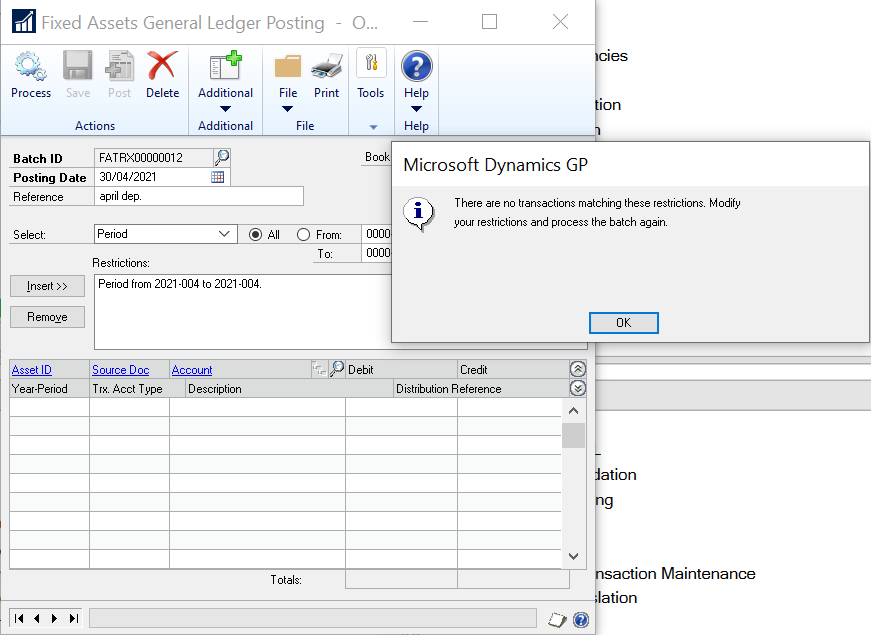
after running the depreciation routine we go to the GL posting and process it the GP says there are no transaction matching these instructions as follows:
pastedimage1622630427927v1.png

although this is correct, i tried using the sa but also didnt work but when i tried to process it on the server hosting the GP it did work and show the batch processed in the depreciation.

i tried to have a new installation of the Dynamics GP on a new machine but also didn't show the transaction.

i checked the GP versions and the features in the installation and its all the same with the working machine.

need some suggestions on what could make this happen!!

Categories:
I have the same question (0)
  • Leng Papio Profile Picture
    855 on at

    I would recommend to:

    1. Take one asset from the list (where it works),

    2. Go back to the GP where the list does not work , and look at the asset using the Inquiry, FA, Financial Detail... Pull up that asset and compare.. what seems to be different compared to where GP works.

    I am suspecting a couple of issues, but until you can compare those windows on both GP (where one works and one does not), we really can't verify the source of the issue.

    Good luck!

    Leng

  • kassab Profile Picture
    660 on at

    Hello Elena,

    After looking at both, we do have the same correct results from both clients.

    all reports running fine on both but the transaction of the GL posting it self isn't working only on one machine and not the others!

    Thanks and Regards,

  • Hokuminaria Profile Picture
    2,950 on at

    Hello Ahmed,

    This is very odd that it works in one and not the other. Few things to check.

    1. If you saved the GL Posting on the machine that worked, it wont pick these up again. 
      1. Can you click the lookup and see if there is a currently saved GL Posting on the machine that is not working?
    2. Verify that you are pointing at the same database as if it pulls in one, it should pull in the other.
    3. For the Batch ID in the GL Posting window, is the numbering convention the same between the two installs.
      1. FATRX00000001 on the working and FATRX00000001 on non working.
        1. Numbers are just an example they might not be the same in your system.
    4. If you do not use a restriction when running this on the problem machine, does it pull anything in?
    5. I would also turn on a script log and dexsql log and capture the process between the two installs to see what is different between the processes and might give a place to look what is going on.
      1. If you want to upload these, i can take a look and let you know what i see.

    I hope this helps!

    Brandon Jarrett | Microsoft Support Engineer.

  • kassab Profile Picture
    660 on at

    Hello Brandon,

    i checked what you suggested to try to understand the issue;

    1. it doesn't pull anything on the problem machines if there is not any restriction.

    2. when pulling on the working machine and saving

    3. the problem machine did have the correct batch sequence getting the next number sequence after the saved batch.

    4.  the  problem machine  also  could display  and open the saved batch created in the working machine.

    so i guess there is a problem hinhe process of pulling the data out in all the machines , which i have no explanation to, even in new installed clients do have the same issue.

    Thanks and Regards

  • Suggested answer
    Beat Bucher  GP Geek  GPUG All Star Profile Picture
    28,058 Moderator on at

    Hi Ahmed,

    Can you make sure the ODBC link used in both GP clients (Workstation & Server) are the same and point to the same system.. ?

    Can you also compare the 2 DYNAMICS.SET files on both client setups and check if there are any differences ?

    Do they use modified REPORTS.DIC or FORMS.DIC files and if so, are they shared on a network location ?

  • kassab Profile Picture
    660 on at

    Hi Beat,

    so i checked the following as you suggested:

    - ODBC is the same between (workstation and Server)

    - Dynamics.Set had differences between workstation and server, so i copied the whole GP folder from the server and renamed the workstation GP to GOold and copied pasted the server's GP folder

    the GP worked fine but the same issue still occur, this is crazy!!

    - they don't use any REPORTS.DIC or FORMS.DIC

    This is a one of a kind issue I've never seen before and i'm out of logical solutions for it!!!

  • Suggested answer
    Romryan Profile Picture
    on at

    Can it be connectivity issue?.

    Do you have a Gp client installed on the server? If so, you can try to run GL posting from there.

  • kassab Profile Picture
    660 on at

    The GP is installed on an Application server not on the database server, and the GL posting is working well only on that GP client.

  • Suggested answer
    Beat Bucher  GP Geek  GPUG All Star Profile Picture
    28,058 Moderator on at

    Thank you Ahmed for the feedback.

    Have you tried to run a checklinks and reconcile against the FA module just in case there would be some data corruption ?

    You said this is happening after a depreciation was run against an asset.. did you check this KB to see if everything looks OK ? support.microsoft.com/.../a-retirement-transaction-may-not-be-included-in-a-fixed-asset-management-batch-that-was-created-in-general-ledger-in-microsoft-dynamics-gp-9e65e5f0-c095-5bae-c3f0-1b48e1f80121

    Have you also tried to delete the GL batch to post and try to reverse the depreciation and re-run it?

    I'm pinging in here my friend Nanook Software  as he's more familiar with FA related issues. Hopefully he can chime in.

  • Suggested answer
    Romryan Profile Picture
    on at

    Could there be some stranded sessions. Run the query below to remove any possible stranded session.

    delete from DYNAMICS..ACTIVITY

    where USERID not in (select loginame from master..sysprocesses)

    delete from tempdb..DEX_SESSION

    where session_id not in (select SQLSESID from DYNAMICS..ACTIVITY)

    delete from tempdb..DEX_LOCK

    where session_id not in (select SQLSESID from DYNAMICS..ACTIVITY)

    delete from DYNAMICS..SY00800

    where USERID not in (select USERID from DYNAMICS..ACTIVITY)

    delete from DYNAMICS..SY00801

    where USERID not in (select USERID from DYNAMICS..ACTIVITY)

Under review

Thank you for your reply! To ensure a great experience for everyone, your content is awaiting approval by our Community Managers. Please check back later.

Helpful resources

Quick Links

Responsible AI policies

As AI tools become more common, we’re introducing a Responsible AI Use…

Neeraj Kumar – Community Spotlight

We are honored to recognize Neeraj Kumar as our Community Spotlight honoree for…

Leaderboard > Finance | Project Operations, Human Resources, AX, GP, SL

#1
Martin Dráb Profile Picture

Martin Dráb 659 Most Valuable Professional

#2
André Arnaud de Calavon Profile Picture

André Arnaud de Cal... 533 Super User 2025 Season 2

#3
Sohaib Cheema Profile Picture

Sohaib Cheema 289 User Group Leader

Last 30 days Overall leaderboard

Product updates

Dynamics 365 release plans
