web
You’re offline. This is a read only version of the page.
close
Skip to main content

Notifications

Announcements

Community site session details

Community site session details

Session Id :
Microsoft Dynamics 365 | Integration, Dataverse...
Suggested Answer

getEventArgs().preventDefault not working in UCI

(0) ShareShare
ReportReport
Posted on by 10

I have encountered an unexpected error. The problem is that the code we used to restrict saving via script is no more working in Appointment entity post wave 2 update it seems. Even in trial I faced same issue only for Appointment entity. The code still work in classic web forms & even in other OOB or custom entities too.

Form Customization:
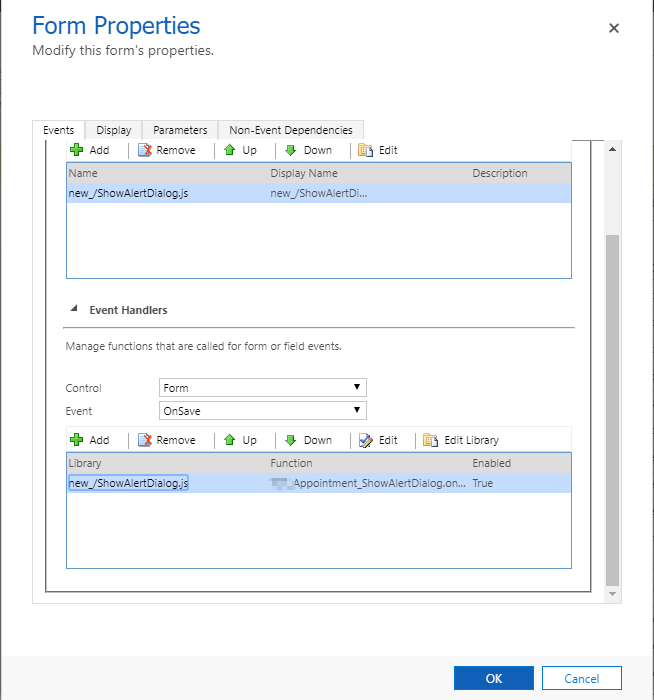
pastedimage1572499697785v1.png

Handler:

//Functoin to call on save
function onSave (executionContext) {
//Local variables
var functionName = "onSave";
var saveEventArgs = null;
try {


//Get save event arguments
saveEventArgs = executionContext.getEventArgs();

//Prevent Save
saveEventArgs.preventDefault();


}
catch (ex) {


Appointment_ShowAlertDialog.throwError(functionName, ex.message);


}
}

I have the same question (0)
  • Suggested answer
    crm development Profile Picture
    870 on at
  • larry schondorf Profile Picture
    15 on at

    I have done all the steps and turned it to false, but I am still getting the error when preventing save?

  • Suggested answer
    Linn Zaw Win Profile Picture
    3,407 on at

    Hi alketa

    That is the known bug in Scheduling Engine on the appointment form. I have documented the symptoms of the issue in my blog post below. Please contact Microsoft Support to provide you with the tools (FCB.Editor) and instructions to disable the scheduling engine.

    http://linnzawwin.blogspot.com/2020/01/model-driven-apps-find-out-why.html

  • alketa Profile Picture
    5 on at

    Were you able to fix this problem?

    I'm having the same issue on Appointment entity in the UCI only.

  • Suggested answer
    Henry J. Profile Picture
    5,237 on at

    This looks like a specific bug, so please get in touch with the support team to analyze this in more details, understand the root cause, and identify potential workarounds and fixes.

    admin.powerplatform.microsoft.com/support

Under review

Thank you for your reply! To ensure a great experience for everyone, your content is awaiting approval by our Community Managers. Please check back later.

Helpful resources

News and Announcements

Season of Giving Solutions is Here!

Quick Links

Responsible AI policies

As AI tools become more common, we’re introducing a Responsible AI Use…

Neeraj Kumar – Community Spotlight

We are honored to recognize Neeraj Kumar as our Community Spotlight honoree for…

Leaderboard > Microsoft Dynamics 365 | Integration, Dataverse, and general topics

#1
André Arnaud de Calavon Profile Picture

André Arnaud de Cal... 64 Super User 2025 Season 2

#1
whitebeard Profile Picture

whitebeard 64

#3
BillurSamdancioglu Profile Picture

BillurSamdancioglu 40 Most Valuable Professional

Last 30 days Overall leaderboard

Product updates

Dynamics 365 release plans
