web
You’re offline. This is a read only version of the page.
close
Skip to main content

Notifications

Announcements

No record found.

Community site session details

Community site session details

Session Id :
Customer experience | Sales, Customer Insights,...
Suggested Answer

"Don't have permissions to create folder in this location" when trying to upload Account documents with Sharepoint Integration

(0) ShareShare
ReportReport
Posted on by 190

Hi,

We've been managing Account documents in CE via the integration with Sharepoint for a couple months now. 

All of a sudden, one of our users advises they cant access the documents area in CE anymore. I also cant access it even though im system administrator, we just receive the below error stating "You don't have permissions to create folder in this location. Contact your Microsoft Teams owner or Sharepoint administrator for access."

So i checked everyones permissions in Sharepoint and both myself and the end user are able to access the folder directly in Sharepoint and upload files that way, just not through the documents area in CRM.

Because the error states Microsoft Teams as well i did find a couple pages saying "You need to be a member of the connected team channel to view files." however i dont know if there is one or how to locate the team channel for the Accounts folder which all the sub-folders for Accounts are saved in.

If anyone has any insights into what could be going on here, i would greatly appreciate your help.
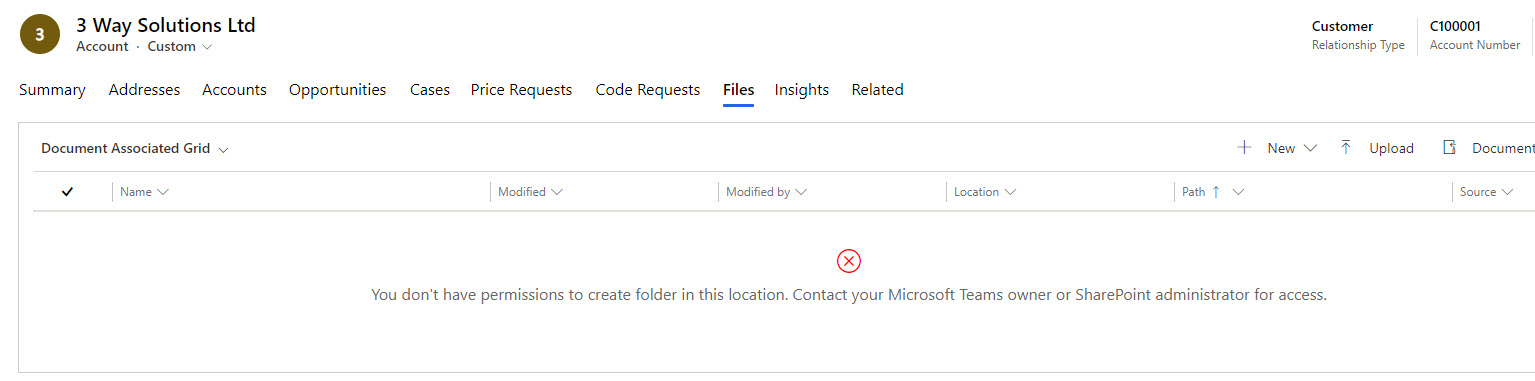
AccountDocumentLocation.jpg

Cheers

Scott Norton

I have the same question (0)
  • Microsoft Profile Picture
    on at

    Could you help check the New button or this form are associated with any permission in dev environment.  with the permission, we can identify the role. and then assign the expected role to the user.

  • necsa Profile Picture
    3,455 on at
  • Inogic Profile Picture
    682 on at

    Hey Scott,

    This error comes when a logged-in user doesn’t have access to the default SharePoint site configured in Dynamics CRM.

    image007-_2800_1_2900_.jpg

    You could quickly check the settings shown in the above screenshot and make sure everything is in line here.

    Hope this solves your query!

  • Scott.Norton Profile Picture
    190 on at

    Hi Roohi,

    Ive checked that and i definitely have all the appropriate access and yet im also having the same issue.

    It seems to have something to with the fact that our document locations are custom made and not the OOTB locations because if i dont create them using workflows and just let the system create them automatically, the new folder appears correctly in SharePoint and is accesible through the UI in D365 CE.

  • AndrewvR Profile Picture
    5 on at

    Hi Scott

    Did you figure this out?  I have a similar scenario as yourself.  I am a Site Admin in SharePoint (for the related site collections) and I get this message when I try to access locations I have created myself

  • Suggested answer
    Scott.Norton Profile Picture
    190 on at

    Hi Andrew,

    My problem was caused by having the wrong 'Parent Site or Location' set up in my workflow which was creating my custom document locations.

    I had it as 'Account Documents' when it should have just been 'Documents on Default Site 1'

    If your able to access OOTB locations then i would suggest letting the system create a document location and then compare that with your custom document locations to spot the difference.

    I hope this helps

    Cheers

    Scott

Under review

Thank you for your reply! To ensure a great experience for everyone, your content is awaiting approval by our Community Managers. Please check back later.

Helpful resources

Quick Links

Responsible AI policies

As AI tools become more common, we’re introducing a Responsible AI Use…

Neeraj Kumar – Community Spotlight

We are honored to recognize Neeraj Kumar as our Community Spotlight honoree for…

Leaderboard > Customer experience | Sales, Customer Insights, CRM

#1
Tom_Gioielli Profile Picture

Tom_Gioielli 170 Super User 2025 Season 2

#2
#ManoVerse Profile Picture

#ManoVerse 70

#3
Jimmy Passeti Profile Picture

Jimmy Passeti 50 Most Valuable Professional

Last 30 days Overall leaderboard

Product updates

Dynamics 365 release plans
