web
You’re offline. This is a read only version of the page.
close
Skip to main content

Notifications

Announcements

No record found.

Community site session details

Community site session details

Session Id :
Microsoft Dynamics CRM (Archived)

Multi select field / Multiple Selection Box

(0) ShareShare
ReportReport
Posted on by

Hello guys!

I'm new here and hope for help. I would like to create a multi select field, e.g. if I want to know what are the interest of my customer, the CRM user should have the option to select more parameters (e.g. Hobby: Music, Movies, Travel etc.). See also the following/attached screenshot.

Thanks in advance!

Hans
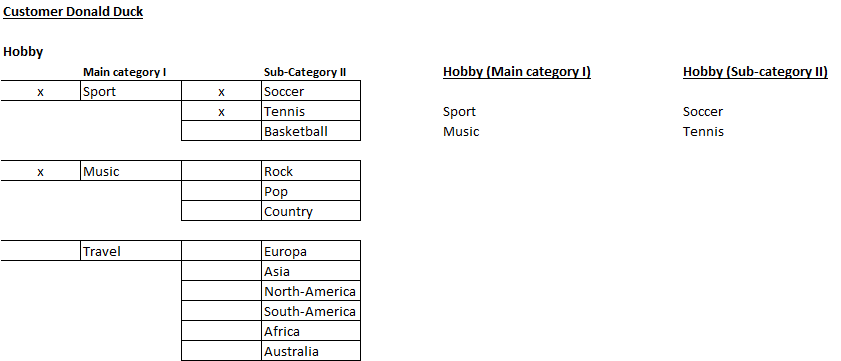
Multi-Select-box-_2D00_-CRM-Dynamics-2016.png

*This post is locked for comments

I have the same question (0)
  • Suggested answer
    Mahadeo Matre Profile Picture
    17,021 on at

    Hi,

    You can do this either with custom entity or with option set and custom HTML web resource.

    With custom entity, you need to make relationship with entity as 1:N, and then add subgrid on parent entity, and then you can add multiple child records to it.

    For this option no need to write any code.

    another option is create one option set, one text filed, and one HTML web resource, Using Html web resource you can show checkbox list for option set and whatever options are selected, you can store those in text filed.

    check this link

    mahadeomatre.blogspot.com/.../option%20set

    Hope this will help..

  • Suggested answer
    JohnAnonymous Profile Picture
    5,241 on at

    The concept of a multi-select option is not present in CRM in ways you might expect.

    If you want to have functionality like this, you have two options in my view:

    - solve it with a customer entity where a person can select a sub category II and you categorize it by the category.

    - build a custom html web resource with javascript to achieve your requirement.

  • Suggested answer
    Yadnyesh Kuvalekar Profile Picture
    4,102 on at

    Hi,

    The concept of multiselect options are possible through N:N relationship in CRM. You cannot achieve this using checkbox type records in OOB setup.

    If you are not restricted to show checkboxes, then it is better for you to go for N:N relationship. If you want checkboxes, then the only option you have is custom HTML and I am not big fan of having custom HTML for such small requirement.

    Follow below steps for achieving this through N:N relationship:

    1. Create a custom entity.

    2. Create N:N relationship in above custom entity and the entity on which you want multi select options.

    3. Go to entity form on which you want multi select option and add sub-grid of the custom entity.

    That's it.

    Refer below link: www.microsoft.com/.../create-or-edit-n-n-relationships-between-entities.aspx

  • Suggested answer
    TheMarkChristie Profile Picture
    10,328 Moderator on at

    Hi

    At the moment you cannot have multi select

    What I would recommend is an intersect entity that connects the hobbies to contacts (I have done this as interests on Contacts)

    Use a N:N Relationship

    www.microsoft.com/.../create-or-edit-n-n-relationships-between-entities.aspx

  • Suggested answer
    TheMarkChristie Profile Picture
    10,328 Moderator on at

    Here is a diagram

    Drawing1.png

  • Community Member Profile Picture
    on at

    Many thanks to all!! I will check the two options!

  • Suggested answer
    Drew Poggemann Profile Picture
    4 on at

    Here is another answer to a similar challenge you might want to look at.  This was a multi-level solution with multiple selected for categorizing an account.

    community.dynamics.com/.../214317

    Hope this helps!

    Thanks,

  • Yadnyesh Kuvalekar Profile Picture
    4,102 on at

    Feel free to mark applicable answers as verified.

Under review

Thank you for your reply! To ensure a great experience for everyone, your content is awaiting approval by our Community Managers. Please check back later.

Helpful resources

Quick Links

Responsible AI policies

As AI tools become more common, we’re introducing a Responsible AI Use…

Neeraj Kumar – Community Spotlight

We are honored to recognize Neeraj Kumar as our Community Spotlight honoree for…

Leaderboard > 🔒一 Microsoft Dynamics CRM (Archived)

#1
SA-08121319-0 Profile Picture

SA-08121319-0 4

#1
Calum MacFarlane Profile Picture

Calum MacFarlane 4

#3
Alex Fun Wei Jie Profile Picture

Alex Fun Wei Jie 2

Last 30 days Overall leaderboard

Featured topics

Product updates

Dynamics 365 release plans



