web
You’re offline. This is a read only version of the page.
close
Skip to main content

Notifications

Announcements

No record found.

Community site session details

Community site session details

Session Id :
Microsoft Dynamics NAV (Archived)

Currency Exchange (Yahoo)

(0) ShareShare
ReportReport
Posted on by

Hi, 

I am trying to set up a currency exchange with the main currency as Singapore Dollars (SGD). However, my suppliers are from Australia and local(Singapore). Can anyone tell me what is the query for relational exchange rate field as I get error messages when I try to raise a purchase order saying that it cannot be empty. Also, can anyone tell if the set up is correct? Thank you so much in advance. 
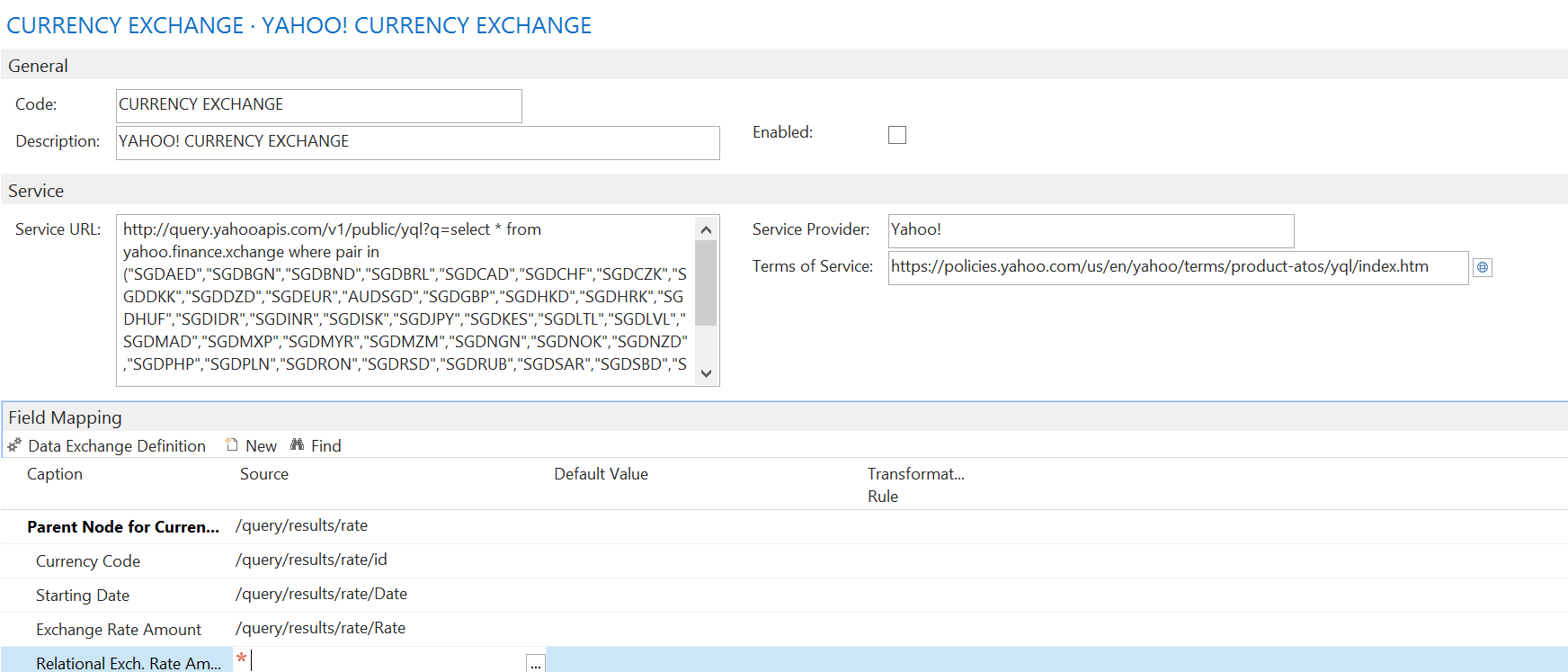
33333.png

*This post is locked for comments

I have the same question (0)
  • Verified answer
    RobertasR Profile Picture
    5,004 on at

    Hi,

    the YAHOO service doesn't work anymore. Try 'Float', for example GBP link would be www.floatrates.com/.../gbp.xml

    You might want to use Transformation rules to parse the date though.

    As for 'Relational Exchange Rate' it should be set to 1.

    Hope that helps.

    Robertas

  • Ahmed Mohamed Rafik Profile Picture
    3,049 User Group Leader on at

    Hi Roychwd,

    As Robertas said, Yahoo service doesn't work anymore.

  • Suggested answer
    Community Member Profile Picture
    on at

    Hi,

    Try to use this link http://www.floatrates.com/daily/sgd.xml  or xml feed provided by any Singapore bank, to get the currency rates. Yahoo service is not working anymore.

    In your above screen shot, replace the details in Service URL, with the link mentioned in above para.

    Click on Data Exchange Definition in Field Mapping, Data Exchange Definition page will open, click on Get File Structure under Column Definition.

    In the new opened, select the appropriate details and click OK, this should populate columns. Here you can then further configure.

    If the rows are not populate, you can refer the below screen shot, which is configured using the floatrates service.

    Currencies-Column-Definitions.png

  • Community Member Profile Picture
    on at

    I setup the Float Rates service as shown in the other posts, setup the file structure using the Get File Structure but get an error when trying to run. Any ideas how to fix this error?

    0218.Capture.PNG

    0218.Capture.PNG

  • Suggested answer
    RobertasR Profile Picture
    5,004 on at

    Hi,

    I assume you're getting this error because your transformation rule is not correct. With FloatRates, you have to create a new transformation rule that would trim the date first ('substring' from 6th character, length = 11 chars) followed by US_DATE_FORMAT.

    Robertas

Under review

Thank you for your reply! To ensure a great experience for everyone, your content is awaiting approval by our Community Managers. Please check back later.

Helpful resources

Quick Links

Responsible AI policies

As AI tools become more common, we’re introducing a Responsible AI Use…

Neeraj Kumar – Community Spotlight

We are honored to recognize Neeraj Kumar as our Community Spotlight honoree for…

Leaderboard > 🔒一 Microsoft Dynamics NAV (Archived)

Last 30 days Overall leaderboard

Featured topics

Product updates

Dynamics 365 release plans
