web
You’re offline. This is a read only version of the page.
close
Skip to main content

Notifications

Announcements

No record found.

Community site session details

Community site session details

Session Id :
Microsoft Dynamics CRM (Archived)

Closing Modal CRM 2013 Dialog caused Javascript error

(0) ShareShare
ReportReport
Posted on by 465

We recently moved a client to CRM 2013 and upon doing so we are seeing that a modal dialog now causes an error.

The code used to launch the modal dialog is..

var serverUri = Mscrm.CrmUri.create('/cs/dialog/rundialog.aspx');

serverUri = serverUri + '?DialogId=' + dialogID + '&EntityName=' + typeName + '&ObjectId=' + recordId;

openStdDlg(serverUri ,"newWindow",615,480,true, false, "status=1,scrollbars=0,toolbar=0,menubar=0,location=0");  

What we are seeing is that if a user either cancels or finishes the dialog a javascript error is always thrown. The dialog performs as it should do and code after the dialog is executed correctly but we always get the error. Error is below.
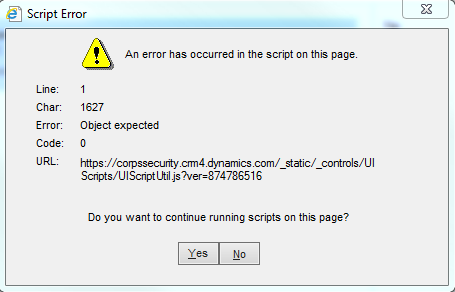
Now I am not sure if the code is now supported or unsupported, however it is causing a bit of head scratching!!

Any help would be appreciated.

Thanks

Mark

*This post is locked for comments

I have the same question (0)
  • Isaac Sultan Profile Picture
    on at

    Hi Mark.

    I'm having the same error with the same javascript code. Exactly in the same line 1627.

    I also thought about the unsupported code, but then I tried to run the Dialog with the Run Dialog ribbon, and I'm getting the same error.

    If you find the solution please post it. I think that is CRM bug.

  • G Sav Profile Picture
    on at

    Not sure if this helps, but when we moved to CRM 2013, we were getting issues, which we originally thought were Java Script, but on removing it all the error was still there. After countless hours, we found an issue. It seems the UI in CRM 2013 now requires certain fields within a form. For example "all day event" in appointments. I heard similar issues with Leads and Quotes. Might be worth investigating.

  • MarkR_B Profile Picture
    465 on at

    Just to confirm that this is on CRM dialogs not forms

  • Isaac Sultan Profile Picture
    on at

    Mark you tried to run the dialog with the ribbon instead javascript? I also received the error. It seems to be a CRM bug

  • Suggested answer
    Shai Bar-Lev Profile Picture
    170 on at

    From the SDK you should call window.open.

    function openDialogProcess(dialogId, entityName, objectId)

    {

    var url = Xrm.Page.context.getClientUrl() +

     "/cs/dialog/rundialog.aspx?DialogId=" +

     dialogId + "&EntityName=" +

     entityName + "&ObjectId=" +

     objectId;

    window.open(url);

    }

    It's not modal (you can go to other tabs or windows) but its working.

    Shai

  • MarkR_B Profile Picture
    465 on at

    I have reviewed this option before and whilst this works it is not modal. The certain requirement needs the user to complete the dialog then redirect when finished.

  • AlexJay Profile Picture
    422 on at

    Potentially point of interest... I have been experiencing the same errors when running modal dialogs following a CRM 2013 upgrade.  

    I have just updated my Chrome browser to the latest version (Version 31.0.1650.63 m) and the error above is now no longer occurring.  It still persists in IE.  Just thought it worth a mention. Thanks.

  • Jose Ramon Profile Picture
    50 on at

    Try this, work perfectly in CRM 2013 in modal window

    var primaryEntityId = Xrm.Page.data.entity.getId();

       var rundialog = Mscrm.CrmUri.create('/cs/dialog/rundialog.aspx');

       rundialog.get_query()['DialogId'] = '00000000-0000-0000-0000-000000000000'; //PUT YOUR GUID HERE

       rundialog.get_query()['ObjectId'] = primaryEntityId;

       rundialog.get_query()['EntityName'] = 'XXXXX'; //PUT YOUR ENTITY NAME

       openStdDlg(rundialog,buildWinName(null),615,480,null);

    if you don't want a modal Window, change openStdDlg by openStdWin

  • qfni123 Profile Picture
    5 on at

    Try Jose's suggestion. It does not solve the problem. The Javascript error still comes up at the end of the dialog. Any other suggestion.

    This problem happens to some versions of IE Browsers. My IE version is: 9.0.8112.1621, Update Version: 9.0.22 (KB2888505). For some versions of IE (major version is 9), I just cannot open the dialog at all.

Under review

Thank you for your reply! To ensure a great experience for everyone, your content is awaiting approval by our Community Managers. Please check back later.

Helpful resources

Quick Links

Responsible AI policies

As AI tools become more common, we’re introducing a Responsible AI Use…

Neeraj Kumar – Community Spotlight

We are honored to recognize Neeraj Kumar as our Community Spotlight honoree for…

Leaderboard > 🔒一 Microsoft Dynamics CRM (Archived)

#1
SA-08121319-0 Profile Picture

SA-08121319-0 4

#1
Calum MacFarlane Profile Picture

Calum MacFarlane 4

#3
Alex Fun Wei Jie Profile Picture

Alex Fun Wei Jie 2

Last 30 days Overall leaderboard

Featured topics

Product updates

Dynamics 365 release plans



