web
You’re offline. This is a read only version of the page.
close
Skip to main content

Notifications

Announcements

No record found.

Community site session details

Community site session details

Session Id :
Microsoft Dynamics CRM (Archived)

Work Order Search Option on Schedule Board

(0) ShareShare
ReportReport
Posted on by 6,211

Hi All,

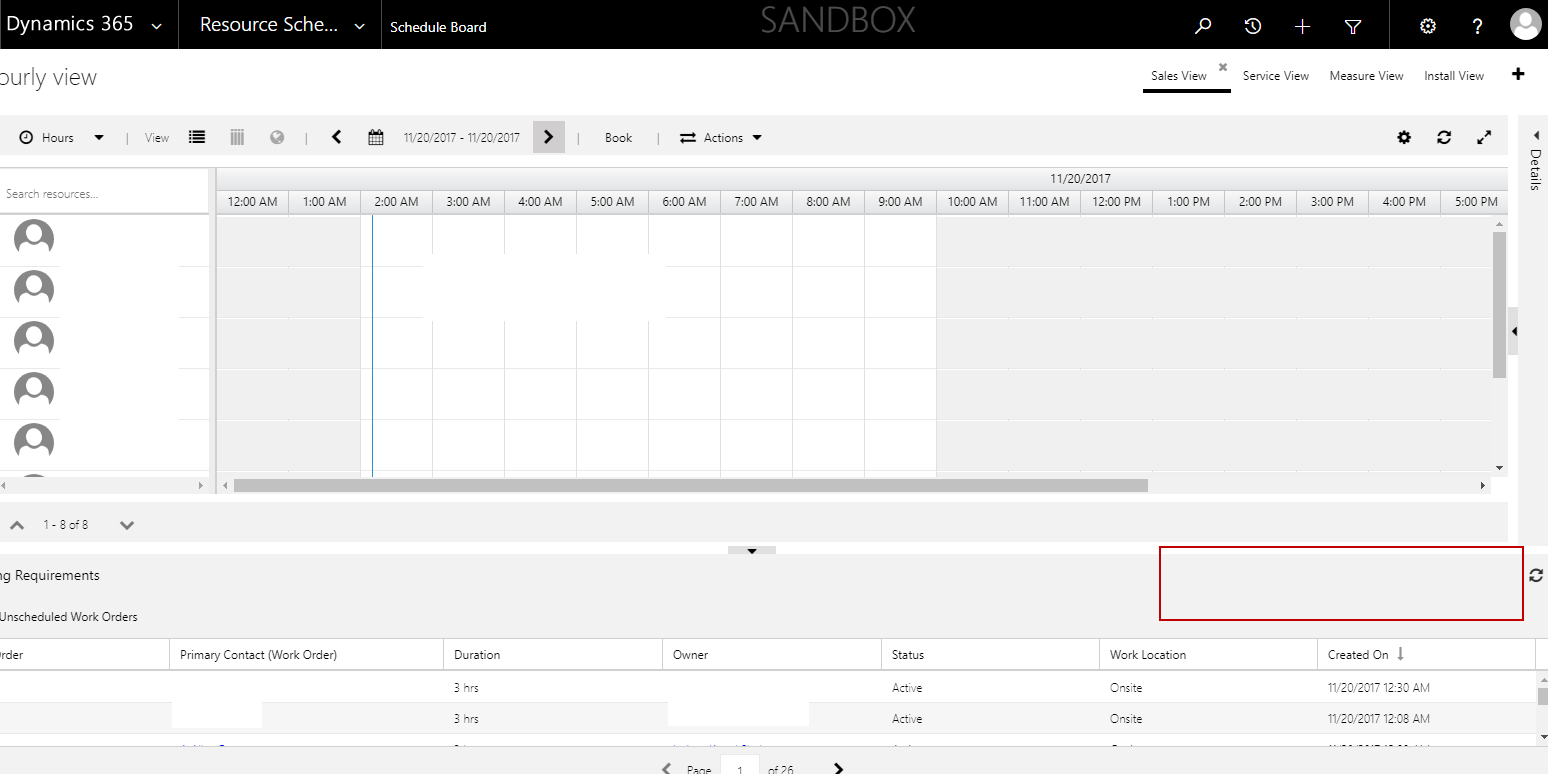
When i go to Schedule board, i have multiple work order but there is no option of search on that, See the below screenshot. Search option comes up in the area highlighted in red, but currently it is not showing up on Schedule board.
SearchInScheduleBoard.png

*This post is locked for comments

I have the same question (0)
  • Thomas David Dayman Profile Picture
    11,323 on at

    Have you tried changing browsers?

  • Shahbaaz Ansari Profile Picture
    6,211 on at

    Yes, in all browser it doesn't show up, after updating field service version, search box got disappeared. Current field service version is 6.2.0.342

  • Thomas David Dayman Profile Picture
    11,323 on at

    I would say get in touch with Microsoft to see if they can resolve the issue.

  • MOPO Profile Picture
    237 on at

    Hi,

    You have the search option for "Name" but that is only for the view of "Ressource Requirements".

    Your tab is showing "Unscheduled Work Orders" and is this view there is no filter / search option.

    More info: blogs.msdn.microsoft.com/.../universal-resource-scheduling-solution-for-dynamics-365-update-6-1

    / Morten

  • Verified answer
    AnkitaA Profile Picture
    30 on at

    This is By design behaviour of CRM.

    The search box searches on the Name column in the displayed view. If the view displayed has no Name column then the search box is hidden.

    Moving forward on all the release of Field service solution search box will be hided If the view displayed has no Name column.

  • Shahbaaz Ansari Profile Picture
    6,211 on at

    Thanks ankita for the reply, i added "Name" column in the view and it resolved my issue.

  • AlexBP_SopraSteria Profile Picture
    10 on at

    You can also customize you own views with columns, tabs, etc.
    like in the advanced view search for the schedule board panels.

    I had a similar issue because I wanted the both Un-scheduled and the missing Scheduled Work Orders (for overview) and thus in focus.This was done with a customized setup for the panels and tabs: | Un-Scheduled WO | Scheduled WO | Unscheduled Service Activities | Open requirements |

    To make this work I added custom solution to add 2 system views, related to these entities:

    1) Entity / Schema-name: (msdyn_ressourcerequirement)
    2) Entity / Schema-name:(msdyn_workorder)

    • With the solution under the entities add a new systemviews (copy of unscheduled work order requirement view) with a twist, so that the filter requirements is changed from SystemStatus "Open-unplanned" -> "Open-Planned"
    • Save all, Publish the solution, close window
    • Refresh browser - (<SHIFT> + <F5>)
    • Go in standard view for schedule board, gear icon and Open standard settings
    • Now under the panels, add a new tab with your new filter hopefully named something logic like "Scheduled Work Orders" and "Use" button to close board setup

    That's it

Under review

Thank you for your reply! To ensure a great experience for everyone, your content is awaiting approval by our Community Managers. Please check back later.

Helpful resources

Quick Links

Responsible AI policies

As AI tools become more common, we’re introducing a Responsible AI Use…

Neeraj Kumar – Community Spotlight

We are honored to recognize Neeraj Kumar as our Community Spotlight honoree for…

Leaderboard > 🔒一 Microsoft Dynamics CRM (Archived)

#1
SA-08121319-0 Profile Picture

SA-08121319-0 4

#1
Calum MacFarlane Profile Picture

Calum MacFarlane 4

#3
Alex Fun Wei Jie Profile Picture

Alex Fun Wei Jie 2

Last 30 days Overall leaderboard

Featured topics

Product updates

Dynamics 365 release plans



