web
You’re offline. This is a read only version of the page.
close
Skip to main content

Announcements

No record found.

News and Announcements icon
Community site session details

Community site session details

Session Id :
Microsoft Dynamics AX (Archived)

Getting the batches related to a particular purchase line in a purchase order

(0) ShareShare
ReportReport
Posted on by

Hi there,

  I have come up with the following query in order to get the batches related to purchase lines in a purchase order:

static void PurchaseBatchNumber(Args _args)
{
PurchLine purchaseLines;
InventDim inventDim;
InventBatch inventBatch;
InventSum inventSum;
Name itemName;

while select purchaseLines where purchaseLines.PurchId == "000013"
join inventDim where purchaseLines.InventDimId == inventDim.inventDimId
outer join inventBatch where inventDim.inventBatchId == inventBatch.inventBatchId
outer join inventSum where purchaseLines.ItemId == inventSum.ItemId && inventDim.inventDimId == inventSum.InventDimId
{
itemName = InventTable::find(purchaseLines.ItemId).itemName();

info(strFmt("Purchase Order: %1, Line Number: %2, Item Id: %3, Item Name: %4, Batch Number: %5, Batch Quantity Ordered: %6, Expiry date: %7, Supplier batch id: %8",
purchaseLines.PurchId, purchaseLines.LineNumber, purchaseLines.ItemId, itemName, inventBatch.inventBatchId, inventSum.Ordered, inventBatch.expDate, inventBatch.PdsVendBatchId));
}
}

And this is the result:
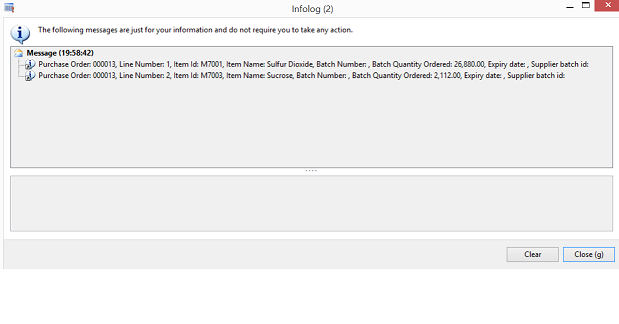
However, if I open the purchase order from AX and check to see the related batches for the first line, this is what I get:
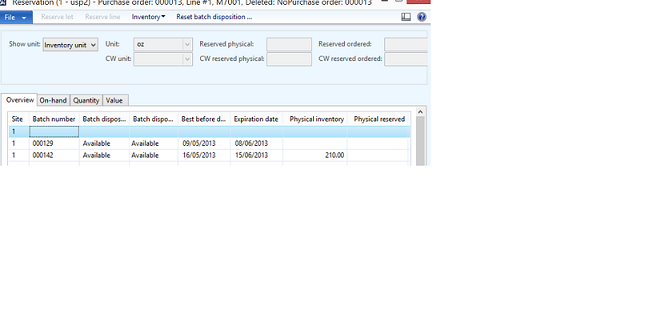
I accessed this screen by going to Purchase ledger --> Purchase Orders --> All purchase orders --> Located purchase order with id 13 --> Edit --> Selected line 1 --> Inventory --> Reservation

As you can see, for the first line, there is only one entry in the infolog.  However, it appears that there are 2 batches associated with it as shown by the second screenshot.

Why is there this mismatch?  Am I doing something wrong or maybe I am not understanding something?

Thanks

*This post is locked for comments

I have the same question (0)
  • Suggested answer
    André Arnaud de Calavon Profile Picture
    303,314 Super User 2026 Season 1 on at

    Hi Anthony,

    Is the batch number visible on the purchase order lines or is it only known at inventory transaction level? In the last scenario you can't use the inventdimid from the purchase order line, but you need the one from each inventory transaction which is linked with the InventTransId per purchase order line.

  • Community Member Profile Picture
    on at

    Hi Andre,

     Thank you for your response.  I am taking a look at the InventTrans table and can't seem to find a link between it and the InventBatch table.

  • André Arnaud de Calavon Profile Picture
    303,314 Super User 2026 Season 1 on at

    Hi Anthony,

    The InventTrans has an InventDimId. This relates to the InventDim table. Here you have the Batch id.

  • Community Member Profile Picture
    on at

    Hi Andre,

      I modified the query as follows:

    static void PurchaseBatchNumber(Args _args)
    {
    PurchLine purchaseLines;
    InventTransOrigin InventTransOrigin;
    InventTrans InventTrans;
    InventDim inventDim;
    InventBatch inventBatch;
    InventSum inventSum;
    Name itemName;

    while select purchaseLines
    where purchaseLines.PurchId == "000029"
    join recId from InventTransOrigin
    where purchaseLines.InventTransId == InventTransOrigin.InventTransId
    join inventDimId from InventTrans
    where InventTransOrigin.RecId == InventTrans.InventTransOrigin
    join inventDim
    where InventTrans.InventDimId == inventDim.inventDimId
    outer join inventBatch
    where inventDim.inventBatchId == inventBatch.inventBatchId
    outer join inventSum
    where purchaseLines.ItemId == inventSum.ItemId
    {
    itemName = InventTable::find(purchaseLines.ItemId).itemName();

    info(strFmt("Purchase Order: %1, Line Number: %2, Item Id: %3, Item Name: %4, Batch Number: %5, Batch Quantity Ordered: %6, Expiry date: %7, Supplier batch id: %8",
    purchaseLines.PurchId, purchaseLines.LineNumber, purchaseLines.ItemId, itemName, inventBatch.inventBatchId, inventSum.Ordered, inventBatch.expDate, inventBatch.PdsVendBatchId));
    }
    }

    However, now I am getting a lot of records.  Unfortunately, they still don't correspond to the data that there is in the second screenshot that I posted.

  • Verified answer
    André Arnaud de Calavon Profile Picture
    303,314 Super User 2026 Season 1 on at

    Hi Anthony,

    Note that the InventBatch table and InventSum table do have a key with two fields. You are only filtering on one of the two fields.

    InventBatch: InventBatchId + ItemId.

    InventSum: ItemId + InventDimId.

    So you have to filter also on the ItemId from the InventBatch table.

    The InventSum needs to be filtered on the InventDimId or you have to sum the Ordered field.

  • Community Member Profile Picture
    on at

    Thank you so much for your answer Andre.  I appreciate it.

Under review

Thank you for your reply! To ensure a great experience for everyone, your content is awaiting approval by our Community Managers. Please check back later.

Helpful resources

Quick Links

Introducing the 2026 Season 1 community Super Users

Congratulations to our 2026 Super Stars!

Congratulations to our 2025 Community Spotlights

Thanks to all of our 2025 Community Spotlight stars!

Leaderboard > 🔒一 Microsoft Dynamics AX (Archived)

#1
Joris dG Profile Picture

Joris dG 5

#2
Sagar Suman Profile Picture

Sagar Suman 2 Super User 2026 Season 1

#2
Alexey Lekanov Profile Picture

Alexey Lekanov 2

Last 30 days Overall leaderboard

Featured topics

Product updates

Dynamics 365 release plans
