web
You’re offline. This is a read only version of the page.
close
Skip to main content

Announcements

No record found.

News and Announcements icon
Community site session details

Community site session details

Session Id :
Microsoft Dynamics GP (Archived)

Default page size when scanning to document attach

(0) ShareShare
ReportReport
Posted on by

Hello,

We are using the new document attach feature to scan in documents, and each time we go to scan something new, the Page Size on the scan is defaulting to "Legal." If we forget to change this, the document gets shrunk down and is hard to read. We have to change it to "Letter" each time we scan a new document.

I did not see a setting in the Devices/printer setup that would control this, or anything in GP either. Does anyone know what drives this default option or if there is a way to change it?

Thank you,

Kyle
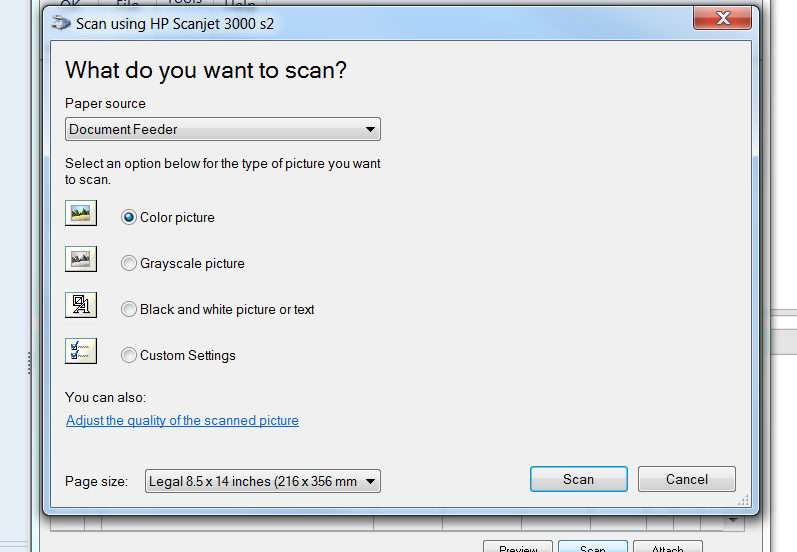
Scan.PNG

*This post is locked for comments

I have the same question (0)
  • Verified answer
    Community Member Profile Picture
    on at

    7268.Capture.JPG

    You should call HP support.  scanjet 3000 s2 has page size detection and looks like it is always detecting the page as legal.

    Cheers!

  • Suggested answer
    Beat Bucher  GP Geek  GPUG All Star Profile Picture
    28,061 Moderator on at

    Kyle,

    Have you tried to use the Windows standard TWAIN drivers rather then HP's native one ?

  • kwj3 Profile Picture
    17 on at

    we are running into a similar issue.

    using doc attach with GP2018 to get the multi-page attachment feature.

    the user indicates she has to change settings for papersource, page size and color on every scan.  this seems like it should be handled by a default setting, so I dug into it a bit.

    what I found was that hp has its own scanning software for the Scanjet n6310.  we changed those defaults but no change in GP behavior.  Next I went into windows settings for the scanner and found it had its own set of defaults (I assume this is using the Windows driver opposed to the HP driver).  I changed those settings to default to the document tray, letter size paper and color.  same results, the user still has to select those settings with each scan.  there must be another scanner default setting somewhere for GP to use. 

    i'm wondering if its possible to set a dex.ini switch to allow for a more automated doc attach process.  think noprintdialog=true, only for doc attach.

    anyone had any luck figuring out where GP is getting it's scanner default settings or how to skip the recurring need to change defaults?

Under review

Thank you for your reply! To ensure a great experience for everyone, your content is awaiting approval by our Community Managers. Please check back later.

Helpful resources

Quick Links

Introducing the 2026 Season 1 community Super Users

Congratulations to our 2026 Super Stars!

Meet the Microsoft Dynamics 365 Contact Center Champions

We are thrilled to have these Champions in our Community!

Congratulations to the April Top 10 Community Leaders

These are the community rock stars!

Leaderboard > 🔒一 Microsoft Dynamics GP (Archived)

#1
Shravan Attelli Profile Picture

Shravan Attelli 1

Last 30 days Overall leaderboard

Featured topics

Product updates

Dynamics 365 release plans
