web
You’re offline. This is a read only version of the page.
close
Skip to main content

Notifications

Announcements

No record found.

Community site session details

Community site session details

Session Id :
Microsoft Dynamics CRM (Archived)

Email tracking from delegate mailbox now not working

(2) ShareShare
ReportReport
Posted on by 422

Hi all,

Any help appreciated on this...

Various users of mine are reporting that they can no longer track email from additional shared mailboxes they have delegate access when using the CRM for Outlook client.  This is something that's only recently become a problem in the last 1-2 weeks.

We're running CRM 2011 on-premises, Outlook 2013, Active Directory and Microsoft Exchange online. 

Some posts I've read actually suggest you cannot or have never been able to track emails from additional mailboxes in outlook and indeed an error does now appear to when attempting to do so:
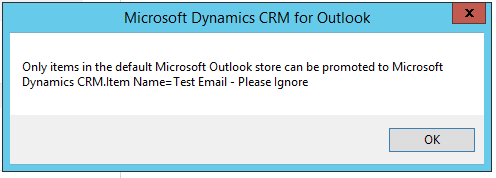
2772.Error1.png

There is a suggested workaround to move the email into the personal mailbox and track from there, though this is also not working, it doesn't throw an error it just doesn't respond to clicking track.

Another workaround suggests setting up rules to copy emails that are sent to the shared mailbox to user's personal accounts and track from there, I could explore this though it's not ideal. 

I've also tried to add a queue (never needed this before) with the additional email address (and approved) to see if that helps.  It doesn't, actually looking at previously tracked emails still in CRM it appears that the tracking for these emails historically reconciled with a contact record using the shared email address as a primary email not a queue or user.   

I created a test account and followed these steps suggested by Donna Edwards and by doing this was able to successfully track emails from the additional mailbox, so it does seem possible. 

However when I assign delegate permissions through the exchange and mailbox settings in the portal the tracking functionality for those mail accounts are still not available for those delegates. 

Perhaps I can set up an Outlook client for each shared mailbox and delegate permissions to all relevant users as per Donna's steps as a workaround, but seems cumbersome.

Does anyone happen to know if anything has changed on the Exchange online servers in the last couple of weeks which may have caused this issue? An update perhaps? 

And if anyone has any suggestions for a resolution I'd love to hear about them.

Thanks in advance

Alex Y

*This post is locked for comments

I have the same question (0)
  • Oswin Profile Picture
    on at

    I have the exact same issue with a customer who's on CRM 2015 update 0.1, and the usual delegate permissions are not sufficient for some users, while it works fine for others. Did you get a solution yet?

  • aineni17 Profile Picture
    on at

    We are experiencing the same issue.. any solution found yet?

  • AlexJay Profile Picture
    422 on at

    Hi, unfortunately I am yet to resolve this issue.  I've not had much time to look into this recently but a user just confirmed that they are actually able to now track when they respond to an email in a delegate mailbox but not otherwise.  They are working around the issue by dragging the emails into their personal mailboxes and tracking from there, which seems to work for them now without a change from me.  We're about to upgrade to 2015 which will include updating all the CRM for outlook clients so I'm hoping this may change things.  If I get a chance I'll spend more time on investigating this otherwise please feedback anything you discover. Cheers.

  • Suggested answer
    Community Member Profile Picture
    on at

    Hi Alex,

    The solution is very simple. I am not quiet sure why no one has figured this out yet. make sure your account have access to shared mailbox first.

    You can add the shared mailbox as a separate mailbox and outlook and track it straight away.

    Go to outlook,  add another account

    Your name :  Shared Mailbox

    Email Address: SharedMailbox@Domain.com

    Password : "Leave it blank"

    and Click on Next.

    You'll see a pop up window with options to enter username and password. Enter your username and password here.

    username : Username@domain.com

    Password : your login password.

    Restart the outlook and done.

    Warm Regards,

    Abhiyan

Under review

Thank you for your reply! To ensure a great experience for everyone, your content is awaiting approval by our Community Managers. Please check back later.

Helpful resources

Quick Links

Responsible AI policies

As AI tools become more common, we’re introducing a Responsible AI Use…

Neeraj Kumar – Community Spotlight

We are honored to recognize Neeraj Kumar as our Community Spotlight honoree for…

Leaderboard > 🔒一 Microsoft Dynamics CRM (Archived)

#1
SA-08121319-0 Profile Picture

SA-08121319-0 4

#1
Calum MacFarlane Profile Picture

Calum MacFarlane 4

#3
Alex Fun Wei Jie Profile Picture

Alex Fun Wei Jie 2

Last 30 days Overall leaderboard

Featured topics

Product updates

Dynamics 365 release plans
